HPC-Cloud versus On-Premise HPC Cost Studies

The Magellan Final Report on Cloud Computing for Science

  1. Findings:  Cost Analysis shows that DOE centers are cost competitive, typically 3–7x less expensive, when compared to commercial cloud providers.
  2. Reasons: Existing DOE centers already achieve many of the benefits of cloud computing since these centers consolidate computing across multiple program offices, deploy at large scales, and continuously refine and improve operational efficiency

Evaluating the Suitability of Commercial Clouds for NASA’s High Performance Computing Applications: A Trade Study

  1. Finding 1:
    Tightly-coupled, multi-node applications from the NASA workload take somewhat more time when run on cloud-based nodes connected with HPC-level interconnects; they take significantly more time when run on cloud-based nodes that use conventional, Ethernet-based interconnects.
  2. Finding 2:
    The per-hour full cost of HECC resources is cheaper than the (compute-only) spot price of similar resources at AWS and significantly cheaper than the (compute-only) price of similar resources at POD.
  3. Finding 3:
    Commercial clouds do not offer a viable, cost-effective approach for replacing in-house HPC resources at NASA
Alert on Linux Advanced Package Tool (APT) Remote Code Execution Vulnerability (CVE-2019-3462)

Taken from https://www.csa.gov.sg/singcert/news/advisories-alerts/alert-on-linux-advanced-package-tool-remote-code-execution-vulnerability

Background
A vulnerability (CVE-2019-3462) in the Linux Advanced Package Tool (APT) has been discovered. Successful exploitation of the vulnerability could result in arbitrary code execution with access to privileged administrator “root” on affected Linux systems. APT is a widely used utility that handles installation, update, upgrade and removal of software across many Linux operating system distributions. This vulnerability has been given a Common Vulnerability Score System version 3 severity base score of 8.1 out of 10.

Affected Software
APT versions 1.4.8 and older.

Impact
Successful exploitation of this vulnerability could lead to a full compromise of a user’s machine, allowing an attacker to perform malicious activities such as unauthorised installation of programs, creation of rogue administrator accounts and alteration of data.

Recommendations
Affected users and system administrators of Debian, Ubuntu, and other Linux distributions are advised to download and install the security updates immediately.

IBM Spectrum Scale v5 GUI

Management GUI enhancements in IBM Spectrum Scale release 5.0.0

Monitoring and Managing the IBM ESS Using the GUI

Configuring performance metrics and display options in the Statistics page of the GUI


Adding New Application to the Display Manager Portal for PBS-Pro

These are the steps to setup an application to be ready for PBS-Pro Display Manager COnsole

Step 1: Copy and Edit XML Files in the PBS PAS Repository

# cd /var/spool/pas/repository/applications/
# cp -Rv GlxSpheres Ansys

There are 3 important files which you must change the name to the application name

# mv app-inp-GlxSpheres.xml app-inp-Ansys.xml
# mv app-conv-GlxSpheres.xml app-conv-Ansys.xml
# mv app-actions-GlxSpheres.xml app-actions-Ansys.xml

Step 2: Change the inside content of the xml file from the original name (GlxSpheres) to (ANSYS)

# sed -i "s/GlxSpheres/Ansys/g" *.xml

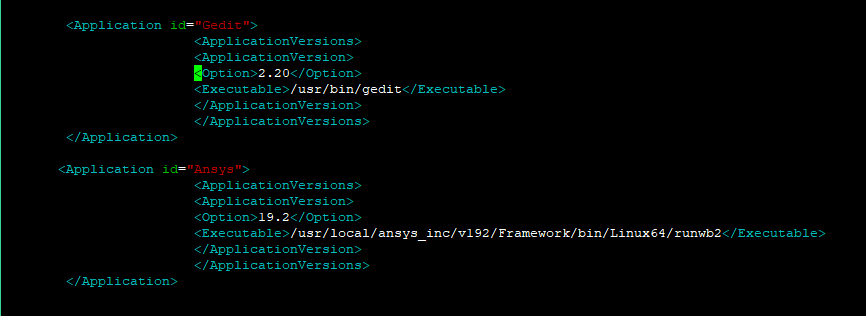
Step 3: Edit site-config.xml to include the new application executable pathing

# cd /var/spool/pas/repository
# vim site-config.xml

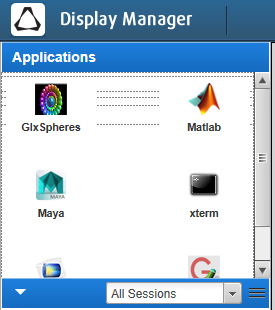
Step 4: Updating Icons for the PBS-Pro Display Manager

See Updating Icons for the PBS-Pro Display Manager

Massive DNS Requests caused by IPv6

When I do a tcpdump, I notice the issues…..

11:25:27.106997 IP hpc-mn1.52900 > xxx.domain: 28690+ AAAA? bmc72. (23)
11:25:27.107385 IP xxx.domain > hpc-mn1.52900: 28690 NXDomain 0/1/0 (98)
11:25:27.108387 IP hpc-mn1.47867 > xxx.domain: 19474+ AAAA? bmc72. (23)
11:25:27.108933 IP xxx.domain > hpc-mn1.47867: 19474 NXDomain 0/1/0 (98)

AAAA? are IPv6 DNS Request.

There is a great article that address this. You may want to take a look at https://jongsma.wordpress.com/tag/tcpdump/


Editing ABAQUS FlexLM License File to control license usage

The Guide was taken from https://media.3ds.com/support/simulia/public/flexlm108/EndUser/chap5.htm

If you wish to restrict user1 to only 64 license

In short,

Step 1: Create a mlm.opt file where the license file are

# touch mlm.opt
MAX 64 abaqus USER user1

Step 2: Edit ABAQUS License File

SERVER this_host 000xxxxyyyyb 27000
VENDOR ABAQUSLM port=27398 options="/usr/SIMULIA/License/2017/linux_a64/code/bin/mlm.opt"
….
….

Step 3: Stop and Start the ABAQUS License File

# ./lmdown
# ./lmgrd -c ABAQUS_LICENSE_FILE.lic -l 241208.log

Option Available OPTION FILE SYNTAX

Keyword Description
BORROW_LOWWATER Set the number of BORROW licenses that cannot be borrowed.
DEBUGLOG Writes debug log information for this vendor daemon to the specified file (v8.0+ vendor daemon).
EXCLUDE Deny a user access to a feature.
EXCLUDE_BORROW
Deny a user the ability to borrow BORROW licenses.
EXCLUDEALL Deny a user access to all features served by this vendor daemon.
FQDN_MATCHING Sets the level of host name matching.
GROUP Define a group of users for use with any options.
GROUPCASEINSENSITIVE Sets case sensitivity for user and host lists specified in GROUP and HOST_GROUP keywords.
HOST_GROUP
Define a group of hosts for use with any options (v4.0+).
INCLUDE Allow a user to use a feature.
INCLUDE_BORROW Allow a user to borrow BORROW licenses.
INCLUDEALL Allow a user to use all features served by this vendor daemon.
LINGER
Allow a user to extend the linger time for a feature beyond its checkin.
MAX Limit usage for a particular feature/group-prioritizes usage among users.
MAX_BORROW_HOURS Changes the maximum borrow period for the specified feature.
MAX_OVERDRAFT Limit overdraft usage to less than the amount specified in the license.
NOLOG Turn off logging of certain items in the debug log file.
REPORTLOG Specify that a report log file suitable for use by the FLEXnet Manager license usage reporting tool be written.
RESERVE Reserve licenses for a user or group of users/hosts.
TIMEOUT Specify idle timeout for a feature, returning it to the free pool for use by another user.
TIMEOUTALL Set timeout on all features.

References:

  1. The Option File (3DS)

Updating Icons for the PBS-Pro Display Manager

Prerequisites: Do look at Adding New Application to the Display Manager Portal for PBS-Pro

Step 1: Make sure the icon size are 32×32 image file

Step 2: Upload the icon image file to PBSworks Appicons site

# cp matlab.jpg /usr/local/pbsworks/pbsworks_install/exec/applications/dm/resources/en_US/modules/appicons/images/32X32/

Step 3: Edit the XML

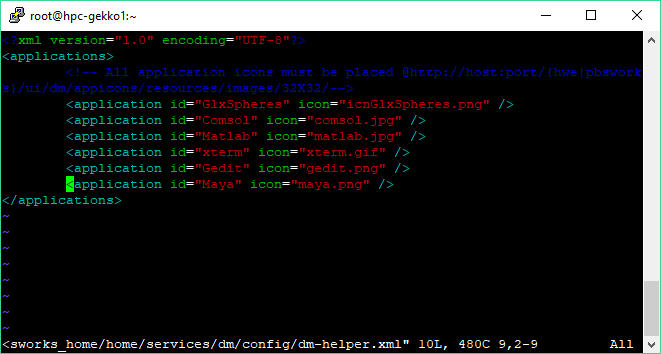
# vim /usr/local/pbsworks/pbsworks_home/home/services/dm/config/dm-helper.xml

Step 3: Restart PBS Services

# service pbsworks restart

Job Monitoring with qstat for PBS-Pro

Checking detailed information on jobs status

# qstat -sw
2156.hpc-mn1 user1 q32 MATLAB -- 1 32 -- 120:0 Q --
Not Running: would exceed project group1's limit on resource ncpus in complex
2157.hpc-mn1 user2 q32 MATLAB -- 1 32 -- 120:0 Q --
Not Running: would exceed project group1's limit on resource ncpus in complex
2159.hpc-mn1 user3 q32 MATLAB -- 1 32 -- 120:0 Q --
Not Running: would exceed project group1's limit on resource ncpus in complex

Job status with comments and vnode info

# qstat -ans
2162.hpc-mn1 user1 q32 MATLAB -- 1 32 -- 120:0 Q --
--
Not Running: would exceed project project1's limit on resource ncpus in complex
2164.hpc-mn1 user2 q32 STDIN 400923 1 1 -- 720:0 R 00:10:05
hpc-n014/31

Checking Queue Information

# qstat -Q
Queue Max Tot Ena Str Que Run Hld Wat Trn Ext Type
---------------- ----- ----- --- --- ----- ----- ----- ----- ----- ----- ----
gpu_p100 0 0 yes yes 0 0 0 0 0 0 Exec
iworkq 0 4 yes yes 4 0 0 0 0 0 Exec
q_idl 0 7 yes yes 0 7 0 0 0 0 Exec

Detail Information of a Job

# qstat -f jobID
Job Id: 2162.hpc-mn1
    Job_Name = MATLAB
    Job_Owner = user1@hpc-mn1
    job_state = Q
    queue = q32
    server = hpc-mn1
    Checkpoint = u
    ...
    ...
    ... 

Job History

# qstat -x
891.hpc-mn1 LSTC-LSDYNA shychan 00:00:00 F q32
1024.hpc-mn1 LSTC-LSDYNA user1 00:00:00 F q32
1473.hpc-mn1 STDIN user2 00:00:03 F q32
1525.hpc-mn1 IDL user3 00:00:01 F q_idl
1526.hpc-mn1 IDL user3 00:00:01 F q_idl

Job status with comments and vnode info from a specific queue

# qstat -ans | grep iworkq
94544.hpc-mn1 user1 iworkq xterm 268906 1 1 256mb 720:0 R 410:0
116984.hpc-mn1 user2 iworkq Abaqus 101260 1 1 256mb 720:0 R 76:48
118478.hpc-mn1 user3 iworkq Ansys 236421 1 1 256mb 720:0 R 51:47
118487.hpc-mn1 user4 iworkq Ansys 255657 1 1 256mb 720:0 R 50:01
119676.hpc-mn1 user5 iworkq Ansys 308767 1 1 256mb 720:0 R 41:49
119862.hpc-mn1 user6 iworkq Matlab 429798 1 1 256mb 720:0 R 24:04
120949.hpc-mn1 user7 iworkq Ansys 450449 1 1 256mb 720:0 R 21:21
121229.hpc-mn1 user8 iworkq xterm 85917 1 1 256mb 720:0 R 04:03
121646.hpc-mn1 user9 iworkq xterm 101901 1 1 256mb 720:0 R 02:07

Using TCPDump on CENTOS 7

tcpdump is a swiss-army tool to help you troubleshoot network and security tools

Capture information based on IP Address

# tcpdump -i eth0 host 192.168.1.1

If you are capturing source

# tcpdump -i eth0 src 192.168.1.5

OR If you are capturing destination

# tcpdump -i eth0 dst 192.168.1.10

Capture and write to a standard pcap file

# tcpdump -i eth0 -s0 -w temp.pcap

where s0 – set the size of captured to unlimited. In other words, capture all packets

Line Buffered Mode

If you are using grep to capture selected parameter, you will need to force the line buffered (-l). The output is sent immediately to the piped command

# tcpdump -i eth0 -s0 -l | grep 'bmc'

Capture on Protocol

# tcpdump -i eth0 udp

OR

# tcpdump -i eth0 -n icmp

References:

  1. Tcpdump Examples
  2. Tcpdump Examples: 50 Practical Recipes for Everyday Tasks