Building OpenMPI with Intel Compilers

Modified from Performance Tools for Software Developers – Building Open MPI* with the Intel® compilers

Step 1: Download the OpenMPI Software from http://www.open-mpi.org/ . The current stable version at point of writing is OpenMPI 1.3.2

Step 2: Download and Install the Intel Compilers from Intel Website. More information can be taken from Free Non-Commercial Intel Compiler Download

Step 3: Add the Intel Directory Binary Path to the Bash Startup

At my ~/.bash_profile directory, I’ve added

export PATH=$PATH:/opt/intel/Compiler/11.0/081/bin/intel64

At command prompt

# source .bashrc

Step 4: Configuration Information

# source /opt/intel/Compiler/11.0/081/bin/compilervars.sh
# gunzip -c openmpi-1.2.tar.gz tar xf -
# cd openmpi-1.2
#./configure --prefix=/usr/local CC=icc CXX=icpc F77=ifort FC=ifort
# make all install

Step 5: Setting PATH environment for OpenMPI
At my ~/.bash_profile directory, I’ve added.

export PATH=/usr/local/bin:${PATH} 
export LD_LIBRARY_PATH=/opt/intel/Compiler/11.0/081/lib/intel64:${LD_LIBRARY_PATH}
(The LD_LIBRARY_PATH must point to /opt/intel/Compiler/11.0/081/lib/intel64/libimf.so)

Step 6: test

$ mpicc --v
cc version 12.1.5 (gcc version 4.4.6 compatibility)

Installing NWChem 5 with OpenMPI, Intel Compilers and MKL and CentOS 5.x

With much credit to Vallard Land’s Blog on Compiling NWChem and information on NwChem Build Notes from CSE Wiki. I was able to install NwChem on my GE-interconnect cluster with minimal modification. First install the prerequistics, that is Intel Compilers and MKL and of course OpenMPI. I’m using CentOS 5.4 x86-64

  1. If you are eligible for the Intel Compiler Free Download. Download the Free Non-Commercial Intel Compiler Download
  2. Build OpenMPI with Intel Compiler

Finally, the most important, the installation of NWChem. First go to NWChem, read the terms and conditions and request for a login and password. Once you have obtained the tar copy of NwChem. At this point in time, download “nwchem-5.1.1.tar.tar”

# tar -xvf nwchem-5.1.1.tar.tar
# cd nwchem-5.1.1

Create a script so that all these “export” parameter can be typed once only and kept. The script I called it compile_nwchem.sh. Make sure that the ssh key are exchanged between the nodes. To have idea an of SSH key exchange, see blog entry Auto SSH Login without Password

export TCGRSH=/usr/bin/ssh
export NWCHEM_TOP=/home/melvin/nwchem-5.1.1/   (installation path)
export NWCHEM_TARGET=LINUX64
export USE_MPI=y
export USE_MPIF=y
export MPI_LOC=/usr/local/
export MPI_LIB=$MPI_LOC/lib
export LIBMPI="-L $MPI_LIB -lmpi -lopen-pal -lopen-rte -lmpi_f90 -lmpi_f77"
export MPI_INCLUDE=$MPI_LOC/include
# export ARMCI_NETWORK=OPENIB (if you using IB)
export LARGE_FILES=TRUE
export NWCHEM_MODULES=all
export FC=ifort
export CC=icc

cd $NWCHEM_TOP/src
make CC=icc FC=ifort -j8

it should compiled well without issue. You should have nwchem executable Do note that NWCHEM is the final binary path of usage. NWCHEM_TOP is

# export NWCHEM=/usr/local/nwchem-5.1.1
# export NWCHEM_TOP=/home/melvin/nwchem-5.1.1/

# mkdir $NWCHEM/bin $NWCHEM/data
# cp /home/melvin/nwchem-5.1.1/bin/LINUX64/nwchem $NWCHEM/bin
# cp /home/melvin/nwchem-5.1.1/bin/LINUX64/depend.x $NWCHEM/bin/
# cd $NWCHEM_TOP/src/basis
# cp -r libraries $NWCHEM/data/
# cd $NWCHEM_TOP/src/
# cp -r data $NWCHEM
# cd $NWCHEM_TOP/src/nwpw/libraryps
# cp -r pspw_default $NWCHEM/data/
# cp -r paw_default/ $NWCHEM/data/
# cp -r TM $NWCHEM/data/
# cp -r HGH_LDA $NWCHEM/data/

This should put complete. Make sure the $NWCHEM directory is made available to the rest of the cluster

Finally, copy the src to the

# cp -r /home/melvin/nwchem-5.1.1/bin/LINUX64/nwchem/src $NWCHEM/src

Another good resource can be seen How to build Nwchem-5.1.1 on Intel Westmere with Infiniband network

Building the GAMESS with Intel® Compilers, Intel® MKL and OpenMPI on Linux

Modified from the excellent tutorial Building the GAMESS with Intel® Compilers, Intel® MKL and Intel® MPI on Linux for OpenMPI which is

The prerequisites Software

  1. Intel® C++ Compiler for LINUX,
  2. Intel® Fortran Compiler for LINUX,
  3. Intel® MKL,
  4. OpenMPI for Linux.

Platform:

  1. IA64/x86_64.

Installing the Prerequisites

  1. If you are eligible for the Intel Compiler Free Download. Download the Free Non-Commercial Intel Compiler Download
  2. Compile Intel Compilers with OpenMPI. See Building OpenMPI with Intel Compiler. Make sure your pathing are properly written and sourced.

Intel Environment setup
I created a intel.sh script inside /etc/profile.d/ and put the following information inside

# cd /etc/profile.d
# touch intel.sh
# vim intel.sh

Edit the following

export INTEL_COMPILER_TOPDIR="/opt/intel/Compiler/11.1/069"
. $INTEL_COMPILER_TOPDIR/bin/intel64/ifortvars_intel64.sh
. $INTEL_COMPILER_TOPDIR/bin/intel64/iccvars_intel64.sh

Building the Application

1. Copy/move tar file gamess-current.tar.gz to the directory /opt

2 .Uncompress the tar file

# tar -zxvf gamess-current.tar.tar

3. Go to the gamess directory

# cd gamess

4. Creating actvte.x file

# cd tools
# cp actvte.code actvte.f
# Replace all "*UNX" by " "(4 spaces with out " ") in the file actvte.f
# ifort -o actvte.x actvte.f
# rm actvte.f
# cd ..

5. Building the Distributed Data Interface(DDI) with OpenMPI:

# cd ddi
# vim compddi

 
5a. Editing the compddi file

## Set machine type (approximately line 18): ##
set TARGET=linux-ia64

## Set MPI communication layer (approximately line 48): ##
set COMM = mpi

## Set include directory for OpenMPI (approximately line 105): ##
## where is mpi header "mpi.h" is located ##
set MPI_INCLUDE_PATH = '-I/usr/mpi/intel/include'

5b. Compile compddi with OpenMPI

## Build DDI with OpenMPI ##
# ./compddi
# cd ..

If building completed successfully then library libddi.a will appear. Otherwise check compddi.log for errors.

6. Compiling the GAMESS:

6a. Editing file comp

vim comp
## Set machine type (approximately line 15): ##
set TARGET=linux-ia64

## Set the GAMESS root directory (approximately line 16): ##
chdir /opt/gamess

## Uncomment (approximately line 1461): ##
setenv MKL_SERIAL YES

6b Editing file compall

## Set machine type (approximately line 16): ##
set TARGET=linux-ia64

## Set the GAMESS root directory (approximately line 17): ##
chdir /opt/gamess

## Set to use Intel® C++ Compiler (approximately line 70): ##
if ($TARGET == linux-ia64) set CCOMP='icc'

6c Compiling the GAMESS:

# ./compall
# cd ..

7. Liniking the GAMESS with Intel® Software products:

7a Edit the file lked

## Set machine type (approximately line 18): ##
set TARGET=linux-ia64

## Set the GAMESS root directory (approximately line 19): ##
chdir /opt/games

## Check the  MKL environment (approximately line 511) is correct: for (x86_64)##
setenv  setenv MKLPATH `ls -d /opt/intel/mkl/*/lib/em64t`
set mklver=`ls /opt/intel/mkl`

## Set the message passing libraries in a single line (approximately line 710): ##
set MSG_LIBRARIES='../ddi/libddi.a -L/usr/local/lib -lmpi -lpthread'

7b Link the GAMESS

# ./lked

If linking completed successfully then executable file gamess.00.x will appear

8. Running the Application

8 Running the Application :
This section below describes how to execute GAMESS with Intel and OpenMPI. For further information check file ./ddi/readme.ddi.
For the testing GAMESS will be used script rungms as the base.

8a

## Set the target for execution to mpi (line 59): ##
set TARGET=mpi

## Set a directory SCR where large temporary files can reside(line 60): ##
set SCR=/scratch

## Correct the setting environment variables ERICFMT and MCPPATH (lines 127and 128): ##
setenv ERICFMT /opt/gamess/ericfmt.dat
setenv MCPPATH /opt/gamess/mcpdata

## Replace all “~$USER” by “/opt/gamess/tests”. Or by other directory. ##
## NOTE: Directory /scratch should exist. If no then create it. ##
## Replace all “/home/mike/gamess” by “/opt/gamess”. ##

## Correct the environment variables for Intel® MKL and OpenMPI (lines 948 and 953): ##
setenv LD_LIBRARY_PATH /opt/intel/mkl/10.2.4.032/lib/em64t $LD_LIBRARY_PATH
setenv LD_LIBRARY_PATH /usr/local/lib:$LD_LIBRARY_PATH.

## Correct setting environment variables to execution OpenMPI path (line 954): ##
set path=(/usr/local/bin $path)

Now choose the testcase from directory ./tests and run GAMESS.
$./rungms exam08
The output data will be stored in the directory /scratch.

To execute GAMESS on 2 or more processes on 1 node:
$ ./rungms exam08 00 2

Dealing with Overflow of Fragmented Packets

Most of my information written in this blog can be found at NFS for clusters and Optimizing NFS Performance

One method to check for fragmented packets issues with the NFS Server is to use the IP: ReasmFails in the file /proc/net/snmp

# head -2 /proc/net/snmp | cut -d' ' -f17
ReasmFails
2

ReasmFails represents the number of fragment reassembly failures, if the ReasmFails goes up too quickly during heavy file activity, it means that the system may be having issues

According to Optimising NFS Performance, if the network topology is too complex,  fragment routes may differ, and may not all arrive at the Server for reassembly.  Once the number of unprocessed, fragmented packets reaches the number specified by ipfrag_high_thresh (in bytes), the NFS Server kernel will simply start throwing away fragmented packets until the number of incomplete packets reaches the number specified by ipfrag_low_thresh.

You can reduce the number of lost packets on the server by increasing the buffer size for fragmented packets.

$ echo 524288 > /proc/sys/net/ipv4/ipfrag_low_thresh
$ echo 524288 > /proc/sys/net/ipv4/ipfrag_high_thresh

which is doubling the defaults

Testing for Saturated Network for NFS

I’ve taken most of this information from the article “NFS for Clusters” and “Linux NFS and Automounter Administration” by Erez Zadok

Profiling Write Operation at NFS

$ time dd if=/dev/zero of=testfile bs=4k count=16384
16384+0 records in
16384+0 records out
67108864 bytes (67 MB) copied, 0.518172 s, 130 MB/s
real    0m0.529s
user    0m0.016s
sys    0m0.500s

time = time a simple command or give resource usage
dd = convert and copy a file
if =  read from FILE instead of stdin
of =  write to FILE instead of stdin
bs = read and write BYTES bytes at a time
count = BLOCKS

According to Wikipedia /dev/zero is a special file that provides as many null characters (ASCII NUL, 0x00) as are read from it. One of the typical uses is to provide a character stream for overwriting information. Another might be to generate a clean file of a certain size. Like /dev/null, /dev/zero acts as a source and sink for data. All writes to /dev/zero succeed with no other effects (the same as for /dev/null, although /dev/null is the more commonly used data sink); all reads on /dev/zero return as many NULs as characters requested.
 

Profiling Read Operation for NFS

When profiling reads instead of writes, call umount and mount to flush caches, or the read might be instantaneous and give the impression of quick read

$ cd /
$ umount /mnt/shareddrive
$ mount /mnt/shareddrive
$ cd /mnt/shareddrive
$ dd if=testfile of=/dev/null bs=4k count=16384

Here after unmounting and mounting again the shared NFS, the testfile which exists on the shared drive is read and writen to /dev/null.

According to the article “NFS for Clusters“, if more than 3% of calls are retransmitted, then there are problems with the network or NFS server.
Look for NFS failures on a shared disk server with

$ nfsstat -s
or
$ nfsstat -o rpc

Overview of MAUI Scheduler Commands

  MAUI is an open source job scheduler for clusters and supercomputers. It is an optimized, configurable tool capable of supporting an array of scheduling policies, dynamic priorities, extensive reservations, and fairshare capabilities.

This Blog Entry attempt to capture the essence of MAUI and some of the more commonly used commands and configuration.

To download MAUI Scheduler, go to Maui Cluster Scheduler. To download the MAUI Documentation, proceed to Cluster Resources Documentation

Useful commands for MAUI

1. Configuring MAUI Scheduler

  1. schedctl -R command can be used to reconfigure the scheduler at any time, forcing it to re-read all config files before continuing.
  2. Shut-down MAUI Scheduler
    # schedctl -k
  3. Stop maui scheduling
    # schedctl -s
  4. maui will resume scheduling immediately
    # schedctl -r

 2. Status Commands

 Maui provides an array of commands to organize and present information about the current state and historical statistics of the scheduler, jobs, resources, users, accounts, etc. The following commands are taken from Cluster Resources and reproduce here

checkjob -> display job state, resource requirements, environment, constraints,
credentials, history, allocated resources, and resource utilization
checknode -> Displays state information and statistics for the specified node.
diagnose -j -> display summarized job information and any unexpected state
diagnose -n -> display summarized node information and any unexpected state
diagnose -p -> display summarized job priority information
diagnose -r -> display summarized reservation information
showgrid -> display various aspects of scheduling performance across a job duration/job size matrix
showq -> display various views of currently queued active, idle, and non-eligible jobs
showstat -f -> display historical fairshare usage on a per credential basis
showstat -g -> display current and historical usage on a per group basis
showstat -u -> display current and historical usage on a per user basis
showstat -v -> display high level current and historical scheduling statistics

3. Job Management Commands

Maui shares job management tasks with the resource manager. The commands below the available job management commands

canceljob   -> cancel existing job
releasehold [-a]  -> remove job holds or defers
runjob   -> start job immediately if possible
sethold   -> set hold on job
setqos   -> set/modify QoS of existing job
setspri   -> adjust job/system priority of job

4. Reservation Management Commands

Maui exclusively controls and manages all advance reservation features including both standing and administrative reservations

diagnose -r -> display summarized reservation information and any unexpected state
releaseres -> remove reservations
setres -> immediately create an administrative reservation
showres -> display information regarding location and state of reservations

5. Policy/Config Management Commands

Maui allows dynamic modification of most scheduling parameters allowing new scheduling policies, algorithms, constraints, and permissions to be set at any time.

changeparam  -> immediately change parameter value
schedctl  -> control scheduling behavior (i.e., stop/start scheduling, recycle, shutdown, etc.)
showconfig ->  display settings of all configuration parameters

6. End User Commands

canceljob ->  cancel existing job
checkjob  -> display job state, resource requirements, environment, constraints, credentials, history, allocated resources, and resource utilization
showbf  -> show resource availability for jobs with specific resource requirements
showq ->  display detailed prioritized list of active and idle jobs
showstart ->  show estimated start time of idle jobs
showstats  -> show detailed usage statistics for users, groups, and accounts which the end user has access to

A Brief Introduction to Linux Virtual Cluster

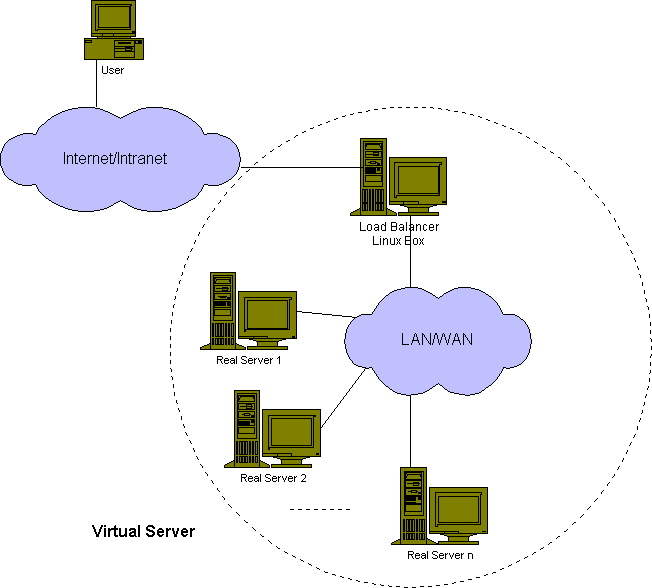
According to the project website, Linux Virtual Server (LVS) is a highly scalable and highly available server built on a cluster of real servers. The architecture of server cluster is fully transparent to end users, and the users interact with the cluster system as if it were only a single high-performance virtual server.

Much of the information is taken from the book “The Linux Enterprise Cluster” by Karl Cooper and the Project Website.

This diagram is taken from the project website which explain very clearly the purpose of this project.

The Linux Virtual Server  (LVS) accepts all incoming client computer requests for services and decides which one in the cluster nodes will reply to the client. Some naming convention used by the LVS community

  1. Real Server refers to the nodes inside the an LVS Cluster
  2. Client Computer refers to computer outside the LVS Cluster
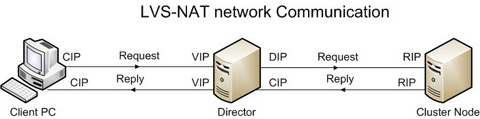
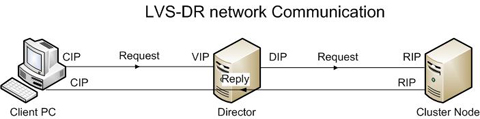
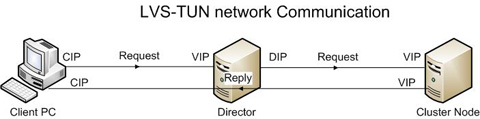
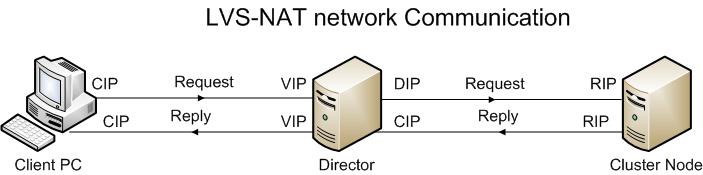
  3. Virtual IP (VIP) address refers to the IP address the Director uses to offer services to client computer. A single LVS Director can have multiple VIPS offering different services to client computerx. This is the only IP that the client computer needs to know to access to.
  4. Real IP (RIP) address refers to the IP Address used on the cluster node. Only the LVS Director is required to know the IP Addresses of this node
  5. Director IP (DIP) address refers to the IP address the LVS Director uses to connect to the RIP network. As requests from the client computer comes, they are forwarded to the client PCs. the VIP and DIP can be on the same NIC
  6. Client IP Address (CIP) address refers to the IP address of the client pc.


A. Types of LVS Clusters

The types of LVS Clusters are usually described by the type of forwarding method, the LVS Director uses to relay incoming requests to the nodes inside the cluster

  1.  Network Address Translation (LVS-NAT)
  2. Direct routing (LVS-DR)
  3. IP Tunnelling (LVS-TUN)

 According to the Book “The Linux Enterprise Cluster by Karl Cooper”, the best forwarding method to use with a Linux Enterprise Cluster is a LVS-DR. The easier to build is LVS-NAT. The LVS-TUN is generally not in use for mission critical applications and mentioned for the sake of competencies.


A1. LVS-NAT Translation


 In a LVS-NAT setup, the Director uses the Linux kernel’s ability (from the kernel’s filter code) to translate IP Addresses and ports as packets pass through the kernel.

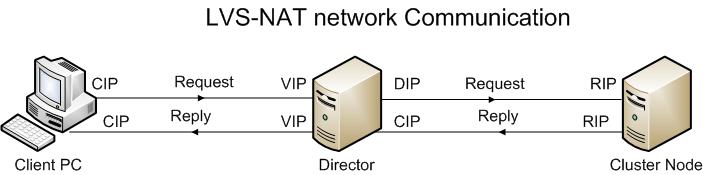
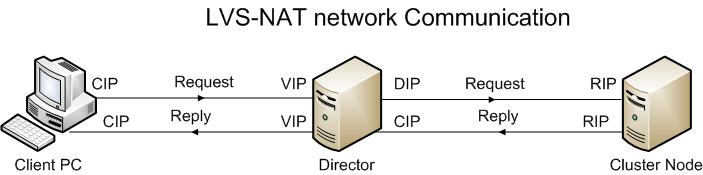
From the diagram above, the client send a request and is sent to the Director on its VIP. The Director redirects the request to the RIP of the Cluster Node. The Cluster Node reply back via its RIP to the Director. The Director convert the cluster node RIP into the VIP owned by the Director and return reply to the client.

Some basic notes on the LVS-NAT

  1. The Director intercepts all communication from clients to the cluster nodes
  2. The cluster nodes uses the Director DIP as their default gateway for reply packets to the client computers
  3. The Director can remap network port numbers
  4. Any operating system can be used inside the cluster
  5. Network or the Director may be a bottleneck. It is mentioned that a 400Mhz can saturate a 100MB connection
  6. It may be difficult to administer the cluster node as the administrator must enter the cluster node via the Director. Of course you can do a bit of network and firewall configuration to circumvent the limitation


A2 LVS-DR (Direct Routing)

s

In a LVS-DR setup, the Director for towards all the incoming requests to the nodes inside the cluster, but the nodes inside the cluster send their replies directly back to the client computer.

From the diagram, the client send a request and is send to the Director on its VIP. The Director redirects the request to the RIP of the Cluster Node. The cluster node reply back directly to the client and the packet uses the VIP as  its source IP Addresses. The Client is fooled into thinking it is talking to a single computer (Director)

Some Basic properties of the LVS-DR

  1. The cluster nodes must be on the same segment as the Director
  2. The Director intercepts inbound communication but not outbound communication between clients and the real servers
  3. The cluster node do not use the Director as the default gateway for reply packets to the client
  4. The Director cannot remap network port number
  5. Most operating systems can be used on the real server inside the cluster. However the Operating System must be capable of configuring the network interface to avoid replying to ARP broadcasts.
  6. If the Director fails, the cluster nodes becomes distributed servers each with its own IP Addresses. You can “save” the situation by using Round-Robin DNS to hand out the RIP addresses for each cluster node. Alternatively, you can “save” the situation by asking the users to connect to the cluster node directly.


A3 LVS-TUN (IP Tunnelling)


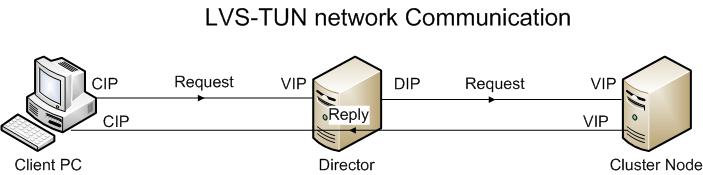
IP tunnelling ca be used to forward packets from one subnet ot virtual LAN (VLAN) to another subnet or VLAN even when the packets must pass through another network. Building on the IP Tunnelling capability that is part of the Linux Kernel, the LVS-TUN forwarding method. The LVS-TUN forwarding method allows you to place the cluster nodes on a cluster network that is not on the same network segment as the Director.

The LVS-TUN enhances the capability of the LVS-DR method of packet forwrding by encapsulating inbound requests for cluster service from the client computers so that they can forwarded to cluster nodes that are no on the same physical network segment as the Director.This is done by encapsulating one packet inside another packet.

Basic Properties of LVS-TUN

  1. The cluster nodes do not need to be on the same physical network segment as the Director
  2. The RIP addresses must not be private IP Addresses
  3. Return packet must not go through the Director.
  4. The Director cannot remap network port number
  5. Only Operating Systems that supports the IP tunnelling protocol can be the servers inside the cluster.
  6. The LVS-TUN is less reliable than the LVD-DR as anything that breaks the connection between the Director and the cluster nodes will drop all client connections.

For more information on LVS Scheduling methods, see Linux Virtual Server Scheduling Methods Blog entry

Deploying watchdog on ipfail-plugin for Heartbeat

The kernel uses watchdog to handle a hung system. Watchdog is simply a kernel module that checks a timer to determine whether the system is alive. Watchdog can reboot the system if it think it is hung. Watchdog is quite useful to to determine a server hang situation

To activate watchdog

respawn clusteruser /usr/lib/heartbeat/ipfail
ping 172.16.1.254     172.16.1.253
#ping_group pingtarget 172.16.1.254 172.16.1.253
watchdog /dev/watchdog
auto_failback off

when you enable the watchdog option in your /etc/ha.d/ha.cf file, Heartbeat will write to /dev/watchdog file at an interval equal to the deadtime timer  If heartbeat fail to update the watchdog device, watchdog will initiate a kernel panic once the watchdog timeout period has expired.

Configure kernel to reboot when there is kernel panics

To force the kernel to reboot instead ojust hanging when there is kernel panics, you have to modify the boot arguments passed to the kernel. This can be done on /etc/grub.conf

#aaaaaa; line-height: 1.5; padding: 15px;">default=0
timeout=0
splashimage=(hd0,0)/boot/grub/splash.xpm.gz
hiddenmenu
title Fedora (2.6.29.4-167.fc11.i686.PAE)
root (hd0,0)
kernel /boot/vmlinuz-2.6xxxxx.i686.PAE ro root=LABEL=/ panic=60
initrd /boot/initrd-2.6.xxxxx.i686.PAE.img

Alternatively, if you are using lilo.conf, you can add the following line

append="panic=60"

Remember to do a

# lilo -v

Deploying ipfail plug-in for HeartBeat

This is a continuation of the Blog Entry Deploying a Highly Available Cluster (Heartbeat) on CentOS. In this Blog Entry, we are looking ipfail plug-in that comes with Heartbeat package.

ipfail plug-in purpose is to allow me to specify one of more ping servers in the HeartBeat configuration file. If the master server fail to see one of the ping server and if the slave server can ping the ping server, it will take over the ownership of the reasource as it assumes, there is network comunication issues with the clients even though the master server or may not be down.

To use ipfail, you must first decide which device on the network both Heartbeat Servers must ping at all times. Enter the information in /etc/ha.d/ha.cf.

respawn clusteruser /usr/lib/heartbeat/ipfail
ping 172.16.1.254     172.16.1.253
#ping_group pingtarget 172.16.1.254 172.16.1.253
auto_failback off
  1. The first line above tells Heartbeat to start the ipfail program on both master and slave server and to respawn it it if it stops using clusteruser user created during the instllation
  2. The 2nd line specifices the 1 or more ping servers that the heartbeat servers must ping to ensure it has connection to the network. Make sure you use ping servers on both interface. In “ping”, the connectivity of each IP address listed are independent and equally important. Ping reply from any of the IP Address listed are considered important.
  3. A ping_group is considered by Heartbeat to be a single cluster node (group-name). The ability to communicate with any of the group members means that the group-name member is reachable.
  4. Deploying watchdog on ipfail-plugin for Heartbeat