Create and Populate a New ISO NFS Storage Domain for RHEV

For the NFS ISO Domain or NFS Data Domain, do ensure the followings

  1. Ensure the NFS File System is properly exported
  2. Ensure the user and group ownership is correct

Step 1: If you are exporting ISO on your NFS File Server. At your /etc/exports

/exports/ISO  192.168.1.0/255.255.255.0 (rw, async)

Export NFS and check mounting

# exportfs -av
# showmount -e


Step 2: Change Permission
The permission on the exported file system must be owned and writable by user vdsm and group kvm

# chown vdsm.kvm /exports/iso
# chmod g+s /exports/iso


Step 3: Check list of available ISO Domains. At RHEM

# rhevm-iso-uploder list
ISO Storage Domain Name   | Datacenter                | ISO Domain Status
dmn_ixora_iso_vol         | RH_Resource               | active


Step 4: Mount the ISO Domain using Red Hat Enterprise Manager (RHEM)
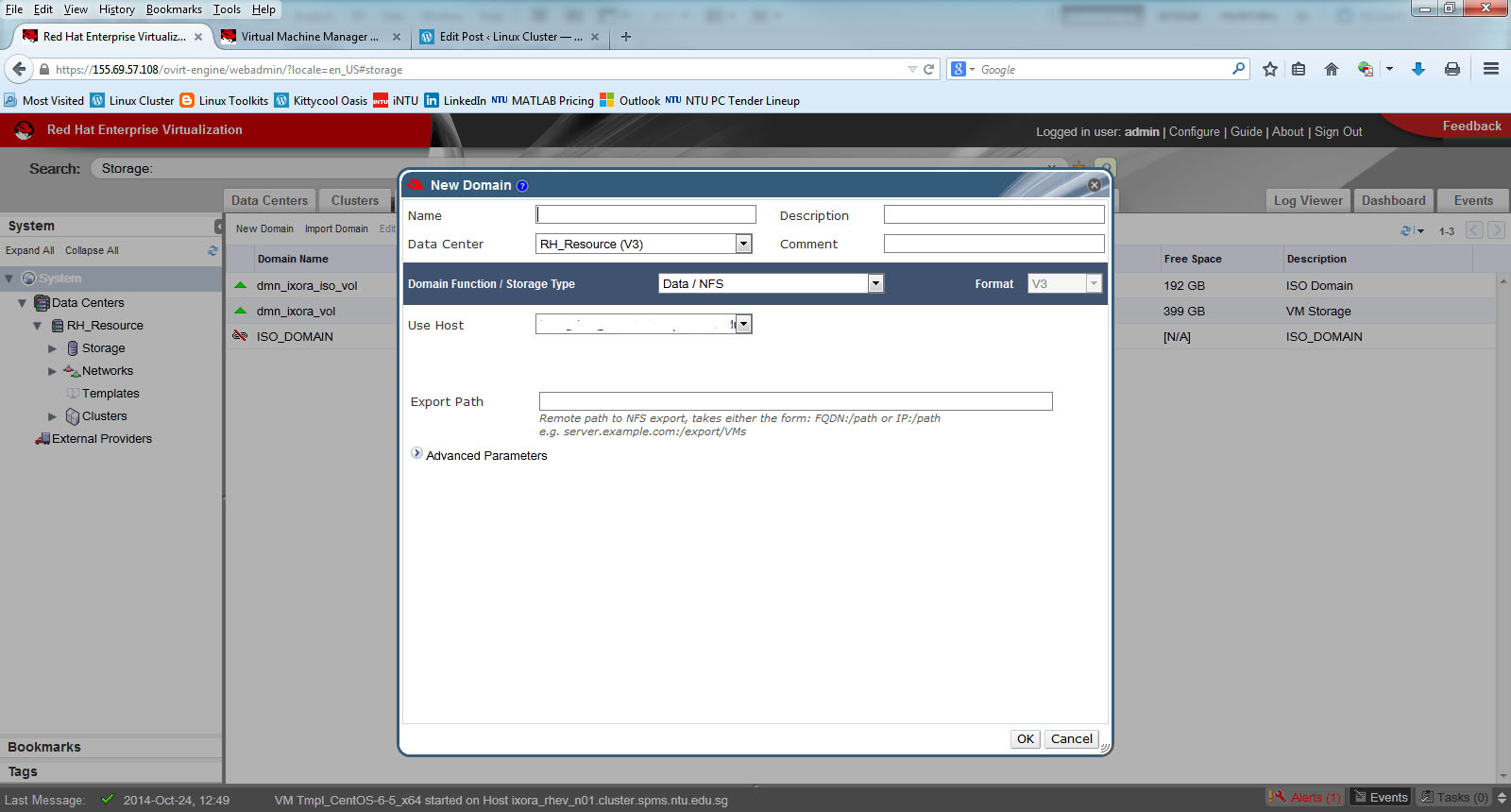
RHEM_Storage_Domain


Step 5: Uploading ISO using command line. Upload the ISO files to the directory /…/uique-UUID/images/11111111-1111-1111-1111-111111111111

# cd /iso/f21673a0-376e-4381-8760-b681c824dd1a/images/11111111-1111-1111-1111-111111111111

Copy the linux or windows iso file into the above directory

# scp remote_server:/something-directory/rhel-6.5.iso .

Change Ownership back to vdsm.kvm

# chown vdsm.kvm rhel-6.5.iso


References:

  1. Create export domain or ISO Domain on RHEV 3

Speeding up kernel crash hang analysis with the kernel log

This is a summaries article taken from RHEL6: Speeding up kernel crash / hang analysis with the kernel log.

When there is a kernel crash or hang, there is often a very large file is produced containing a memory dump of the entire system called a vmcore. Analysis of the kernel crash or hang often requires this large file be uploaded to Red Hat for analysis (if you have subscription)


For RHEL 6.4 and above

Starting with RHEL 6.4, Starting with Red Hat Enterprise Linux 6.4 and kexec-tools-2.0.0-258.el6, the kdump process will dump the kernel log to a file called vmcore-dmesg.txt before creating the vmcore file.

# ls /var/crash/127.0.0.1-2012-11-21-09\:49\:25/
vmcore  vmcore-dmesg.txt
# cp /var/crash/127.0.0.1-2012-11-21-09\:49\:25/vmcore-dmesg.txt /tmp/00123456-vmcore-dmesg.txt

For RHEL 6.0 to RHEL 6.3, 

For other versions of Red Hat Enterprise Linux 6, or for cases where vmcore-dmesg.txt is not generated, you can use the following makedumpfile command to obtain the kernel log from an existing vmcore. NOTE: The makedumpfile command is part of the kexec-tools package)

# makedumpfile --dump-dmesg [path-to-vmcore] [kernel-log-file]
# makedumpfile --dump-dmesg /var/crash/127.0.0.1-2013-06-14-16\:26\:07/vmcore /tmp/00123456-vmcore-dmesg.txt
The dmesg log is saved to /tmp/00123456-vmcore-dmesg.txt.
makedumpfile Completed.

NOTE: If the above command fails, it may indicate the vmcore is corrupt to the point of not containing any useful information.

Create export domain or ISO Domain on RHEV 3

This is taken from Red Hat Portal How to create an export domain or iso domain? (Need customer access)

On the NFS, you need to do the following

# mkdir /export/data
# chown -R 36:36 /export/data
# chmod 755 /export/data
# vim /export_data
/export/data *(rw)
# /etc/init.d/nfs restart
# chkconfig nfs on

The key setup is that the ownership must be given vdsm kvm (36:36). Or you will have errors like
“Error while executing action Add Storage Connection: Problem while trying to mount target”

# mkdir /export/ISO 
# chown -R 36:36 /export/ISO 
# chmod 755 /export/ISO 
# vim /export/ISO /export/ISO *(rw) 
# /etc/init.d/nfs restart 
# chkconfig nfs on

References:

  1. Red Hat Enterprise Virtualisation and NFS (NetApp Community)
  2. How to create an export domain or iso domain? (Red Hat Portal – Restricted Access)