Installing Grace (xmgrace) on CentOS 5 and 6

For further information on what is Grace ( xmgrace ) and some notes during installation. Do read the blog entry

  1. Grace plotting tool for X Window System 
  2. Compiling Grace: checking for a Motif >= 1002 compatible API… no

For installing in a nutshell on CentOS 5 and CentOS 6.

./configure --enable-grace-home=/opt/grace \
--with-extra-incpath=/usr/local/include:/opt/include \
--with-extra-ldpath=/usr/local/lib:/opt/lib \
--prefix=/usr/local

–enable-grace-home=DIR      define Grace home dir [PREFIX/grace]
–with-extra-incpath=PATH    define extra include path (dir1:dir2:…) [none]
–with-extra-ldpath=PATH     define extra ld path (dir1:dir2:…) [none]


Compiling,

make

Testing

make tests

Installation

make install

Making links

make links

References:

  1. Encountering the pars.yacc:5426 error when installing Grace 5.1.23 on CentOS 5

Compiling Octave from Source on CentOS 5

GNU Octave is a high-level language, primarily intended for numerical computations. It provides a convenient command line interface for solving linear and nonlinear problems numerically, and for performing other numerical experiments using a language that is mostly compatible with Matlab. It may also be used as a batch-oriented language.

Step 1: Download and untar the latest version of Octave

See Octave Download for more information

# wget ftp://ftp.gnu.org/gnu/octave/octave-3.4.3.tar.gz
# tar -zxvf octave-3.4.5.tar.gz

Step 2: Check for presence of required libraries.

Octave Require BLAS and LAPACK to compile at a minimum.

Ensure that the blas and lapack libraries are already compiled, or included in your OS. For more information, see Installing lapack, blas and atlas on CentOS 5

If you are compiling octave with FFTW, make sure FFTW has been compiled. For more information, see Installing FFTW

Step 3: Compile Octave

# ./configure --prefix=/usr/local/octave  \
--with-blas="-L/usr/lib64 -lblas" \
--with-lapack="-L/usr/lib64 -llapack" \
--with-fftw3f-libdir=/usr/local/fftw/lib \
--with-fftw3-includedir=/usr/local/fftw/include \
--without-curl \
--
# make -j 8
# make install

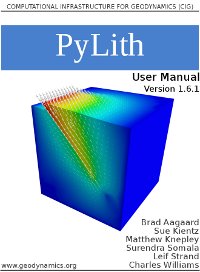
Installing Pylith using Pylith Installer

PyLith is a finite element code for the solution of dynamic and quasi-static tectonic deformation problems. This entry will only focus on the compilation of Pylith from the installer. Most if not all of the information comes from INSTALLER files.


OVERVIEW

This installer builds the current PyLith release and its dependencies from source.

PyLith depends on several other libraries, some of which depend on other libraries. As a result, building PyLith from source can be tricky and is fraught with potential pitfalls. This installer attempts to eliminate these obstacles by providing a utility that builds all of the dependencies in the proper order with the required options in addition to PyLith itself.

The installer will download the source code for PyLith and all of the dependencies during the install process, so you do not need to do this yourself. Additionally, the installer provides the option of checking out the PyLith and PETSc source code from the Subversion and Mercurial repositories (requires subversion and mercurial be installed); only use this option if you want the bleeding edge versions and are willing to rebuild frequently.

SYSTEM REQUIREMENTS

PyLith Installer should work on any UN*X system.  It requires the following language tools:

* A C compiler.
* Tar archiving utility
* wget or curl networking downloaders.

If you are using a modern UN*X system, there is a good chance that the above tools are already installed.

STEP 1 – Download and unpack the installer

Download the installer.

http://www.geodynamics.org/cig/software/pylith/pylith-installer-1.6.1-0.tgz

Untar the source code for the installer:

# mkdir -p $HOME/src/pylith
# cd $HOME/src/pylith
# mv $HOME/Downloads/pylith-installer-1.6.1-0.tgz
# tar -zxf pylith-installer-1.6.1-0.tgz

STEP 2 – Run Configure

On multi-core and multi-processor systems (not clusters but systems with more than one core and/or processor), the build process can be sped up by using multiple threads when running “make”. Use the configure argument –with-make-threads=NTHREADS where NTHREADS is the number of threads to use (1, 2, 4, 8, etc). The default is to use only
one thread. In the examples below, we set the number of threads to 2.

The examples below is not an exhaustive list of configure settings, rather it is a list of common combinations. You can enable/disable building each package to select the proper set of dependencies that need to be built.

Run configure with –help to see all of the command line arguments.

DEFAULT Installation

The default installation assumes you have
* C, C++, and Fortran compilers
* Python 2.4 or later
* MPI

$ mkdir -p $HOME/build/pylith
$HOME/src/pylith/pylith-installer-1.6.1-0/configure \
--with-make-threads=2 \
--prefix=$HOME/pylith

DESKTOP-LINUX-OPENMPI
In this case we assume MPI does not exist on your system and you want to use the OpenMPI implementation.

We assume you have
* C, C++, Fortran compilers
* Python 2.4 or later

mkdir -p $HOME/build/pylith
$HOME/src/pylith/pylith-installer-1.6.1-0/configure \
--enable-mpi=openmpi \
--with-make-threads=2 \
--prefix=$HOME/pylith

CLUSTER

We assume the cluster has been configured with compilers and MPI appropriate for the hardware. We assume that Python has not been installed or was not built with the selected compiler suite. So we assume you have
* C, C++, Fortran compilers
* MPI

mkdir -p $HOME/build/pylith
$HOME/src/pylith/pylith-installer-1.6.1-0/configure \
--enable-python \
--with-make-threads=2 \
--prefix=$HOME/pylith

STEP 3 – Setup your environment

Setup your environment variables (as indicated in the output of the
configure script).

cd $HOME/build/pylith
source setup.sh

STEP 4 – Build the software

Build all of the required dependencies and then PyLith. You do not need to run “make install”, because the installer includes this step in the make process.

#  make

NOTE

Depending on the speed and memory of your machine and the number of dependencies and which ones need to be built, the build process can   take anywhere from about ten minutes to several hours. As discussed above you can interrupt the build process and continue at a later   time from where you left off.

If you get error messages while running make with multiple threads, then try running make again as not all packages fully support parallel builds. You can also go to the build directory of the package and run “make” before running make in $HOME/build/pylith   again to resume the build process. For example,

#  cd netcdf-build
#  make

STEP 5 – Verify the installation

Run your favorite PyLith example or test problem to insure that PyLith
was installed properly.

Add the line

. $HOME/build/pylith/setup.sh

to your .bashrc (or other appropriate file) or manually add the environment variables from setup.sh to your .bashrc (or other appropriate file) so that the environment is setup properly automatically every time you open a shell.

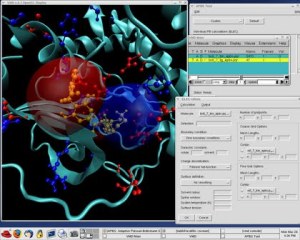
Compiling adaptive Poisson-Boltzmann Solver (APBS) on CentOS 5

Adaptive Poisson-Boltzmann Solver (APBS) is a software package for modeling biomolecular solvation through solution of the Poisson-Boltzmann equation (PBE), one of the most popular continuum models for describing electrostatic interactions between molecular solutes in salty, aqueous media.

Installation is very simple. There are many binaries there and you can use the binaries directly. Do note that the latest binaries (apbs-1.3) uses will require glibc 2.7 and greater. If you are using CentOS 5, you may want to use apbs-1.21 binaries or below.

I’m assuming you are using Intel Compilers. You can download and install Intel Compiler.

  1. If you are eligible for the Intel Compiler Free Download. Download the Free Non-Commercial Intel Compiler Download
  2. Build OpenMPI with Intel Compiler

If you are prepared to compile from source using the latest version, then you should be able to use the latest version even on CentOS 5.

To compile from source. The simplest and most straightforward compilation

# tar -zxvf apbs-1.3-source.tar.gz
# cd apbs-1.3-source
# ./configure --prefix=/usr/local/apbs-1.3
# make; make install

To enable openmpi

# ./configure --prefix=/usr/local/apbs-1.3 --with-openmpi=/usr/local/mpi
# make; make install

For more information, do look at the $HOME/apbs-1.3/configure –help or INSTALL file

1. APBS Project Site (http://sourceforge.net/projects/apbs/)

Installing ALPS 2.0 from source on CentOS 5

What is ALPS Project?

The ALPS project (Algorithms and Libraries for Physics Simulations) is an open source effort aiming at providing high-end simulation codes for strongly correlated quantum mechanical systems as well as C++ libraries for simplifying the development of such code. ALPS strives to increase software reuse in the physics community.

Good information on installing ALPS can be found on ALPS Wiki’s Download and install ALPS for Ubuntu 9.10, Ubuntu 10.04, Ubuntu 10.10, Debian and MacOS

Installing ALPS with Boost

# wget http://alps.comp-phys.org/static/software/releases/alps-2.0.2-r5790-src-with-boost.tar.gz

You will need either gfortran or Intel Fortran Compiler. If you are installing using gfortan

# yum install gcc-c++ gcc-gfortran

If you want to use the evaluation tools, you will need to install a newer version of Python than the provided 2.4. You can install from source or use an unofficial repository for binary RPMs. This is not required if you just want to run your compiled simulations (c++ applications), but make sure you still have python headers (specify -DALPS_BUILD_PYTHON=OFF when invoking cmake):

# yum install python-devel

BLAS/LAPACK is necessary. Make sure you have EPEL repository ready. For more information,Red Hat Enterprise Linux / CentOS Linux Enable EPEL (Extra Packages for Enterprise Linux) Repository

# yum install blas-devel lapack-devel

CMake 2.8.0 and HDF5 1.8 need to be installed. There is a wonderful scripts that comes with ALPS that help to compile CMAKE 2.8 and HDF5.1.8 with CentOS 5

$ $HOME/src/alps2/script/cmake.sh $HOME/opt $HOME/tmp
$ $HOME/src/alps2/script/hdf5.sh $HOME/opt $HOME/tmp

Build ALPS

Create a build directory (anywhere you have write access) and execute cmake giving the path to the alps and to the boost directory:

# cmake -D Boost_ROOT_DIR:PATH=/path/to/boost/directory /path/to/alps/directory

For example if the alps precompiled directory is in /root/alps-2.0.2

# cmake -D Boost_ROOT_DIR:PATH=/root/alps-2.0.2/boost /root/alps-2.0.2/alps

To install in another directory, set set the variable CMAKE_INSTALL_PREFIX

# cmake -DCMAKE_INSTALL_PREFIX=/path/to/install/directory /path/to/alps/directory

For example:

# cmake -DCMAKE_INSTALL_PREFIX=/usr/local/alps-2.0.2 /root/alps-2.0.2/alps

Build and test ALPS

$ make -j 8
$ make test
$ make install

* HDF5.1.8 binaries and  libraries are very useful not only for compiling ALPS but other applications require HDF5.1.8. You may want to consider to move its binaries and libraries to the /usr/local/ directories

Compiling GotoBLAS2 in Nehalem and newer CPU

GotoBLAS2 uses new algorithms and memory techniques for optimal performance of the BLAS routines. The download site can be found at GotoBLAS2 download

# wget http://cms.tacc.utexas.edu/fileadmin/images/GotoBLAS2-1.13_bsd.tar.gz
# tar -zxvf GotoBLAS2-1.13_bsd.tar.gz
# cd GotoBLAS2
# gmake clean
# gmake TARGET=NEHALEM

you will get

GotoBLAS build complete.

  OS               ... Linux
  Architecture     ... x86_64
  BINARY           ... 64bit
  C compiler       ... GCC  (command line : gcc)
  Fortran compiler ... INTEL  (command line : ifort)
  Library Name     ... libgoto2_nehalemp-r1.13.a (Multi threaded; Max num-threads is 8)

you will see the resulting libraries and softlinks

libgoto2.a -> libgoto2_nehalemp-r1.13.a
libgoto2_nehalemp-r1.13.a
libgoto2_nehalemp-r1.13.so
libgoto2.so -> libgoto2_nehalemp-r1.13.so

You can create a /usr/local/GotoBLAS2 and copy the files there and do the PATHING.

If you are having issues, do take a look at Error in Compiling GotoBLAS2 in Westmere Chipsets

Compiling BLACS on CentOS 5

1. You have to compile OpenMPI 1.4.x with g77 and gfortran. I’m compiling with OpenIB and Torque as well

./configure --prefix=/usr/local/mpi/gnu-g77/ \
F77=g77 FC=gfortran \
--with-openib \
--with-openib-libdir=/usr/lib64 \
--with-tm=/opt/torque

2. Download BLACS from www.netlib.org/blacs. Remember to download both mpiblacs.tgz and the mpiblacs-patch03.tgz

# cd /root
# tar -xzvf mpiblacs.tgz
# tar -xzvf mpiblacs-patch03.tgz
# cd BLACS
# cp ./BMAKES/BMake.MPI-LINUX Bmake.inc

3. Edit Bmake.inc according to the recommendation from OpenMPI FAQ

# Section 1:
# Ensure to use MPI for the communication layer

   COMMLIB = MPI

# The MPIINCdir macro is used to link in mpif.h and
# must contain the location of Open MPI's mpif.h. 
# The MPILIBdir and MPILIB macros are irrelevant
# and should be left empty.

   MPIdir = /path/to/openmpi-1.4.3
   MPILIBdir =
   MPIINCdir = $(MPIdir)/include
   MPILIB =

# Section 2:
# Set these values:

   SYSINC =
   INTFACE = -Df77IsF2C
   SENDIS =
   BUFF =
   TRANSCOMM = -DUseMpi2
   WHATMPI =
   SYSERRORS =

# Section 3:
# You may need to specify the full path to
# mpif77 / mpicc if they aren't already in
# your path. IF not type the whole path out.

   F77            = /usr/local/mpi/gnu-g77/bin/mpif77
   F77LOADFLAGS   =

   CC             = /usr/local/mpi/gnu-g77/bin/mpicc
   CCLOADFLAGS    =

4. Following the recommendation from BlACS Errata (Necessary flags for compiling the BLACS tester with g77)

blacstest.o : blacstest.f
	$(F77) $(F77NO_OPTFLAGS) -c $*.f
to:
blacstest.o : blacstest.f
	$(F77) $(F77NO_OPTFLAGS) -fno-globals -fno-f90 -fugly-complex -w -c $*.f

5. Compile the Blacs tests. You should see

# cd /root/BLACS/TESTING
# make clean
# make

You should see xCbtest_MPI-LINUX-1 and xFbtest_MPI-LINUX-1

6. Tun the Tests

# mpirun -np 5 xCbtest_MPI-LINUX-0
# mpirun -np 5 xFbtest_MPI-LINUX-0

7. If the test is successful, you may wish to copy the BLACS library to /usr/local/lib. But I like to  separate my compiled libraries separately to /usr/local/blacs/lib

# cp /root/BLACS/LIB*.a /usr/local/blacs/lib
# chmod 555 /usr/local/blacs/lib/*.a

Compiling LAPACK on CentOS 5

Download the lapack latest stable version (lapack-3.3.0.tgz) from http://www.netlib.org/lapack

# cd /root
# tar -xzvf lapack-3.3.0.tgz
# cd /root/lapack-3.3.0
# cp make.inc.example make.inc

Assuming Edit make.inc. Assuming the Compiling ATLAS on CentOS 5

#BLASLIB = ../../blas$(PLAT).a
BLASLIB = /usr/local/atlas/lib/libf77blas.a /usr/local/atlas/lib/libatlas.a

Compile lapack package

# make

Copy the libraries to

# mkdir /usr/local/lapack/lib
# cp /root/lapack-3.3.0/*.a /usr/local/lapack/lib
# cd /usr/local/lapack/lib/
# chmod 555 *.a

Other related Information

  1. Compiling ATLAS on CentOS 5

Compiling ATLAS on CentOS 5

This tutorial is to help you compile ATLAS (Automatically Tuned Linear Algebra Software) with gFortran. For those who are using Intel Compiler, you have the reliable Intel MKL (Math Kernel Library)

First thing first, some comparison between ATLAS and MKL.

ATLAS

ATLAS The Automatically Tuned Linear Algebra Software (ATLAS) provides a complete implementation of the BLAS API 3 and a subset of LAPACK 3. A big number of instructions-set specific optimizations are used throughout the library to achieve peak-performance on a wide variety of HW-platforms.

ATLAS provides both C and Fortran interfaces.

ATLAS is available for all HW-platforms capable of running UNIX or UNIX-like operating systems as well as Windows ™.

MKL

Intel’s Math Kernel Library (MKL) implements a set of linear algebra, fast Fourier transforms and vector math functions. It includes LAPACK 3, BLAS 3 and extended BLAS and provides both C and Fortran interfaces.

MKL is available for Windows ™ and Linux (x86/i686 and above) only.

Download the latest stable package from ATLAS (http://sourceforge.net/projects/math-atlas/files/Stable/). The current stable version is atlas3.8.0.tar.gz. Do note that ATLAS don’t like configuration on its original location, hence the need to create ATLAS_BUILD directory.

# cd /root
# tar -xzvf atlas3.8.3.tar.gz
# mkdir /root/ATLAS_BUILD
# cd /root/ATLAS_BUILD
# /root/ATLAS/configure

You will need to turn off CPU Throttling. For CentOS and Fedora, you will use

# /usr/bin/cpufreq-selector -g performance

For more information, you can see my blog entry Switching off CPU Throttling on CentOS or Fedora

Compile ATLAS

make
make check
make ptcheck
make time
make install

By default, ATLAS installed to /usr/local/atlas

Finally remember to add /usr/local/atlas/lib to your LD_LIBRARY_PATH

Notes:

    1. Linux Cluster Application Site
    2. ScaLAPACK, LAPACK, BLACS and ATLAS on OpenMPI & Linux installation tutorial

    Installing Gromacs 4.0.7 on CentOS 5


    GROMACS is a versatile package to perform molecular dynamics, i.e. simulate the Newtonian equations of motion for systems with hundreds to millions of particles.
    It is primarily designed for biochemical molecules like proteins, lipids and nucleic acids that have a lot of complicated bonded interactions, but since GROMACS is extremely fast at calculating the nonbonded interactions (that usually dominate simulations) many groups are also using it for research on non-biological systems, e.g. polymers

    Do note that this Gromacs Installation Guide is for Gromacs 4.0.x. For detailed instruction, see GROMACS Installation Instructions. For installation of FFTW, you may want to take a look at Blogh Entry Installing FFTW

    Since I’m using FFTWMPI (OpenMPI to be exact) and configure FFTW with –prefix=/usr/local/fftw,

    I’ve configured the following

    # ./configure CPPFLAGS="-I/usr/local/fftw/include" LDFLAGS="-L/usr/local/fftw/lib" \
    --with-fft=fftw3 --enable-mpi --disable-float

    Some notes…… (Assuming you are using bash)

    1. CPPFLAGS=”-I/usr/local/fftw/include”
    2. LDFLAGS=”-L/usr/local/fftw/lib”
    3. To compile with FFTW version 3 “–with-fft=fftw3”
    4. To enable MPI “–enable-mpi”
    5. To select Double precision  “–disable-float”
    # make -j 8

    where 8 is the number of cores.

    # make mdrun

    * if you have configure with “–enable-mpi”

    # make install

    * Install all the binaries, libraries and shared data files with:

    # make install-mdrun

    * If you only want to build the mdrun executable (in the case of an MPI build),

    # make links

    * If you want to create links in /usr/local/bin to the installed GROMACS executables