Taken from Scale your file system with Parallel NFS (IBM developworks)
NFS is a mature technologies that form the mainstay of file system for many of Linux Boxes. However, one area that NFS found itself wanting is in the field of High Performance Computing where the I/O is highly intensive and demanding.
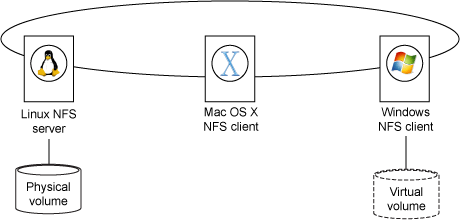
The above diagram shows the Linux NFS Server exporting its physical hard disks to the NFS Clients. The mounting an NFS file system is transparent to the client as when mounted, applications simply read and write files, subject to access control, oblivious to the machinations required to persist data. A pretty neat solution
NFS is quite capable, as evidenced by its widespread use as Network Attached Storage (NAS). It runs over both Transmission Control Protocol (TCP) and User Datagram Protocol (UDP) and is (relatively) easy to administer. Furthermore, NFS version 4, the most recent, ratified version of the standard, improves security, furthers interoperability between Windows and UNIX®-like systems, and provides better exclusivity through lock leases. (NFSv4 was ratified in 2003.) NFS infrastructure is also inexpensive, because it typically runs well on common Ethernet hardware. NFS suits most problem domains.
However, one domain not traditionally well served by NFS is high-performance computing (HPC), where data files are very large, sometimes huge, and the number of NFS clients can reach into the thousands. (Think of a compute cluster or grid composed of thousands of commodity computing nodes.) Here, NFS is a liability, because the limits of the NFS server—be it bandwidth, storage capacity, or processor speed—throttle the overall performance of the computation. NFS is a bottleneck.
The next revision of NFS, version 4.1, includes an extension called Parallel NFS (pNFS) that combines the advantages of stock NFS with the massive transfer rates proffered by parallelized input and output (I/O). Using pNFS, file systems are shared from server to clients as before, but data does not pass through the NFS server. Instead, client systems and the data storage system connect directly, providing numerous parallelized, high-speed data paths for massive data transfers. After a bit of initialization and handshaking, the pNFS server is left “out of the loop,” and it no longer hinders transfer rates.
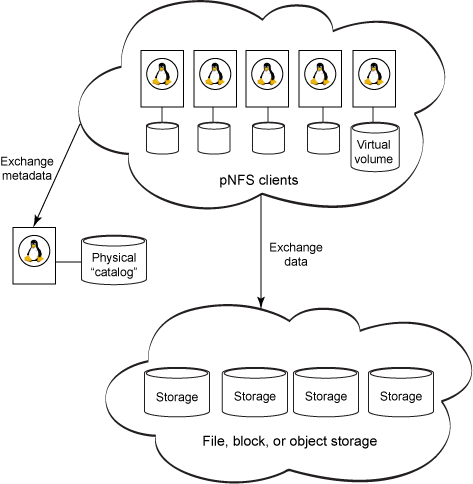
Like NFS, the pNFS server exports file systems and retains and maintains the canonical metadata describing each and every file in the data store. As with NFS, a pNFS client—here a node in a cluster—mounts the server’s exported file systems. Like NFS, each node treats the file system as if it were local and physically attached. Changes to metadata propagate through the network back to the pNFS server. Unlike NFS, however, a Read or Write of data managed with pNFS is a direct operation between a node and the storage system itself, pictured at the bottom in Figure 2. The pNFS server is removed from data transactions, giving pNFS a definite performance advantage.
Thus, pNFS retains all the niceties and conveniences of NFS and improves performance and scalability. The number of clients can be expanded to provide more computing power, while the size of the storage system can expand with little impact on client configuration. All you need to do is keep the pNFS catalog and storage system in sync.
The inner workings of pNFS
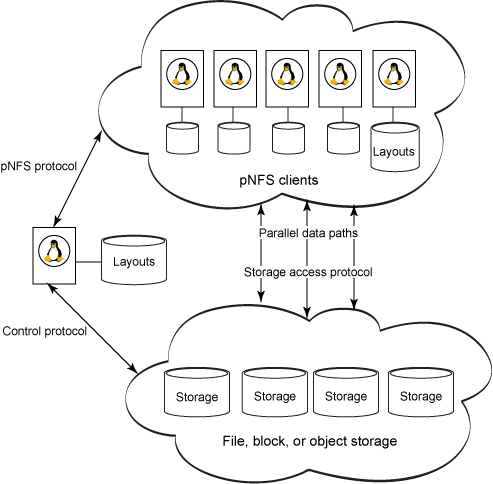
The pNFS protocol transfers file metadata (formally known as a layout) between the pNFS server and a client node. You can think of a layout as a map, describing how a file is distributed across the data store, such as how it is striped across multiple spindles. Additionally, a layout contains permissions and other file attributes. With metadata captured in a layout and persisted in the pNFS server, the storage system simply performs I/O.
The storage access protocol specifies how a client accesses data from the data store. As you might guess, each storage access protocol defines its own form of layout, because the access protocol and the organization of the data must be concordant.
The control protocol synchronizes state between the metadata server and the data servers. Synchronization, such as reorganizing files on media, is hidden from clients. Further, the control protocol is not specified in NFSv4.1; it can take many forms, allowing vendors the flexibility to compete on performance, cost, and features.
- The client requests a layout for the file at hand.
- The client obtains access rights by opening the file on the metadata server.
- When authorized and given the layout, the client is free to access information from the data servers directly. Access proceeds according to the storage access protocol required for the type of store. (More on this below.)
- If the client alters the file, the client’s instance of the layout is duly modified, and all modifications are committed back to the metadata server.
- When the client no longer needs the file, it commits any remaining changes, returns its copy of the layout to the metadata server, and closes the file.
More specifically, a Read operation is a series of protocol operations:
- The client sends a
LOOKUP+OPEN request to the pNFS server. The server returns a file handle and state information.
- The client requests a layout from the server through the
LAYOUTGETcommand. The server returns the file layout.
- The client issues a
READ request to the storage devices, which initiates multiple Read operations in parallel.
- When the client is finished reading, it expresses the end of the operation with
LAYOUTRETURN.
- If the layout shared with clients is ever obsolete because of separate activity, the server issues a
CB_LAYOUTRECALL to indicate that the layout is no longer valid and must be purged and/or refetched.
A Write operation is similar, except that the client must issue a LAYOUTCOMMIT before LAYOUTRETURN to “publish” the changes to the file to the pNFS server.
Layouts can be cached in each client, further enhancing speed, and a client can voluntarily relinquish a layout from the server if it’s no longer of use. A server can also restrict the byte range of a Write layout to avoid quota limits or to reduce allocation overhead, among other reasons.
To prevent stale caches, the metadata server recalls layouts that have become inaccurate. Following a recall, every affected client must cease I/O and either fetch the layout anew or access the file through plain NFS. Recalls are mandatory before the server attempts any file administration, such as migration or re-striping.



 The Linux Cluster