Useful Commands for Centrify Suite

Taken from [TIPS] A Centrify Server Suite Cheat Sheet


BASIC Troubleshooting

Pt 1. To check the general status of the client

$ adinfo
Local host name: xxx
Joined to domain: xxx.com
Joined as: xxx
Pre-win2K name: xxx
Current DC: xxx
Preferred site: NTU-Site
Zone: xxx
Last password set: 2019-07-24 06:29:08 +08
CentrifyDC mode: connected
Licensed Features: Enabled

Pt 2. To see the corresponding Centrify Suite Version

$ adinfo --suite-version
adinfo (CentrifyDC 5.5.0-200)
Centrify Server Suite 2018

Pt 3. To view Active Directory connectivity to the current domain

$ adinfo --test
Domain Diagnostics:
Domain:
DNS query for:
DNS query for:
Testing Active Directory connectivity:
Domain Controller:
ldap: 389/tcp - good
ldap: 389/udp - good
smb: 445/tcp - good
kdc: 88/tcp - good
kpasswd: 464/tcp - good
ntp: 123/udp - good
Domain Controller:
ldap: 389/tcp - good
ldap: 389/udp - good
smb: 445/tcp - good
kdc: 88/tcp - good
kpasswd: 464/tcp - good
ntp: 123/udp - good
Domain Controller:
ldap: 389/tcp - good
ldap: 389/udp - good
smb: 445/tcp - good
kdc: 88/tcp - good
kpasswd: 464/tcp - good
ntp: 123/udp - good
Domain Controller:
ldap: 389/tcp - good
ldap: 389/udp - good
smb: 445/tcp - good
kdc: 88/tcp - good
kpasswd: 464/tcp - good
ntp: 123/udp - good

Pt 4: To see the current joined Centrify zone

$ adinfo --zone
xxx.com/MyOU/Centrify/Zones/Global

ADVANCED / TROUBLESHOOTING Information

Pt 5: To check the status of the DNS cache and stats

$ adinfo --diag dns
adinfo (CentrifyDC 5.5.0-200)
Host Diagnostics
uname: Linux hpc-gekko1 3.10.0-693.el7.x86_64 #1 SMP Tue Aug 22 21:09:27 UTC 2017 x86_64
OS: CentOS
Version: 7.0
Number of CPUs: 32
…..
…..

Pt 6: To check network connectivity statistics

$ adinfo --sysinfo netstate
System Diagnostic
===============Network State===================
Site Map
com.sg=>PreferredSite:XXX.com, SubnetSite:XXX-Site
Domain Map
…
…
state: alive
swept: 21 mins ago
...

Pt 7: To see the status of the AD computer trust relationship

$ adinfo --sysinfo adagent
System Diagnostic
===================adagent internals===================
Binding Table
$=>main11.main.ntu.edu.sg(MAIN.NTU.EDU.SG) connected
xxx.com=>xxx.com disconnected
xxx1=>xxx1.com disconnected
xxx2=>xxx2.com connected
xxx3=>xxx3.com connected

TESTING Credentials Information

$ adinfo -A --user myuserid
Active Directory password:
...

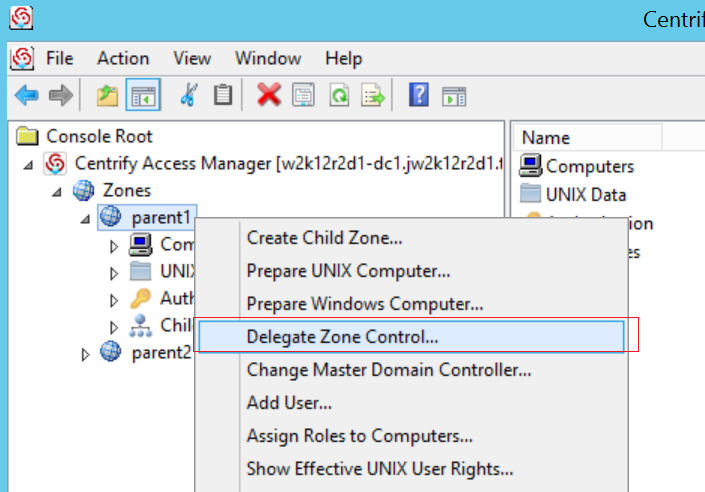
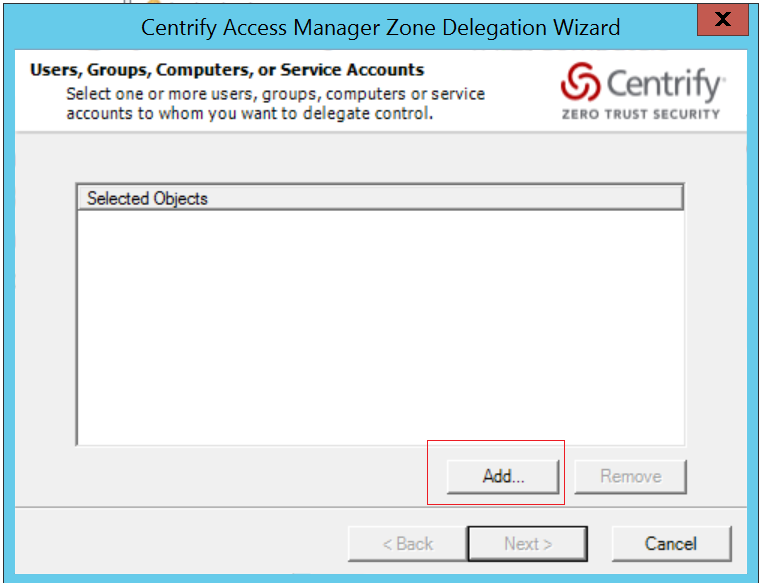
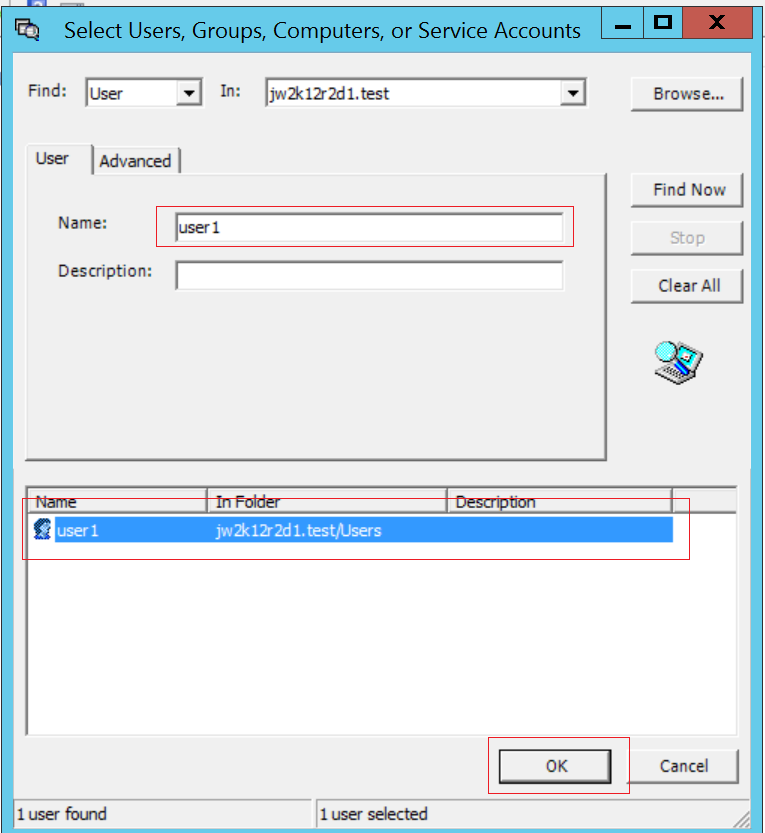
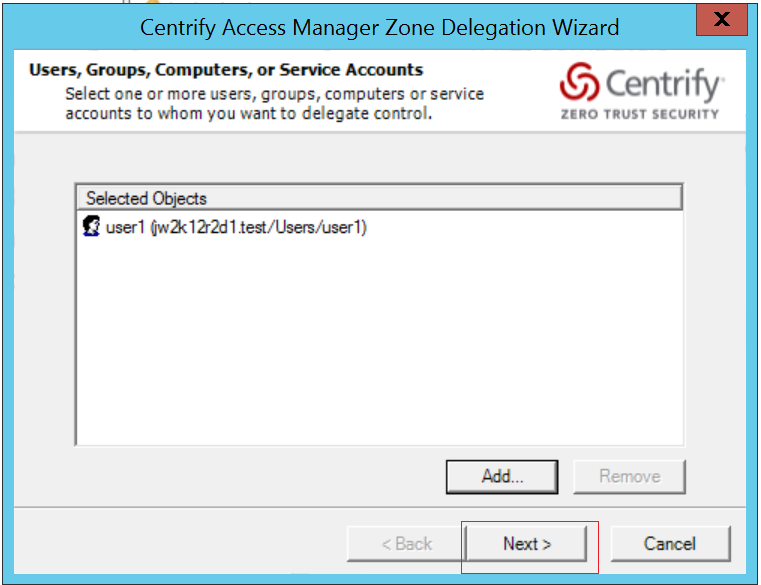
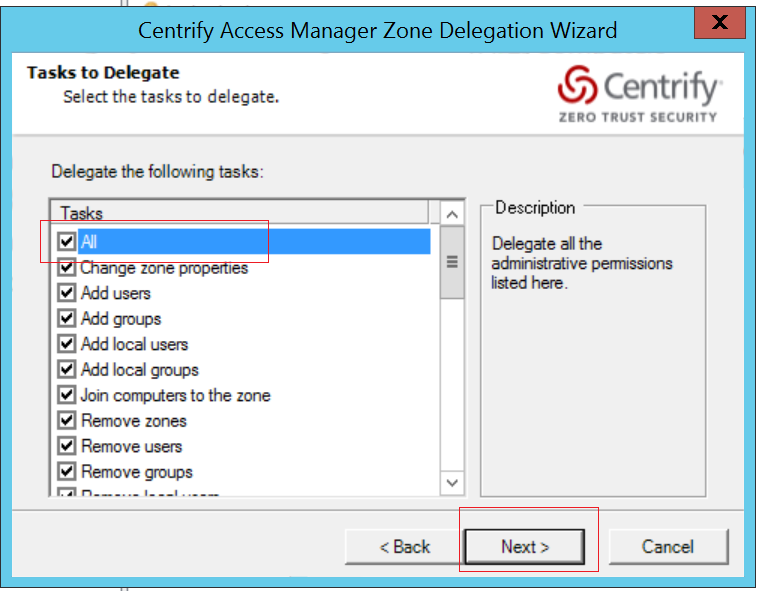
Delegate Zone Control to the user in the Centrify Management Console

  • Open Access Manager as Administrator
  • Right click “Centrify Access Manager > Zone > Global”
  • Select “Delegate Zone Control…”

  • In the Dialog window, click “Add”

  • Input user name into “Name:” field and click “Find Now”
  • Select the User and click “OK”

  • Click “Next”

  • Click “All” in the Tasks list and click “Next”

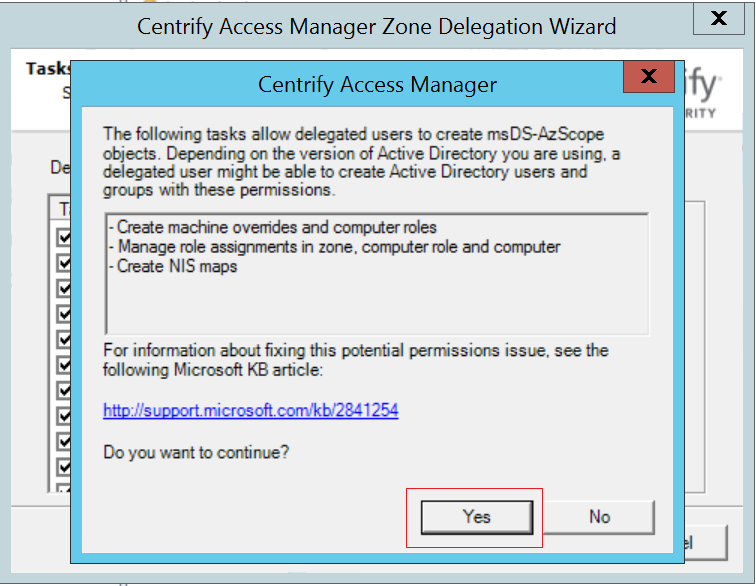
  • Click “Yes”

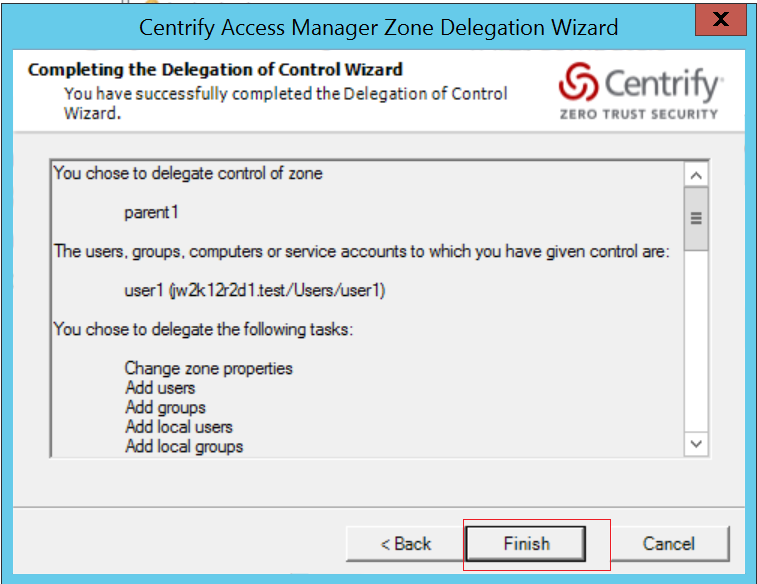
  • Click “Finish”

Resolving Orphaned Objects in Centrify Access Manager

On the Centrify Access Manager, when we search for the userid, the Centrify Access Manager is not found.
But when we add the userid in the system, it mentioned that the userid is duplicated. It seems that the userid has been cached and orphaned somewhere in Centrify.

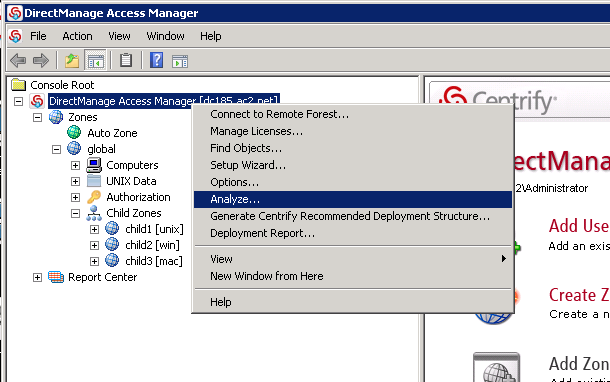
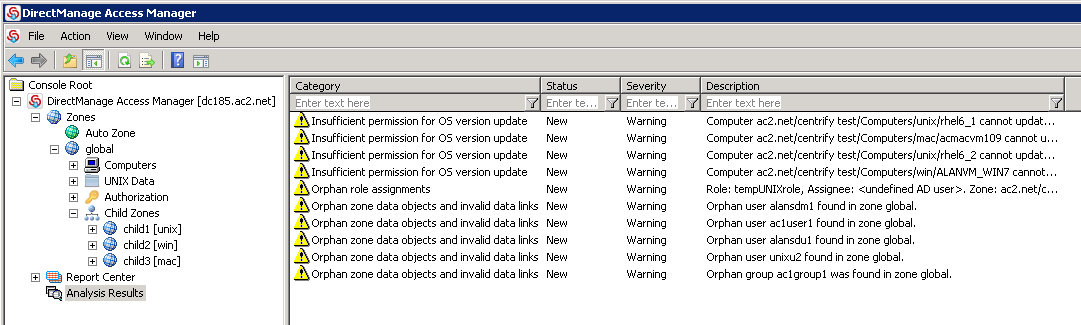
Step 1: To find out duplicated users / objects, you may use Analyze feature in Access Manager. See Pix 1

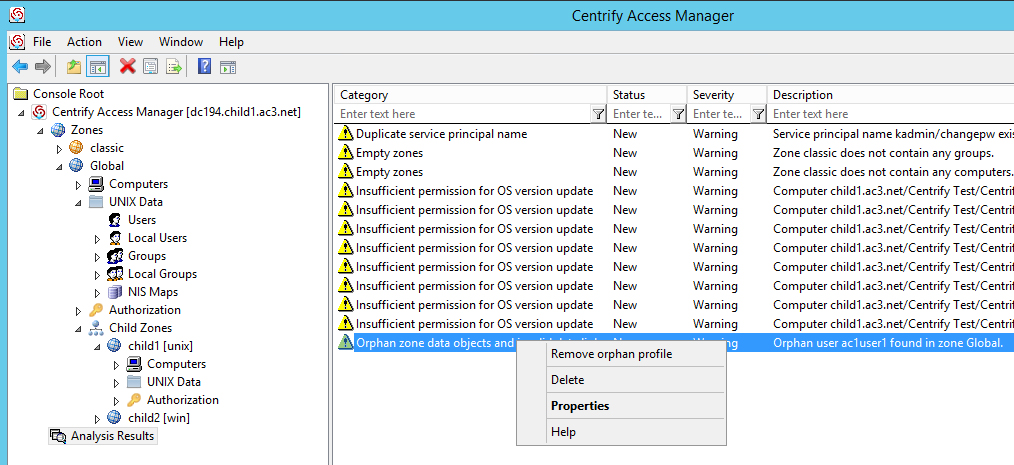
Step 2: Analyse Results

You will notice

– Duplicate users in zones
– Orphan zone data objects and invalid data links

Step 3: Right-Clicked to fix the isses

You should be able to add the user.


Rectifying Corrupted Keytab file on Centrify Client

Do the required Centrify Log Collection. Do take a look at Collecting logs from Centrify Client

If you notice the logs

============

Oct  5 20:19:06 lsf-login2 adclient[16400]: DEBUG <fd:27 PAMVerifyPassword > base.osutil Module=Kerberos : while getting service credentials: Decrypt integrity check failed (reference base/aduser.cpp:1629 rc: -1765328353) Oct  5 20:19:06 lsf-login2 adclient[16400]: DEBUG <fd:27 PAMVerifyPassword > base.aduser Unable to verify user’s credentials: while getting service credentials: Decrypt integrity check failed Oct  5 20:19:06 lsf-login2 adclient[16400]: DIAG  <fd:27 PAMVerifyPassword > daemon.ipcclient validate password caught exception: while getting service credentials: Decrypt integrity check failed Oct  5 20:19:06 lsf-login2 adclient[16400]: WARN  <fd:27 PAMVerifyPassword > audit User ‘user1’ not authenticated: while getting service credentials: Decrypt integrity check failed Oct  5 20:19:06 lsf-login2 adclient[16400]: DEBUG <fd:27 PAMVerifyPassword > daemon.ipcclient2 doPAMVerifyPassword: user ‘jliu024’ not OK: -1765328353 (Kerberos) Oct  5 20:19:06 lsf-login2 adclient[16400]: DEBUG <fd:27 PAMVerifyPassword > daemon.ipcclient2 request ‘PAMVerifyPassword’ complete =======================

To resolve the issue, do the following

# adkeytab -r -u User1

And try to restart adclient again as root

# /usr/share/centrifydc/bin/centrifydc restart

Collecting logs from Centrify Client

On the Centrify Unix server, as root or sudo, please run the following commands:

1. Turn on Centrify debug:

# /usr/share/centrifydc/bin/addebug on
# /usr/share/centrifydc/bin/addebug clear

2. Reproduce the issue, attempt to log-in.

3. Collect adinfo:

# adinfo -t

4. Turn Off Debug

# /usr/share/centrifydc/bin/addebug off

5. Run adquery and dzinfo for the selected Users:

# adquery user -A UserID1 > /tmp/adquery.txt
# dzinfo UserID1 > /tmp/dzinfo.txt

6. Send the Logs to Centrify Support

/var/centrify/tmp/adinfo_support.tar.gz
/tmp/adquery.txt
/tmp/dzinfo.txt

Testing the AD User Authentication with Centrify

Test 1: Test with SSH

The simplest way is to enable SSH and connect to it.

Test 2: Test with adinfo

# adinfo -A --user user1
Active Directory password:
Password for user "user1" is correct

Test 3: Test using kinit

# /usr/share/centrifydc/kerberos/bin/kinit user1
# /usr/share/centrifydc/kerberos/bin/klist
Ticket cache: FILE:/tmp/krb5cc_0
Default principal: user2@test.com
.....
.....
Valid starting       Expires           Service principal
.....
.....

References:

  1. Centrify is in connected mode but users are unable to login.