The following command can be used to
RMC> show npar
RMC> modify npar pnum=PARTITION_ID hthread={on,off}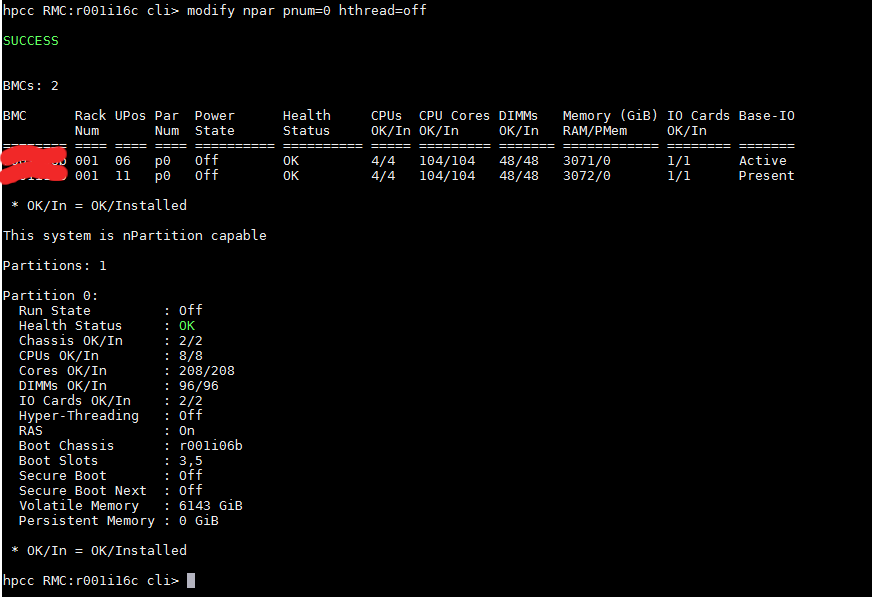
References:

The following command can be used to
RMC> show npar
RMC> modify npar pnum=PARTITION_ID hthread={on,off}References:

AMD has today launched a new EPYC processor designed for the data center industry, cloud, and enterprise customers.
The AMD EPYC 7003 Series central processing units (CPUs) include up to 64 Zen 3 cores per processor, and also include the EPYC 7763 server processor for a performance and per-core cache memory boost. The 7003 series also includes PCIe 4 connectivity and eight memory channels per processor.
Security features include AMD Infinity Guard and a new feature called Secure Encrypted Virtualization-Secure Nested Paging (SEV-SNP). This adds memory integrity protection capabilities to create an isolated execution environment. This can help to prevent hypervisor-based attacks.
According to AMD, cloud providers can leverage the 7003 Series’ high core density, security features, and improved integer performance.
Further, high performance computing (HPC) customers can leverage the 7003 series’ faster time to recovery due to more I/O and memory throughput, and the Zen 3 cores.
For the full article, do take a look at https://itbrief.co.nz/story/amd-unveils-new-epyc-processor-for-high-performance-computing
If you are hoping to compile flac-1.3.3 with libogg-1.3.4, do the following
Step 1: Download latest libogg from Xiph.org

Step 2: Untar and Compile the libogg
% tar -zxvf libogg-1.3.4.tar.gz% cd libogg-1.3.4
% ./configure --prefix=/usr/local/libogg-1.3.4
% make && make install
Step 3: Download flac-1.3.3 from https://github.com/xiph/flac

Step 4: Untar and Compile flac-1.3.3 with libogg-1.3.4
% git clone https://github.com/xiph/flac.git
% cd flac
% ./autogen.sh
% ./configure --prefix=/usr/local/flac-1.3.3 --with-ogg-libraries=/usr/local/libogg-1.3.4/lib --with-ogg-includes=/usr/local/libogg-1.3.4/include/

-=-=-=-=-=-=-=-=-=-= Configuration Complete =-=-=-=-=-=-=-=-=-=-

  Configuration summary :

    FLAC version : ............................ 1.3.3

    Host CPU : ................................ x86_64
    Host Vendor : ............................. unknown
    Host OS : ................................. linux-gnu

    Compiler is GCC : ......................... yes
    GCC version : ............................. 4.8.5
    Compiler is Clang : ....................... no
    SSE optimizations : ....................... yes
    Asm optimizations : ....................... yes
    Ogg/FLAC support : ........................ yes
    Stack protector  : ........................ yes
    Fuzzing support (Clang only) : ............ no

% make && make install
One validated use case with MemVerge software, is being able to use MySQL instances within the same VM to make full use of all vCPUs. The results suggest that the VM density for this application could be increased by a factor of 4 or even 8 with minimal performance loss……
See “MemVerge Software-Defined Memory Data Services Increases VM Density“
If you are encountering Error messages during login with “Too many open files” and the session gets terminated automatically, it is because the open file limit for a user or system exceeds the default setting and you may wish to change it
To see the settings for maximum open files,
# cat /proc/sys/fs/file-max
55494980
This value means that the maximum number of files all processes running on the system can open. By default this number will automatically vary according to the amount of RAM in the system. As a rough guideline it will be about 100,000 files per GB of RAM.
To override the system wide maximum open files, as edit the /etc/sysctl.conf
# vim /etc/sysctl.conf
 fs.file-max = 80000000
Activate this change to the live system
# sysctl -p
To see the setting for maximum open files for a user
# su - user1
$ ulimit -n
1024
To change the setting, edit the /etc/security/limits.conf
$ vim /etc/security/limits.conf
user - nofile 2048
To change for all users
* - nofile 2048
This set the maximum open files for ALL users to 2048 files. These settings will require the user to relogin
This article is taken from DATA PROCESSING TESTS BY NTT DATA SUGGEST THAT AN INTEL® FPGA PAC CAN FILTER, AGGREGATE, SORT, AND CONVERT FILES 4X FASTER THAN SOFTWARE ALONE from Intel
Nearly 80% of total data processing time is spent on tasks such as filtering, aggregation, sorting, and format conversion. NTT Data conducted proof-of-concept tests aimed at improving data processing performance for these tasks. The tests employed an Intel® FPGA Programmable Acceleration Card (Intel® FPGA PAC) to process Linux audit logs, resulting in processing speeds more than four times faster than the same processing done in exclusively in software.
Two factors drove this exercise:
For more information, do take a look at DATA PROCESSING TESTS BY NTT DATA SUGGEST THAT AN INTEL® FPGA PAC CAN FILTER, AGGREGATE, SORT, AND CONVERT FILES 4X FASTER THAN SOFTWARE ALONE
Taken from Sharcnet HPC
The Video will consider two cases – when the GPUs are inside a single node, and a multi-node case.
If you are having Errors like the one below. I was trying to use Intel-MPI and MPIEXECJL and I was having this error. I realised that I was getting a bit mixed up on using Intel MPI mpiexec and using mpiexecjl. In the first instance, we use “mpiexecjl”
In my subscription script, we have
....
....
export CC=`which mpicc`
export FC=`which mpif90`
julia --project -e 'ENV["JULIA_MPI_PATH"]="/usr/local/intel/2018u3/impi/2018.3.222/intel64/bin"; using Pkg; Pkg.build("MPI"; verbose=true)'

mpiexecjl -n 16 julia --project HelloWorld.jl
....
....
During the run, we have the following logs……
....
....
+ julia --project -e 'ENV["JULIA_MPI_PATH"]="/usr/local/intel/2018u3/impi/2018.3.222/intel64/bin"; using Pkg; Pkg.build("MPI"; verbose=true)'
[ Info: using system MPI
┌ Info: Using implementation
│ libmpi = "libmpi"
│ mpiexec_cmd = `/usr/local/intel/2018u3/impi/2018.3.222/intel64/bin/bin/mpiexec`
└ MPI_LIBRARY_VERSION_STRING = "Intel(R) MPI Library 2018 Update 3 for Linux* OS\n"
┌ Info: MPI implementation detected
│ impl = IntelMPI::MPIImpl = 4
│ version = v"2018.3.0"
└ abi = "MPICH"
Building MPI → `~/.julia/packages/MPI/b7MVG/deps/build.log`
+ date
+ mpiexecjl -n 16 julia --project HelloWorld.jl
ERROR: IOError: could not spawn `/usr/local/intel/2018u3/impi/2018.3.222/intel64/bin/bin/mpiexec -n 16 julia HelloWorld.jl`: no such file or directory (ENOENT)
....
....
Just directly using the mpiexec will solve the issue.
mpiexec -n 16 julia --project HelloWorld.jl
If you use mpiexec and yet face issues like. It may not be exactly the issue with mpiexec, but issues with missing Package (as in my case)
[mpiexec@node1] match_arg (../../utils/args/args.c:254): unrecognized argument project
[mpiexec@node1] HYDU_parse_array (../../utils/args/args.c:269): argument matching returned error
[mpiexec@node1] parse_args (../../ui/mpich/utils.c:4770): error parsing input array
[mpiexec@node1] HYD_uii_mpx_get_parameters (../../ui/mpich/utils.c:5106): unable to parse user arguments
To add Packages, get into Julia. For example,
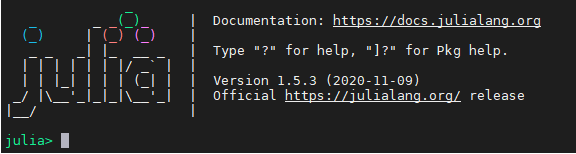
julia > using Pkg
julia > Pkg.add("SharedArrays")
KALDI (Kaldi Speech Recognition Toolkit)
Step 1: Git Clone kaldi packages
% git clone https://github.com/kaldi-asr/kaldi.git
Step 2: Check Dependencies.
Do run the following steps in the blog entry Fixing zlib Dependencies Issues for kaldi
Step 3: Load OpenMPI-3.1.4 with GNU-6.5
You may wish to compile OpenMPI with GNU-6.5 according to Compiling OpenMPI-3.1.6 with GCC-6.5
Step 4: Compile kaldi tools
% cd /usr/local/kaldi/tools
% make
.....
.....
All done OK.
(This make take a long well)
Step 5: Compile src of the main kaldi
% source /usr/local/intel/2018u3/mkl/bin/mklvars.sh intel64
% export CXXFLAGS="-I/usr/local/zlib-1.2.11/include"
% ./configure --use-cuda=no
% make -j clean depend
% make -j 4

