Managing of Roaming Users’ Home Directories with Systemd-Homed

This article can be taken from OpenSource.com titled “Manage Linux users’ home directories with systemd-homed

Image By: OpenSource.com

The systemd-homed service supports user account portability independent of the underlying computer system. A practical example is to carry around your home directory on a USB thumb drive and plug it into any system which would automatically recognize and mount it. According to Lennart Poettering, lead developer of systemd, access to a user’s home directory should not be allowed to anyone unless the user is logged in. The systemd-homed service is designed to enhance security, especially for mobile devices such as laptops. It also seems like a tool that might be useful with containers.

This objective can only be achieved if the home directory contains all user metadata. The ~/.identity file stores user account information, which is only accessible to systemd-homed when the password is entered. This file holds all of the account metadata, including everything Linux needs to know about you, so that the home directory is portable to any Linux host that uses systemd-homed. This approach prevents having an account with a stored password on every system you might need to use.

The home directory can also be encrypted using your password. Under systemd-homed, your home directory stores your password with all of your user metadata. Your encrypted password is not stored anywhere else thus cannot be accessed by anyone. Although the methods used to encrypt and store passwords for modern Linux systems are considered to be unbreakable, the best safeguard is to prevent them from being accessed in the first place. Assumptions about the invulnerability of their security have led many to ruin.

This service is primarily intended for use with portable devices such as laptops. Poettering states, “Homed is intended primarily for client machines, i.e., laptops and thus machines you typically ssh from a lot more than ssh to, if you follow what I mean.” It is not intended for use on servers or workstations that are tethered to a single location by cables or locked into a server room.

The systemd-homed service is enabled by default on new installations—at least for Fedora, which is the distro that I use. This configuration is by design, and I don’t expect that to change. User accounts are not affected or altered in any way on systems with existing filesystems, upgrades or reinstallations that keep the existing partitions, and logical volumes.

Manage Linux users’ home directories with systemd-homed (OpenSource.com)

For more Read-Up, do take a look at “Manage Linux users’ home directories with systemd-homed

Licensing Errors for ANSYS IcePak Solver

If you are encountering issues like the one below.

"If you have this error "Failed to enable features using current license settings. Note that Pro, Premium, Enterprise licenses are available on your server. To use these licenses check the corresponding option. For more information, search "PPE" in the help documentation. Failover feature "ANSYS IcePak Solver" is not available. Request name aice_solv does not exist in the....."

Highlighted Area of Research by HPCWire

HPCWire highlighted 3 Areas of Research in the High-Performance Computing and Related Domains. The article can be found here

Research 1: HipBone: A performance-portable GPU-accelerated C++ version of the NekBone benchmark

HipBone “is a fully GPU-accelerated C++ implementation of the original NekBone CPU proxy application with several novel algorithmic and implementation improvements which optimize its performance on modern finegrain parallel GPU accelerators.” 

What’s New in HPC Research: HipBone, GPU-Aware Asynchronous Tasks, Autotuning & More

Research 2: A Case for intra-rack resource disaggregation in HPC

A multi-institution research team utilized Cori, a high performance computing system at the National Energy Research Scientific Computing Center, to analyze “resource disaggregation to enable finer-grain allocation of hardware resources to applications.”

What’s New in HPC Research: HipBone, GPU-Aware Asynchronous Tasks, Autotuning & More

Research 3: Improving Scalability with GPU-Aware Asynchronous Tasks

Computer scientists from the University of Illinois at Urbana-Champaign and Lawrence Livermore National Laboratory demonstrated improved scalability to hide communication behind computation with GPU-aware asynchronous tasks.

What’s New in HPC Research: HipBone, GPU-Aware Asynchronous Tasks, Autotuning & More

SLAW and Singularity

What is SLAW?

SLAW is a scalable, containerized workflow untargeted LC-MS processing. It was developed by Alexis Delabriere in the Zamboni Lab at ETH Zurich. An explanation of the advantages of SLAW and its motivations of development can be found in this blog post. In brief, the core advantages of SLAW are:

Getting the Test Data from the Source Code

You may want to download the SLAW Source Code which contains some test data you can test for your SLAW Container.

% git clone https://github.com/zamboni-lab/SLAW.git

Let make a new directory my_SLAW and copy the test_data out. I’m assuming you have Singularity Installed. Compiling Singularity-CE-3.9.2 on CentOS-7.

Create the output folder and unzip the MzmL.zip

% cp SLAW/test_data ~my_SLAW
% cd ~my_SLAW/test_data
% mkdir output
% unzip mzML.zip
% singularity pull slaw.sif docker://zambonilab/slaw:latest

Test Runing. Just a few things to note. Try to use the absolute PATH for PATH_OUTPUT and MZML_Folder

% singularity run -C -W . -B PATH_OUTPUT:/output  -B MZML_FOLDER:/input slaw.sif

For example,

% singularity run -C -W . -B /home/user1/my_SLAW/output:/output  -B /home/user1/my_SLAW/mzmL:/input slaw.sif
2022-02-25|00:46:52|INFO: Total memory available: 53026 and 32 cores. The workfl
2022-02-25|00:46:52|INFO: Guessing polarity from file:DDA1.mzML
2022-02-25|00:46:53|INFO: Polarity detected: positive
2022-02-25|00:46:54|INFO: STEP: initialisation TOTAL_TIME:2.41s LAST_STEP:2.41s
2022-02-25|00:46:55|INFO: 0 peakpicking added
2022-02-25|00:46:59|INFO: MS2 extraction finished
2022-02-25|00:46:59|INFO: Starting peaktable filtration
2022-02-25|00:46:59|INFO: Done peaktables filtration
2022-02-25|00:46:59|INFO: STEP: peakpicking TOTAL_TIME:7.57s LAST_STEP:5.16s
2022-02-25|00:46:59|INFO: Alignment finished
2022-02-25|00:46:59|INFO: STEP: alignment TOTAL_TIME:7.60s LAST_STEP:0.03s
2022-02-25|00:47:10|INFO: Gap filling and isotopic pattern extraction finished.
2022-02-25|00:47:10|INFO: STEP: gap-filling TOTAL_TIME:18.01s LAST_STEP:10.41s
2022-02-25|00:47:10|INFO: Annotation finished
2022-02-25|00:47:10|INFO: STEP: annotation TOTAL_TIME:18.04s LAST_STEP:0.03s
2022-02-25|00:47:10|INFO: Processing finished.

Compiling OpenFOAM-9 with Third-Party-9 with Intel MPI on CentOS 7

Step 1a: Get the Software

If you do have root access to the machine, the recommended installation directory is $HOME/OpenFOAM . If you have root permissions and the installation is for more than one user, one of the ‘standard’ locations can be used, e.g. /usr/local/OpenFOAM.

# wget -O - http://dl.openfoam.org/source/9 | tar xvz
# wget -O - http://dl.openfoam.org/third-party/9 | tar xvz

Step 1b: The files unpack to produce directories OpenFOAM-9-version-9 and ThirdParty-9-version-9, which need to be renamed as follows:

# mv OpenFOAM-9-version-9 OpenFOAM-9
# mv ThirdParty-9-version-9 ThirdParty-9

Step 2a: Load Intel Compilers. I loaded the Intel Parallel Cluster Suite 2018

# source /usr/local/intel/2018u3/bin/compilervars.sh intel64
# source /usr/local/intel/2018u3/mkl/bin/mklvars.sh intel64
# source /usr/local/intel/2018u3/impi/2018.3.222/bin64/mpivars.sh intel64
# source /usr/local/intel/2018u3/parallel_studio_xe_2018/bin/psxevars.sh intel64
# export MPI_ROOT=/usr/local/intel/2018u3/impi/2018.3.222/intel64

Step 2b: Create softlink for include64 and lib64 for Intel MPI (if requried only). You can check first. If it is there, it should be something like this.

# ls -l /usr/local/intel/2018u3/impi/2018.3.222/intel64/include64
# lrwxrwxrwx 1 root hpccentrifyusers 7 Aug  9  2019 /usr/local/intel/2018u3/impi/2018.3.222/intel64/include64 -> include

If not there, you may want to do this.

# cd /usr/local/intel/2018u3/impi/2018.3.222/intel64
# ln -s include include64
# ln -s lib lib64

Step 3: Edit the OpenFOAM bashrc

# vim /usr/local/OpenFOAM/OpenFOAM-9/etc/bashrc
.....
export FOAM_INST_DIR=$(cd $(dirname ${BASH_SOURCE:-$0})/../.. && pwd -P) || \
export FOAM_INST_DIR=/usr/local/$WM_PROJECT
.....
#- Compiler location:
#    WM_COMPILER_TYPE= system | ThirdParty (OpenFOAM)
export WM_COMPILER_TYPE=system

#- Compiler:
#    WM_COMPILER = Gcc | Gcc48 ... Gcc62 | Clang | Icc
export WM_COMPILER=Icc
unset WM_COMPILER_ARCH WM_COMPILER_LIB_ARCH

#- Memory addressing:
#    On a 64bit OS this can be 32bit or 64bit
#    On a 32bit OS addressing is 32bit and this option is not used
#    WM_ARCH_OPTION = 32 | 64
export WM_ARCH_OPTION=64

#- Precision:
#    WM_PRECISION_OPTION = SP | DP | LP
export WM_PRECISION_OPTION=DP

#- Label size:
#    WM_LABEL_SIZE = 32 | 64
export WM_LABEL_SIZE=32

#- Optimised, debug, profiling:
#    WM_COMPILE_OPTION = Opt | Debug | Prof
export WM_COMPILE_OPTION=Opt

#- MPI implementation:
#    WM_MPLIB = SYSTEMOPENMPI | OPENMPI | SYSTEMMPI | MPICH | MPICH-GM | HPMPI
#               | MPI | FJMPI | QSMPI | SGIMPI | INTELMPI
export WM_MPLIB=INTELMPI

#- Operating System:
#    WM_OSTYPE = POSIX | ???
export WM_OSTYPE=POSIX
.....

Step 4a: Edit the ThirdParty-9 scotch_6.0.9 Packages

$ cd /usr/local/OpenFOAM/ThirdParty-9/scotch_6.0.9/src

Step 4b: Copy the right Architecture and place it with the directory that holds the Makefile. For example we wanted “Makefile.inc.x86-64_pc_linux2.icc.impi”

# cp /usr/local/OpenFOAM/ThirdParty-9/scotch_6.0.9/src/Make.inc/Makefile.inc.x86-64_pc_linux2.icc.impi /usr/local/OpenFOAM/ThirdParty-9/scotch_6.0.9/src

Step 5: Go back to OpenFOAM source directory

# source /usr/local/OpenFOAM/OpenFOAM-9/etc/bashrc
# cd /usr/local/OpenFOAM/OpenFOAM-9
# ./Allwmake -j 16 | tee Allwmake.log

Webinar – Cloud-Native Supercomputing Powers New Data Centre Architecture

Computing power becomes the service. Data center becomes the new computing unit to serve the unlimited computing resource with high performance, flexibility and security. Network as the bridge between the computing resource and storage resource, between data centers and between the user and data center,  is becoming the key to impact performance and security. The Cloud Native Supercomputing architecture is designed to leverage the advantage from both supercomputer and cloud to provide the best performance in the modern zero trust environment.

By attending this webinar, you will learn how to:

  • Use the supercomputing technologies in data center
  • Deliver the cloud flexibility with supercomputing technologies to drive the most powerful data center
  • Provide the cloud native supercomputing service in zero trust environment

Date: February 23, 2022
Time: 15:00 – 16:00 SGT
Duration: 1 hour

To Register (Cloud Native Supercomputing Powers New Data Center Architecture (nvidianews.com)

Using /proc/$PID/fd to understand where the files are written to.

/proc/$PID/fd provide a symbolic link to the file that the process $PID has open on the file descriptor NUM. One useful gain from this, is that I can use /proc/$PID/fd to understand where the files are written to.

% top

Let’s use Process 66090 (1508.exe)

% cd /proc/66090/fd
% ls -l
lr-x------ 1 user1 user1 64 Feb 15 12:41 0 -> /localhome/user1/scratch/G16c-Mistral909223.hpc-mn1/G16c-Mistral.Input.909223.hpc-mn1
l-wx------ 1 user1 user1 64 Feb 15 12:41 1 -> /localhome/user1/AgMPYH-GSH_4.gjf.Output.909223.hpc-mn1.log
lrwx------ 1 user1 user1 64 Feb 15 12:42 10 -> /localhome/user1/scratch/G16c-Mistral909223.hpc-mn1/Gau-66090.d2e
l-wx------ 1 user1 user1 64 Feb 15 12:41 129 -> /myhome/user1/breezetraces/user1-909223.hpc-mn1-hpc-g8004/tmp/monitor-command-fifo
lr-x------ 1 user1 user1 64 Feb 15 12:41 130 -> /proc/66090/mounts
lrwx------ 1 user1 user1 64 Feb 15 12:41 2 -> /var/spool/pbs/spool/909223.hpc-mn1.ER
lrwx------ 1 user1 user1 64 Feb 15 12:41 3 -> /localhome/user1/scratch/G16c-Mistral909223.hpc-mn1/Gau-66081.inp
lrwx------ 1 user1 user1 64 Feb 15 12:41 4 -> socket:[75030280]
lrwx------ 1 user1 user1 64 Feb 15 12:41 5 -> socket:[75030281]
lrwx------ 1 user1 user1 64 Feb 15 12:42 6 -> /localhome/user1/scratch/G16c-Mistral909223.hpc-mn1/Gau-66090.rwf
lrwx------ 1 user1 user1 64 Feb 15 12:42 7 -> /localhome/user1/AgMPYH-GSH_4.chk
lrwx------ 1 user1 user1 64 Feb 15 12:42 8 -> /localhome/user1/scratch/G16c-Mistral909223.hpc-mn1/Gau-66090.skr
lrwx------ 1 user1 user1 64 Feb 15 12:42 9 -> /localhome/user1/scratch/G16c-Mistral909223.hpc-mn1/Gau-66090.int

You can see for most of the user processes, it is written to /localhome/user1.

Building a Deployment-Ready TensorFlow Model (Part 1)

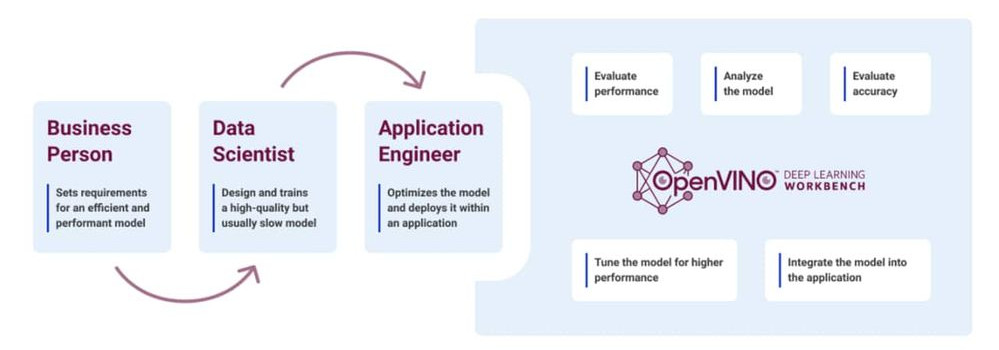
This is an interesting 3-part article on OpenVINO Deep Learning Workbench.

Pruning deep learning models, combining network layers, developing for multiple hardware targets—getting from a trained deep learning model to a ready-to-deploy inference model seems like a lot of work, which it can be if you hand code it.

With Intel® tools you can go from trained model to an optimized, packaged inference model entirely online without a single line of code. In this article, we’ll introduce you to the Intel® toolkits for deep learning deployments, including the Intel® Distribution of OpenVINO™ toolkit and Deep Learning Workbench. After that, we’ll get you signed up for a free Intel DevCloud for the Edge account so that you can start optimizing your own inference models.

The No-Code Approach to Deploying Deep Learning Models on Intel® Hardware

For more information, see The No-Code Approach to Deploying Deep Learning Models on Intel® Hardware

Compiling Clustal Omega 1.24 on CentOS 7

Overview

Clustal Omega is the latest addition to the Clustal family. It offers a significant increase in scalability over previous versions, allowing hundreds of thousands of sequences to be aligned in only a few hours. It will also make use of multiple processors, where present. In addition, the quality of alignments is superior to previous versions, as measured by a range of popular benchmarks.

Compilers and Libraries used

Compiling argtable-2.13

Compiling argtable-2.13 is very straightforward

% tar -zxvf argtable2-13.tar.gz
% cd argtable2-13
% ./configure --prefi=/usr/local/argtable2-13
% make
% make install 

Compiling Clustal Omega 1.24. You can download the source code from http://www.clustal.org/omega/

% tar -zxvf clustal-omega-1.2.4.tar.gz
% cd clustal-omega-1.2.4
% ./configure --prefix=/usr/local/clustal-omega-1.2.4 CFLAGS='-I/usr/local/argtable2-13/include' LDFLAGS='-L/usr/local/argtable2-13/lib'
% make
% make install

References:

  1. http://www.clustal.org/omega/INSTALL
  2. http://argtable.sourceforge.net/