Licensing error while opening ANSYS Fluent Meshing

The usage of Fluent was smooth. But when I launched the Fluent (Fluent with Meshing)

I’ve got this error. “No license is available at this time”

Taking a look at ANSYS Learning Forum, According to the forum (Licensing error while opening ANSYS Mechanical) “That error message would appear when there is another operation going on that won’t allow the license to be shared , such as meshing or solving, etc.

To resolve the issue:

  1. Execute the command “/usr/local/ansys_inc/v195/commonfiles/tools/linx64/ansyslm_relutil -userprefs

You should see the dialog box.

You have to go to the bottom of the dialog box “When using Workbench, would you like to”, Use a separate license for each application

Finally, close the application and restart. The issue should go away.

References:

  1. Licensing error while opening ANSYS Mechanical

Using FIO to measure IO Performance

FIO is a tool for measuring IO performance. You can use FIO to run a user-defined workload and collect the associated performance data.

A good writeup can be found at Fio Basics. For more information, do MAN on fio

Step 1: To Install fio, make sure you activated the epel repository.

# yum install fio

Parameters to be used.

% fio --filename=myfio --size=5GB --direct=1 --rw=randrw --bs=4k --ioengine=libaio --iodepth=256 --runtime=120 --numjobs=4 --time_based --group_reporting --name=iops-test-job --eta-newline=1
  • –filename
    An entire block size or filename can be specified. For example if you are testing block size filename=/dev/sda:/dev/sdb
  • –size
    Indicate the size of the test file generated.  If you are testing the block size and did not specify the size, the entire block will be used.
  • –direct=1
    This means that the page cache is bypassed. No memory is used.
  • –rw
    Check whether IO is access sequentially or randonly. There are a few options.
    read – Sequential reading
    write – Sequential Write
    randread – random reading
    randwrite – random writing
    readwrite , rw – Mixed, sequential workload
    randrw – Mixed Random Workload
  • –bs
    Block Size. By default 4kB is used.
  • –ioengine=libiao
    libaio  enables asynchronous access from the application level. The option would requires –direct=1
  • –iodepth
    Refers to how many requests.
  • –numjobs
    Specifies the number of processes that start the jobs in parallel
  • –runtime
    Terminate processing after the specified period of time
  • –name
    Name of the job
  • –time-based
    fio will run for the duration of the runtime specified
  • –group_reporting
    Display statistics for groups of jobs as a whole instead of for each individual job. This is especially true if
    numjobs is used;

Listing processes for a specific user

Using htop to list users. Which is one of my favourite.

% top -U user1

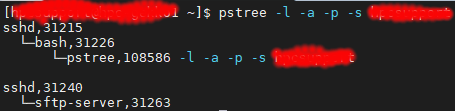
pstree which displays a tree of processes and can include parents and child processes which make it easier to understand.

% pstree -l -a -p -s user1


where
-l : Long format
-a : Show command line args
-p : Display Linux PIDs
-s : See parents of the selected process

pgrep look up or signal processes based on name and other attributes

% pgrep -l -u user1

References:

  1. Linux list processes by user names