PBS Professional MoM Access Configuration Parameters

Taken from PBS Professional Admin Guide

The Configuration Parameters can be found at /var/spool/pbs/mom_priv/config

$restrict_user <value>
  • Controls whether users not submitting jobs have access to this machine. When True, only those users running jobs are allowed access.
  • Format: Boolean
  • Default: off
$restrict_user_exceptions <user_list>
  • List of users who are exempt from access restrictions applied by $restrict_user. Maximum number of names in list is 10.
  • Format: Comma-separated list of usernames; space allowed after comma
$restrict_user_maxsysid <value>
  • Allows system processes to run when $restrict_user is enabled. Any user with a numeric user ID less than or equal to value is exempt from restrictions applied by $restrict_user.
  • Format: Integer
  • Default: 999

Example


To restrict user access to those running jobs, add:

$restrict_user True

To specify the users who are allowed access whether or not they are running jobs, add:

$restrict_user_exceptions User1, User2

To allow system processes to run, specify the maximum numeric user ID by adding:

$restrict_user_maxsysid 999

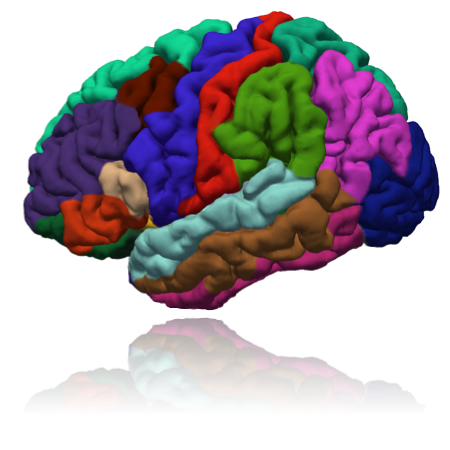
Setting up FreeSurfer 7.2.0 for CentOS-7

FreeSurfer is an open source software suite for processing and analyzing (human) brain MRI images.

  • Skullstripping
  • Image Registration
  • Subcortical Segmentation
  • Cortical Surface Reconstruction
  • Cortical Segmentation
  • Cortical Thickness Estimation
  • Longitudinal Processing
  • fMRI Analysis
  • Tractography
  • FreeView Visualization GUI
  • and much more..

The freesurfer downloads can be found here

The Tar GZ for Linux Install can be found here

% tar -zxvpf freesurfer-linux-centos7_x86_64-7.0.0.tar.gz
% cd freesurfer

Prepare the Environment in your .bashrc

export FREESURFER_HOME=/usr/local/freesurfer
export FSFAST_HOME=$FREESURFER_HOME/fsfast
export FSF_OUTPUT_FORMAT=nii.gz
export FMRI_ANALYSIS_DIR=$FREESURFER_HOME/fsfast
export FUNCTIONALS_DIR=$FREESURFER_HOME/sessions
export FS_OVERRIDE=0
export MNI_DIR=$FREESURFER_HOME/mni
export MINC_BIN_DIR=$FREESURFER_HOME/mni/bin
export MINC_LIB_DIR=$FREESURFER_HOME/mni/lib
export MNI_DATAPATH=$FREESURFER_HOME/mni/data
export PERL5LIB=$FREESURFER_HOME/mni/share/perl5
export MNI_PERL5LIB=$FREESURFER_HOME/mni/share/perl5

oneAPI DevSummit, Asia-Pacific and Japan

This one-day, LIVE virtual conference features talks, panels, and a hands-on learning experience focused on using oneAPI, DPC++, and AI/ML to accelerate performance of cross-architecture workloads (CPU, GPU, FPGA, and other accelerators).

Register now to:

  • Connect with fellow developers and innovators.
  • Learn about the latest developer tools for oneAPI.
  • Hear from thought leaders in industry and academia who are working on innovative cross-platform, multi-vendor oneAPI solutions.
  • Discover real world projects using oneAPI to accelerate data science and AI pipelines.
  • Dive into a hands-on session on Intel® oneAPI toolkits for HPC and AI applications.
  • Join a vibrant community supporting each other using oneAPI, DPC++ and AI.

To Register

Full Scheduled Event

Compiling dcm2niix on CentOS 7

Prerequisites

  1. GNU 6.5
  2. > CMAKE 3.9.6

What is dcm2niix?

dcm2niix is designed to convert neuroimaging data from the DICOM format to the NIfTI format. This web page hosts the developmental source code – a compiled version for Linux, MacOS, and Windows of the most recent stable release is included with MRIcroGL. A full manual for this software is available in the form of a NITRC wiki.

Compilation

% git clone https://github.com/rordenlab/dcm2niix.git
% cd dcm2niix
% cmake -DUSE_OPENJPEG=ON -DCMAKE_CXX_FLAGS=-g -DUSE_STATIC_RUNTIME:BOOL=OFF -DCMAKE_INSTALL_PREFIX=/usr/local/dcm2niix . && make
% make install

If you turn USE_STATIC_RUNTIME:BOOL=ON, Some Centos/Redhat may report “/usr/bin/ld: cannot find -lstdc++”. This can be resolved by installing static versions of libstdc++: yum install libstdc++-static.

IBM Spectrum Scale Container Native Storage Access (CNSA)

IBM Spectrum Scale Container Native Storage Access (CNSA) allows the deployment of Spectrum Scale in a Red Hat OpenShift cluster. Using a remote mount attached file system, CNSA provides a persistent data store to be accessed by the applications via the IBM Spectrum Scale Container Storage Interface (CSI) driver using Persistent Volumes (PVs).

What is NLP (Natural Language Processing)?

0:00 – Intro
0:38 – Unstructured data
1:12 – Structured data
2:03 – Natural Language Understanding (NLU) & Natural Language Generation (NLG)
2:36 – Machine Translation use case
3:40 – Virtual Assistance / Chat Bots use case
4:14 – Sentiment Analysis use case
4:44 – Spam Detection use case
5:44 – Tokenization
6:18 – Stemming & Lemmatization
7:42 – Part of Speech Tagging
8:22 – Named Entity Recognition (NER)
9:08 – Summary

voro++.hh: No such file or directory during compilation of lammps with voronoi

If you encounter an error such as the one below during compilation for lammps such as written in Compiling LAMMPS-15Jun20 with GNU 6 and OpenMPI 3

../compute_voronoi_atom.h:24:21: fatal error: voro++.hh: No such file or directory

This is due to one of the a header file not found at /usr/local/lammps-29Oct20/src/compute_voronoi_atom.cpp. To resolve the issue, do take a look at Line 23 or 24 and edit to the path where you place voro++.hh

/* #include <voro++.hh> */
#include "/usr/local/lammps-29Oct20/lib/voronoi/voro++-0.4.6/src/voro++.hh"

References:

  1. https://sourceforge.net/p/lammps/mailman/message/31832584/