Compiling OpenMPI 1.7.2 with CUDA and Intel Compilers 13

If you are intending to compile OpenMPI with CUDA Support, do note that you have to download the feature version of OpenMPI. The version I used for compiling OpenMPI with CUDA is version 1.7.2. The current stable version of OpenMPI 1.6.5 does not have CUDA-Support

1. Download and unpack OpenMPI 1.7.2 (features)

# wget http://www.open-mpi.org/software/ompi/v1.7/downloads/openmpi-1.7.2.tar.gz
# tar -zxvf openmpi-1.7.2.tar.gz
# cd openmpi-1.7.2

2. Configure the OpenMPI with CUDA Support

# ./configure --prefix=/usr/local/openmpi-1.7.2-intel-cuda CC=icc CXX=icpc F77=ifort FC=ifort --with-cuda=/opt/cuda --with-cuda-libdir=/usr/lib64
# make -j 8
# make install

References:

  1. 34. How do I build Open MPI with support for sending CUDA device memory?

PBS scripts for mpirun parameters for Chelsio / Infiniband Cards

If you are running Chelsio Cards, you  may want to specify the mpirun parameters to ensure the

/usr/mpi/intel/openmpi-1.4.3/bin/mpirun 
-mca btl openib,sm,self --bind-to-core 
--report-bindings -np $NCPUS -machinefile $PBS_NODEFILE $PBS_O_WORKDIR/$file

–bind-to-core: Bind each MPI process to a core
–mca btl openib,sm,self: (Infiniband, shared memory, the loopback)

For information on Interprocess communication with shared memory,

  1. see Speaking UNIX: Interprocess communication with shared memory

Running OpenMPI in oversubscribe nodes

Taken from OpenMPI FAQ  21. Can I oversubscribe nodes (run more processes than processors)?

Open MPI basically runs its message passing progression engine in two modes: aggressive and degraded.

  • Degraded: When Open MPI thinks that it is in an oversubscribed mode (i.e., more processes are running than there are processors available), MPI processes will automatically run in degraded mode and frequently yield the processor to its peers, thereby allowing all processes to make progress.
  • Aggressive: When Open MPI thinks that it is in an exactly- or under-subscribed mode (i.e., the number of running processes is equal to or less than the number of available processors), MPI processes will automatically run in aggressive mode, meaning that they will never voluntarily give up the processor to other processes. With some network transports, this means that Open MPI will spin in tight loops attempting to make message passing progress, effectively causing other processes to not get any CPU cycles (and therefore never make any progress).

Example of Degraded Modes (Running 4 Slots on 1 Physical  cores). MPI knows that there is only 1 slot and 4 MPI process are running on the single slot.

$ cat my-hostfile
localhost slots=1
$ mpirun -np 4 --hostfile my-hostfile a.out

Example of Aggressive Modes (Running 4 slots on 4 or more Physical Cores). MPI knows that there is at least 4 slots for the 4 MPI process.

$ cat my-hostfile
localhost slots=4
$ mpirun -np 4 --hostfile my-hostfile a.out

General run-time tuning for Open MPI 1.4 and later (Part1)

Taken from 17. How do I tell Open MPI to use processor and/or memory affinity in Open MPI v1.4.x? (How do I use the –by* and –bind-to-* options?)

During the mpirun, you can put in the parameter of the Open MPI 1.4 and above to improve performance

  1. –bind-to-none: Do not bind processes (Default)
  2. –bind-to-core: Bind each MPI process to a core
  3. –bind-to-socket: Bind each MPI process to a processor socket
  4. –report bindings: Report how the launches processes are bound by Open MPI

If the hardware has multiple hardware threads like those belonging to Hyperthreading, only the first thread of each core is used with the -bind-to-*. According to the article, it is supposed to be fixed in v1.5

The following options below is to be used with –bind-to-*

  1. –byslot: Alias for –bycore
  2. –bycore: When laying out processes, put sequential MPI processes on adjacent processor cores. (Default)
  3. –bysocket: When laying out processes, put sequential MPI processes on adjacent processor sockets.
  4. –bynode: When laying out processes, put sequential MPI processes on adjacent nodes.

Finally you can use the –cpus-per-procs which binds ncpus OS processor IDS to each MPI process. If there is a machine with 4 cores and 4 cores, hence 16 cores in total.

$ mpirun -np 8 --cupus-per-proc 2 my_mpi_process

The command will bind each MPI process to ncpus=2 cores. All cores on the machine will be used.

Compiling BLACS on CentOS 5

1. You have to compile OpenMPI 1.4.x with g77 and gfortran. I’m compiling with OpenIB and Torque as well

./configure --prefix=/usr/local/mpi/gnu-g77/ \
F77=g77 FC=gfortran \
--with-openib \
--with-openib-libdir=/usr/lib64 \
--with-tm=/opt/torque

2. Download BLACS from www.netlib.org/blacs. Remember to download both mpiblacs.tgz and the mpiblacs-patch03.tgz

# cd /root
# tar -xzvf mpiblacs.tgz
# tar -xzvf mpiblacs-patch03.tgz
# cd BLACS
# cp ./BMAKES/BMake.MPI-LINUX Bmake.inc

3. Edit Bmake.inc according to the recommendation from OpenMPI FAQ

# Section 1:
# Ensure to use MPI for the communication layer

   COMMLIB = MPI

# The MPIINCdir macro is used to link in mpif.h and
# must contain the location of Open MPI's mpif.h. 
# The MPILIBdir and MPILIB macros are irrelevant
# and should be left empty.

   MPIdir = /path/to/openmpi-1.4.3
   MPILIBdir =
   MPIINCdir = $(MPIdir)/include
   MPILIB =

# Section 2:
# Set these values:

   SYSINC =
   INTFACE = -Df77IsF2C
   SENDIS =
   BUFF =
   TRANSCOMM = -DUseMpi2
   WHATMPI =
   SYSERRORS =

# Section 3:
# You may need to specify the full path to
# mpif77 / mpicc if they aren't already in
# your path. IF not type the whole path out.

   F77            = /usr/local/mpi/gnu-g77/bin/mpif77
   F77LOADFLAGS   =

   CC             = /usr/local/mpi/gnu-g77/bin/mpicc
   CCLOADFLAGS    =

4. Following the recommendation from BlACS Errata (Necessary flags for compiling the BLACS tester with g77)

blacstest.o : blacstest.f
	$(F77) $(F77NO_OPTFLAGS) -c $*.f
to:
blacstest.o : blacstest.f
	$(F77) $(F77NO_OPTFLAGS) -fno-globals -fno-f90 -fugly-complex -w -c $*.f

5. Compile the Blacs tests. You should see

# cd /root/BLACS/TESTING
# make clean
# make

You should see xCbtest_MPI-LINUX-1 and xFbtest_MPI-LINUX-1

6. Tun the Tests

# mpirun -np 5 xCbtest_MPI-LINUX-0
# mpirun -np 5 xFbtest_MPI-LINUX-0

7. If the test is successful, you may wish to copy the BLACS library to /usr/local/lib. But I like to  separate my compiled libraries separately to /usr/local/blacs/lib

# cp /root/BLACS/LIB*.a /usr/local/blacs/lib
# chmod 555 /usr/local/blacs/lib/*.a

Fabric-Based Collective Offload Solution

This blog entry is summarise from the excellent article “Achieving Breakthrough MPI Performance with Fabric Collectives Offload” by Voltaire. This is also a continuation of the article “Performance Penalty for MPI Communication

A. Fabric-based collective offload solution.
There are 3 principles

  1. Network Offload –
    Offloading floating point computation from the server CPU to the network switch. The collective operations can be easily handled by the switch CPU and its cache
  2. Topology-aware orchestration –
    The Fabric Subnet Manager (SM) which has complete fabric knowledge of the fabric physical topology and ensure that the collective logical-tree optimise the collective communication accordingly 
  3. Communication isolation –
    Collective communication is isolated from the rest of the rest of the fabric by making use of VLAN

Adapter-based Offload collective offload

  1. The Adapter-based Offload approach delegates collective communication, management and progress as well as computation if need to the Host Channel Adapter (HCA). This will addresses the issues of OS noise shielding, but cannot be expected to improve the entire set of collective inefficiencies such as fabric congestion and topology. From the article, there are scalability issues with this approach as the size of the job increases, the number of HCA resources used. This in turn will increase memory consumption and cache missing, resulting in added latency for the collective operation.

Voltaire Solution

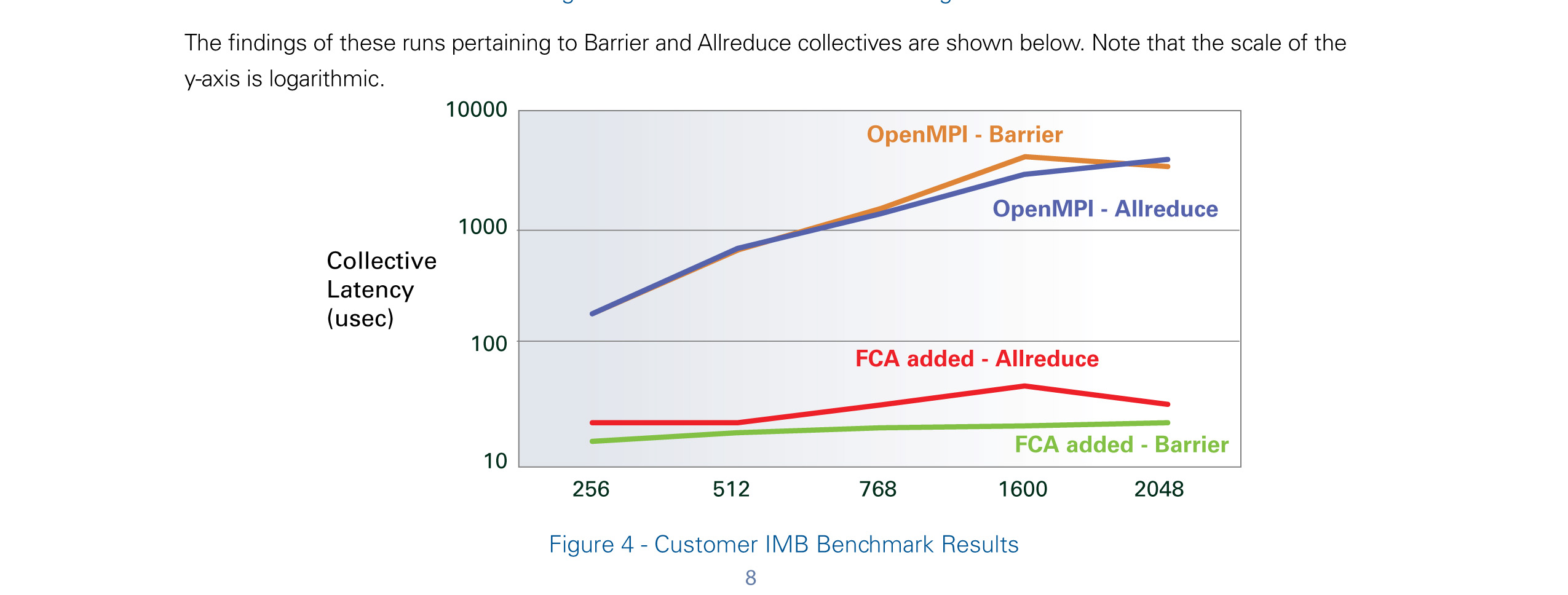
Voltaire uses the Fabric-based collective offload approach called Fabric Colective Accelerator (FCA) software. The solution is composed of a manager that orchestrates the initalisation of the collective communication tree and MPI Library that offloads the computation onto the Voltaire switch CPU. For more details, do look at “Achieving Breakthrough MPI Performance with Fabric Collectives Offload” you will find very useful graphs and details on this solution.

PDF Document: Achieving Breakthrough MPI Performance with Fabric Collectives Offload by Voltaire

Performance Penalty for MPI Communication

This blog entry is summarise from the excellent article “Achieving Breakthrough MPI Performance with Fabric Collectives Offload” by Voltaire.

According to the paper,

What are MPI collectives?

  1. MPI is the defacto standard for communication among processes that model a parallel program running on a distributed memory system.
  2. MPI functions include point-to-point communication and group communication between many nodes
  3. for some collectives, the operation involes mathematical group operation that is performed among the results of each professes such as summation or determining min/mx value

What prohibit x86 cluster application performance scalability?

  1. Cluster’s network and collective operations. Collective Operations which is the group communication which has to wait for all the member of the groups to pariticpate before it can conclude. In other wors, the slowest member will impac the overall performance
  2. Applications can spend up to 50% o 60% on collectives. The more number of nodes, the % increased in the inefficiency

Problems with collective scalability

A. Cluster Hotspot and Congestion

  1.  Non-Blocking configuration does not eliminiate the problem even though it is providing a higher I/O throughput . This is because applications communication pattern are rarely evenly distributed and “hot-spot” do occur
  2. Collective Messages are affected by congestion due to the “many-to-one” problem of group communication and large amount of collective messages travelling over the fabrics

B. Server OS noise

  1. In non-real-time OS environment, many tasks and events can cause a running process to perform a context switch in favour of other tasks before returning to the collective operations after some time. This is due to the “OS noise” which includes hardware interrupts, page faults, swap-ins and preemption on the main program.

For more information on how this MPI performance can be resolves, do look at upcoming Blog Entry “Fabric-Based Collective Offload Solution

Building OpenMPI with Intel Compilers

Modified from Performance Tools for Software Developers – Building Open MPI* with the Intel® compilers

Step 1: Download the OpenMPI Software from http://www.open-mpi.org/ . The current stable version at point of writing is OpenMPI 1.3.2

Step 2: Download and Install the Intel Compilers from Intel Website. More information can be taken from Free Non-Commercial Intel Compiler Download

Step 3: Add the Intel Directory Binary Path to the Bash Startup

At my ~/.bash_profile directory, I’ve added

export PATH=$PATH:/opt/intel/Compiler/11.0/081/bin/intel64

At command prompt

# source .bashrc

Step 4: Configuration Information

# source /opt/intel/Compiler/11.0/081/bin/compilervars.sh
# gunzip -c openmpi-1.2.tar.gz tar xf -
# cd openmpi-1.2
#./configure --prefix=/usr/local CC=icc CXX=icpc F77=ifort FC=ifort
# make all install

Step 5: Setting PATH environment for OpenMPI
At my ~/.bash_profile directory, I’ve added.

export PATH=/usr/local/bin:${PATH} 
export LD_LIBRARY_PATH=/opt/intel/Compiler/11.0/081/lib/intel64:${LD_LIBRARY_PATH}
(The LD_LIBRARY_PATH must point to /opt/intel/Compiler/11.0/081/lib/intel64/libimf.so)

Step 6: test

$ mpicc --v
cc version 12.1.5 (gcc version 4.4.6 compatibility)