Issues when Installing Dockers on Rocky Linux 8.10

I was installing dockers on Rocky Linux 8.10. These were my steps:

dnf config-manager --add-repo https://download.docker.com/linux/centos/docker-ce.repo
dnf install docker-ce docker-ce-cli containerd.io

I immediately got this error…..

Error: 
 Problem 1: problem with installed package podman-4:4.9.4-1.module+el8.10.0+1815+5fe7415e.x86_64
  - package podman-4:4.9.4-1.module+el8.10.0+1815+5fe7415e.x86_64 from @System requires runc >= 1.0.0-57, but none of the providers can be installed
  - package podman-4:4.9.4-1.module+el8.10.0+1815+5fe7415e.x86_64 from appstream requires runc >= 1.0.0-57, but none of the providers can be installed
  - package podman-4:4.9.4-1.module+el8.10.0+1825+623b0c20.x86_64 from appstream requires runc >= 1.0.0-57, but none of the providers can be installed
  - package podman-4:4.9.4-12.module+el8.10.0+1843+6892ab28.x86_64 from appstream requires runc >= 1.0.0-57, but none of the providers can be installed
  - package podman-4:4.9.4-13.module+el8.10.0+1871+e6fa1069.x86_64 from appstream requires runc >= 1.0.0-57, but none of the providers can be installed
  - package podman-4:4.9.4-13.module+el8.10.0+1874+ce489889.x86_64 from appstream requires runc >= 1.0.0-57, but none of the providers can be installed

To resolve the issues, do add the --allowerasing flag,

dnf install docker-ce docker-ce-cli containerd.io --allowerasing
================================================================================
 Package                   Arch   Version                Repository        Size
================================================================================
Installing:
 containerd.io             x86_64 1.6.32-3.1.el8         docker-ce-stable  35 M
     replacing  runc.x86_64 1:1.1.12-1.module+el8.10.0+1815+5fe7415e
 docker-ce                 x86_64 3:26.1.3-1.el8         docker-ce-stable  27 M
 docker-ce-cli             x86_64 1:26.1.3-1.el8         docker-ce-stable 7.8 M
Installing dependencies:
 libcgroup                 x86_64 0.41-19.el8            baseos            69 k
Installing weak dependencies:
 docker-buildx-plugin      x86_64 0.14.0-1.el8           docker-ce-stable  14 M
 docker-ce-rootless-extras x86_64 26.1.3-1.el8           docker-ce-stable 5.0 M
 docker-compose-plugin     x86_64 2.27.0-1.el8           docker-ce-stable  13 M
Removing dependent packages:
 buildah                   x86_64 1:1.34.0-1.module+el8.10.0+1815+5fe7415e
                                                         @AppStream        31 M
 cockpit-podman            noarch 84.1-1.module+el8.10.0+1815+5fe7415e
                                                         @AppStream       682 k
 containers-common         x86_64 2:1-81.module+el8.10.0+1815+5fe7415e
                                                         @AppStream       580 k
 podman                    x86_64 4:4.9.4-1.module+el8.10.0+1815+5fe7415e
                                                         @AppStream        52 M
 podman-catatonit          x86_64 4:4.9.4-1.module+el8.10.0+1815+5fe7415e
                                                         @AppStream       794 k

Transaction Summary
================================================================================
Install  7 Packages
Remove   5 Packages

Total download size: 102 M
Is this ok [y/N]: y

References:
Using the Host’s FirewallD as the Main Firewall to Secure Docker

Found a rare article How to Secure a Docker Host Using Firewalld that teaches how to address the issue when that docker bypasses the FirewallD rules.

According to the Article, the goal of the Configuration is to

  • The firewall rules should count for whole host system – so including Docker containers with port mappings
  • A Docker container should be accessible from the internet if and only if the host port used in Docker container port mapping is allowed in the firewall
  • The approach should not break container networking

Do read up and you will be glad that this article was written for Administrators like us. Another Reference you may want to consider reading is Why Docker and Firewall don’t get along with each other!

Working around Docker’s download limit on RedHat OpenShift

Taken from “How to work around Docker’s new download rate limit on Red Hat OpenShift” from RedHat Developer.

Docker recently changed its policy for downloading images as an anonymous user. The company now has a limit of 100 downloads every six hours from a single IP address.

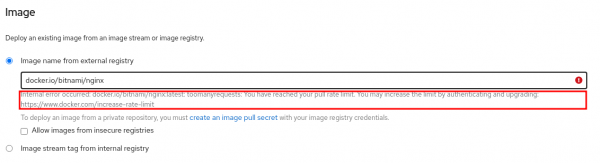
If you are using the OpenShift Developer Sandbox to experiment with a free OpenShift cluster, you might encounter the error message shown in Figure 1.

All you have to do to avoid Docker’s new rate-limit error is authenticate to your Docker Hub account. After you’ve authenticated to the account, you won’t be pulling the image as an anonymous user but as an authenticated user. The image download will count against your personal limit of 200 downloads per six hours instead of the 100 downloads shared across all anonymous cluster users.

For the complete article, do take a look at “How to work around Docker’s new download rate limit on Red Hat OpenShift” from RedHat Developer.

Implementing Docker Group using Centrify

Why Privilege Access For Docker Container?

Taken from Centrify HOWTO: Secure container/docker environments by managing privileges for admins and users

“To perform any docker operation, you need to either be root or part of a local group, ‘docker’, on your Linux machine. Why is that? Because access into a docker container is via a UNIX socket and any socket related operations require the user to have privileged access. ‘Docker’ group membership is sufficient for all container operations, exception is starting the docker daemon itself, which must always run as the root user.”

Step 1:

We need to create a group called Docker and put in the necessary members

Step 2: Verify the permission of the Linux Server

# ls -lZ /var/run/docker.sock
srw-rw----. root root system_u:object_r:container_var_run_t:s0 /var/run/docker.sock
# getenforce
Permissive

Step 3: Change Owner of the Docker

# chown root:docker /var/run/docker.sock

Step 4: Test the change permission issues

[user1@node1 ~]$ docker search openfoam
INDEX NAME DESCRIPTION STARS OFFICIAL AUTOMATED
docker.io docker.io/openfoamplus/of_v30plus_rhel66 Offical image of OpenFOAM+ (v3.0+) provide... 8
docker.io docker.io/openfoamplus/of_v1606plus_centos66 Offical image of OpenFOAM+ (v1606+) provid... 6
docker.io docker.io/openfoam/openfoam5-paraview54 Image of OpenFOAM v5 and ParaView 5.4.0 on... 5
docker.io docker.io/openfoam/openfoam6-paraview56 Image of OpenFOAM v6 and ParaView 5.6.0 on... 5
docker.io docker.io/openfoamplus/of_v1612plus_centos66 Offical image of OpenFOAM+ (v1612+) provid... 5
docker.io docker.io/openfoam/openfoam7-paraview56 Image of OpenFOAM v7 and ParaView 5.6.0 on... 4
docker.io docker.io/openfoamplus/of_v1706_centos73 Offical image of OpenFOAM(v1706) provided ... 4
docker.io docker.io/openfoamplus/of_v1712_centos73 Offical docker image of OpenFOAM(v1712) pr... 4
docker.io docker.io/openfoam/openfoam6-paraview54 Image of OpenFOAM v6 and ParaView 5.4.0 on... 3
docker.io docker.io/openfoamplus/of_v1812_centos73 Offical docker image of OpenFOAM(v1806) pr... 3
docker.io docker.io/openfoamplus/of_v1806_centos73 Offical docker image of OpenFOAM(v1806) pr... 2
docker.io docker.io/openfoamplus/of_v1906_centos73 Official docker image of OpenFOAM(v1906 ve... 2
docker.io docker.io/dicehub/openfoam OpenFOAM image for use in DICE (Dynamic In... 1
docker.io docker.io/openfoam/openfoam-dev-graphical-apps OpenFOAM-dev on Ubuntu 16.04 using the ope... 1
docker.io docker.io/openfoam/openfoam-dev-paraview54 OpenFOAM-dev and ParaView 5.4.0 on Ubuntu ... 1
docker.io docker.io/openfoam/openfoam-dev-paraview56 Image of OpenFOAM-dev and ParaView 5.6.0 o... 1
docker.io docker.io/openfoam/openfoam4-paraview50 Image of OpenFOAM v4 and ParaView 5.0.1 on... 1
docker.io docker.io/openfoam/openfoam5-graphical-apps Image of OpenFOAM v5 on Ubuntu 16.04 from ... 1
docker.io docker.io/openfoam/openfoam6-graphical-apps Image of OpenFOAM v6 on Ubuntu 18.04 from ... 1
docker.io docker.io/unifem/openfoam-ccx Docker Image for OpenFOAM and Calculix 1 [OK]
docker.io docker.io/nerdalize/openfoam This image makes it easy to run OpenFOAM o... 0 [OK]
docker.io docker.io/openfoam/openfoam-dev-paraview50 OpenFOAM-dev and ParaView 5.0.1 on Ubuntu ... 0
docker.io docker.io/parallelworks/openfoam OpenFOAM 0
docker.io docker.io/parallelworks/openfoam240_pvpython OpenFOAM240 with Python Paraview 0
docker.io docker.io/parallelworks/openfoam4 OpenFOAM Base Container 0

References:

  1. HOWTO: Secure container/docker environments by managing privileges for admins and users
  2. How to fix docker: Got permission denied while trying to connect to the Docker daemon socket

Installing Docker on CentOS 7


Point 1: Install the Dependencies

# yum install yum-utils device-mapper-persistent-data lvm2
  • yum-utils ->Include yum-config-manager
  • device-mapper-persistent-data and lvm2 -> Device Mapper Storage Drivers

Point 2: Add Docker Repository to CentOS

# yum-config-manager --add-repo https://download.docker.com/linux/centos/docker-ce.repo

Point 3: Install Docker on CentOS

# yum install docker

Point 4: Manage Docker Service (Start, Enable and Check Status)

# systemctl start docker
# systemctl enable docker
# systemctl status docker 0

Point 5: Installing specific version of docker

# yum list docker-ce --showduplicates
docker-ce.x86_64 17.03.0.ce-1.el7.centos docker-ce-stable
docker-ce.x86_64 17.03.1.ce-1.el7.centos docker-ce-stable
docker-ce.x86_64 17.03.2.ce-1.el7.centos docker-ce-stable
.....
.....
.....
.....
.....
docker-ce.x86_64 18.06.0.ce-3.el7 docker-ce-stable
docker-ce.x86_64 18.06.1.ce-3.el7 docker-ce-stable
docker-ce.x86_64 18.06.2.ce-3.el7 docker-ce-stable
docker-ce.x86_64 18.06.3.ce-3.el7 docker-ce-stable

Point 5b:

# yum install docker-ce-18.06.3.ce

References:

  1. How to Install Docker on CentOS 7