Intel Launches 11th Gen Intel Core and Intel Evo (code-named “Tiger Lake”)

Intel released 11th Gen Intel® Core™ mobile processors with Iris® Xe graphics (code-named “Tiger Lake”). The new processors break the boundaries of performance with unmatched capabilities in productivity, collaboration, creation, gaming and entertainment on ultra-thin-and-light laptops. They also power the first class of Intel Evo platforms, made possible by the Project Athena innovation program. (Credit: Intel Corporation)

  • Intel launches 11th Gen Intel® Core™ processors with Intel® Iris® Xe graphics, the world’s best processors for thin-and-light laptops1, delivering up to 2.7x faster content creation2, more than 20% faster office productivity3 and more than 2x faster gaming plus streaming4 in real-world workflows over competitive products.
  • Intel® Evo™ platform brand introduced for designs based on 11th Gen Intel Core processors with Intel Iris Xe graphics and verified through the Project Athena innovation program’s second-edition specification and key experience indicators (KEIs).
  • More than 150 designs based on 11th Gen Intel Core processors are expected from Acer, Asus, Dell, Dynabook, HP, Lenovo, LG, MSI, Razer, Samsung and others.
QLC support in Pure Flash Array

Read an interesting article by Pure Storage on QLC support into Pure Flash Array//C which is challenging or at least coming close to hybrid (SSD + Spinning Disk) Storage Solution. The technology used. The article is titled “Hybrid Arrays – Not Dead Yet, But … QLC Flash Is Here

According to the article,

Why QLC?

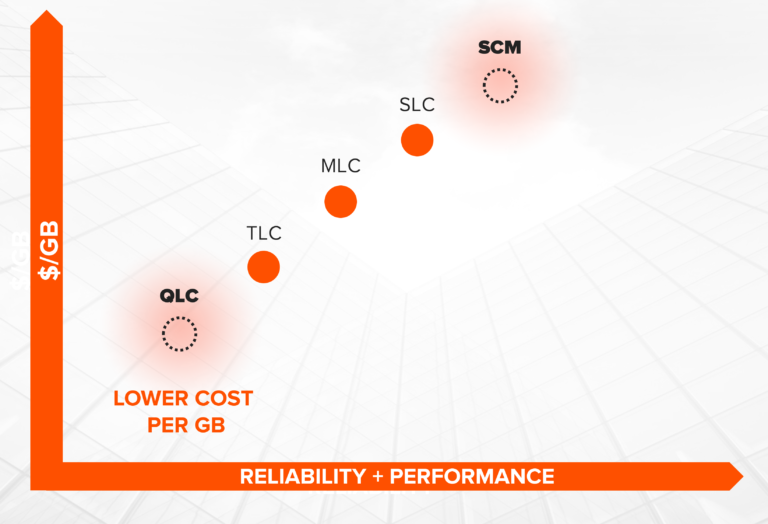
It all comes down to how many bits of data can be stored in each tiny little cell on a flash chip. Most enterprise flash arrays currently use triple-level cell (TLC) chips that store three bits in each cell. A newer generation, quad-level cell (QLC) can store—you guessed it—four bits per cell. 

Better still, it’s more economical to manufacture QLC flash chips than TLC flash. Sounds great, except for two big problems: 

  • QLC flash has far lower endurance, typically limited to fewer than 1,000 program/erase cycles. This is one-tenth the endurance of TLC flash.
  • QLC flash is less performant, with higher latency and lower throughput than TLC. 

Because of these technical challenges, there are only a few QLC-based storage arrays on the market. And the only way those arrays can attain enterprise-grade performance is by overprovisioning (which decreases the amount of usable storage) or by adding a persistent memory tier (which significantly increases cost).


How did Pure Storage integrate?

So what has Pure done differently? Crucially, the hardware and software engineers who built QLC support into FlashArray//C built on Pure’s unique vertically integrated architecture. Instead of using flash solid-state drive (SSD) modules like other storage vendors, Pure’s proprietary DirectFlash® modules connect raw flash directly to the FlashArray™ storage via NVMe, which reduces latency and increases throughput. And unlike traditional SSDs that use a flash controller or flash translation layer, DirectFlash is primarily raw flash. The flash translation takes place in the software.

This architecture allows the Purity operating environment to schedule and place data on the storage media with extreme precision, overcoming the technical challenges that have constrained other vendors.


For more information do read “Hybrid Arrays – Not Dead Yet, But … QLC Flash Is Here

Disk performance

Storage Benchmarking

There are 4 things that you may want to consider

I/O Latency
I/O latency is defined simply as the time that it takes to complete a single I/O operation. For a conventional spinning disk, there are 3 sources of latency – seek latency, rotational latency and transfer time.

  1. Command Overhead
  2. Seek Latency is how long it takes for the disk head assembly to travel to the track of the disk where the data will be read/written. The fastest high-end server drives today to have a seek time around 4 ms. The average desktop disk is around 9ms (Taken from Wikipedia)
  3. Rotational Latency is the delay taken for the rotation fo the disk to bring the disk sector under the read-write-head. For a 7200 rpm disk, latency is around 4.17 ms (Taken from Wikipedia)
  4. Transfer Time is the time taken for the time it takes to transmit or move data from one place to another. Transfer time equals transfer size divided by data rate.
Typical HDD figures (From Wikipedia)
HDD spindle
speed [rpm]
Average
rotational
latency [ms]
4,200 7.14
5,400 5.56
7,200 4.17
10,000 3.00
15,000 2.00

So the simplistic calculation

overhead + seek + latency + transfer
0.5ms + 4ms  + 4.17ms + 0.8ms = 9.47ms

Acceptable I/O

A question frequently asked is what is the acceptable I/O? According to the Kaminario site, which states that
The Avg. Disk sec/Read performance counter indicates the average time, in seconds, of a read of data from the disk. The average value of the Avg. Disk sec/Read performance counter should be under 10 milliseconds. The maximum value of the Avg. Disk sec/Read performance counter should not exceed 50 milliseconds.


References:

  1. What Is an Acceptable I/O Latency?
  2. Disk Performance
  3. Difference between Seek Time and Rotational Latency in Disk Scheduling


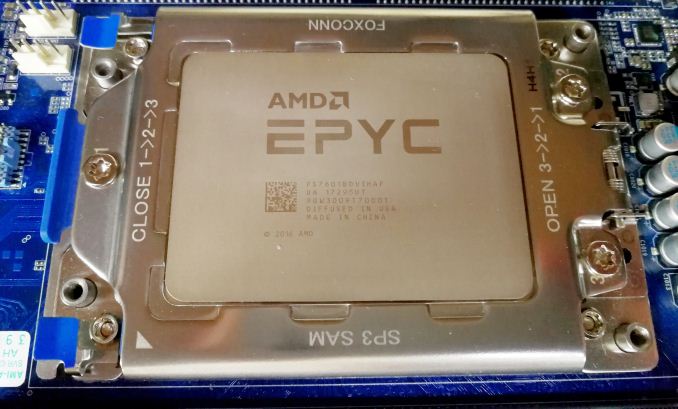
AMD EYPC Processor Library Support

Important Notes:

  • Open-source libraries and Intel MKL work well on AMD platform.
  • For Intel MKL, please setup a proper environment variable “export MKL_DEBUG_CPU_TYPE =5 ” in your bashrc

Library: BLAS
AOCL: BLIS
URLs: https://developer.amd.com/amd-aocl/blas-library/

Library: LAPACK
AOCL: libFLAME
URLs: https://developer.amd.com/amd-aocl/blas-library/#libflame

Library: FFTW
AOCL: FFTW
URLs: https://developer.amd.com/amd-aocl/fftw/

Library: ScaLAPACK
AOCL: ScaLAPACK
URLs: https://github.com/amd/scalapack

Library: Core Math library
AOCL: LibM
URLs: https://developer.amd.com/amd-aocl/amd-math-library-libm/

Library: Random number generator library
AOCL: RNG Library
URLs: https://developer.amd.com/amd-aocl/rng-library/

Library: Secure RNG Library
AOCL: Secure RNG library
URLs: https://developer.amd.com/amd-aocl/rng-library/#securerng


HPC + AI Wall Street

HPC + AI Wall Street is formulated to advance the understanding of market-ready innovations, enabling growth, new revenue streams, and competitive advantages. This leading conference highlights successful use cases, showcasing thought leaders and driving next-generation advancements in Capital Markets.
HPC + AI Wall Street 2020 is an information-packed day of world-class Financial Services thought leaders in two tracks — Leadership and DevOps. Our virtual trade show of online exhibits and immersive collaborations provides interactive customer engagement opportunities.

To Register https://www.hpcaiwallstreet.com/attend/

Accelerate Insights with AI and HPC Combined by Intel

In this presentation the presenter will address those questions and give an overview of respective technology for Artificial Intelligence, including hardware platforms & software stacks with a special focus on how to enable successful development of AI solutions. The presenter will look into how to do this on the datacenter technology you know and use today, as well as specific technology for AI workloads. This will also be illustrated with practical customer examples

mount.nfs: requested NFS version or transport protocol is not supported

If you have encountered issues like

mount.nfs: requested NFS version or transport protocol is not supported

OR

mount.nfs4: Protocol not supported

To resolve this

Mount with NFS version 3 (with 4 verbose flags)

% mount -vvvv -t nfs -o vers=3 nfs-server:/share /mnt/nfs

References:

  1. Error “mount.nfs: requested NFS version or transport protocol is not supported” when attempting to mount an NFS share on Red Hat Enterprise Linux 6