
Author: kittycool only
Using FIO to measure IO Performance
FIO is a tool for measuring IO performance. You can use FIO to run a user-defined workload and collect the associated performance data.
A good writeup can be found at Fio Basics. For more information, do MAN on fio
Step 1: To Install fio, make sure you activated the epel repository.
# yum install fioParameters to be used.
% fio --filename=myfio --size=5GB --direct=1 --rw=randrw --bs=4k --ioengine=libaio --iodepth=256 --runtime=120 --numjobs=4 --time_based --group_reporting --name=iops-test-job --eta-newline=1- –filename
An entire block size or filename can be specified. For example if you are testing block size filename=/dev/sda:/dev/sdb - –size
Indicate the size of the test file generated. If you are testing the block size and did not specify the size, the entire block will be used. - –direct=1
This means that the page cache is bypassed. No memory is used. - –rw
Check whether IO is access sequentially or randonly. There are a few options.
read – Sequential reading
write – Sequential Write
randread – random reading
randwrite – random writing
readwrite , rw – Mixed, sequential workload
randrw – Mixed Random Workload - –bs
Block Size. By default 4kB is used. - –ioengine=libiao
libaio enables asynchronous access from the application level. The option would requires –direct=1 - –iodepth
Refers to how many requests. - –numjobs
Specifies the number of processes that start the jobs in parallel - –runtime
Terminate processing after the specified period of time - –name
Name of the job - –time-based
fio will run for the duration of the runtime specified - –group_reporting
Display statistics for groups of jobs as a whole instead of for each individual job. This is especially true if
numjobs is used;
Maximizing Performance for Distributed Machine Learning and Deep Learning with SHARP
The NVIDIA Mellanox Scalable Hierarchical Aggregation and Reduction Protocol (SHARP) takes advantage of the in-network computing capabilities in the NVIDIA Mellanox Quantum switch, dramatically improving the performance of distributed machine learning workloads.
Listing processes for a specific user
Using htop to list users. Which is one of my favourite.
% top -U user1
pstree which displays a tree of processes and can include parents and child processes which make it easier to understand.
% pstree -l -a -p -s user1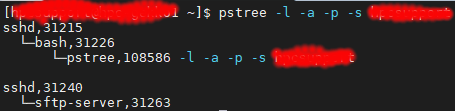
where
-l : Long format
-a : Show command line args
-p : Display Linux PIDs
-s : See parents of the selected process
pgrep look up or signal processes based on name and other attributes
% pgrep -l -u user1
References:
SC20 TOP500 Birds of a Feather (BoF)
The TOP500 list of supercomputers serves as a “Who’s Who” in the field of high-performance computing (HPC). It started as a list of the most powerful supercomputers in the world and has evolved to a major source of information about trends in HPC. The 56th TOP500 list was published in November 2020 just in time for SC20.
No rule to make target /usr/include/sgidefs.h, needed by `surf.o’
I was compiling an external programs required by VMD surf at $VMDHOME/vmd-1.9.4a48/lib/surf
% make depend
make: *** No rule to make target `/usr/include/sgidefs.h', needed by `surf.o'. Stop.
You will require yum install imake
# yum install makedepend
Installing CUDA Python
How to install CUDA Python followed by a tutorial on how to run a Python example on a GPU
Digital Scalable multi-node training for AI jobs on NVIDIA DGX, OpenShift and Spectrum Scale
Nvidia and IBM did a complex proof-of-concept to demonstrate the scaling of AI workload using Nvidia DGX, Red Hat OpenShift and IBM Spectrum Scale at the example of ResNet-50 and the segmentation of images using the Audi A2D2 dataset. The project team published an IBM Redpaper with all the technical details and will present the key learnings and results.
Tutorial on In-Network Computing SHARP Technology for MPI Offloads
In this video from the 2017 HPC Advisory Council Stanford Conference, Devendar Bureddy from Mellanox presents a Tutorial on In-Network Computing SHARP Technology for MPI Offloads.
How to prevent SSH from disconnecting
From Sharcnet HPC

