YumRepo Error: All mirror URLs are not using ftp, http[s] or file.

If you doing a yum update or yum install for CentOS 6. You might face the error:

Setting up Upgrade Process
YumRepo Error: All mirror URLs are not using ftp, http[s] or file.
Eg. Invalid release/repo/arch combination/
removing mirrorlist with no valid mirrors: /var/cache/yum/x86_64/6/base/mirrorlist.txt
Error: Cannot retrieve repository metadata (repomd.xml) for repository: base. Please verify its path and try again

This is because YUM repository was removed from the main CentOS update servers. As a result, no security or feature upgrades are provided.

Where are these obsolete Yum Repository now? They are found in CentOS Vault Repository. To use the Vault repository, set up its repo configuration instead of the now defunct repositories configuration:

# curl https://www.getpagespeed.com/files/centos6-eol.repo --output /etc/yum.repos.d/CentOS-Base.repo

You may want to edit CentOS-Base.repo directly. My OS is CentOs 6.9

.....
.....
[base]
name=CentOS-$releasever - Base
#mirrorlist=http://mirrorlist.centos.org/?release=$releasever&arch=$basearch&repo=os&infra=$infra
#baseurl=http://mirror.centos.org/centos/$releasever/os/$basearch/
baseurl=https://vault.centos.org/6.9/os/$basearch/
enabled=1
gpgcheck=1
gpgkey=file:///etc/pki/rpm-gpg/RPM-GPG-KEY-CentOS-6

#released updates
[updates]
name=CentOS-$releasever - Updates
#mirrorlist=http://mirrorlist.centos.org/?release=$releasever&arch=$basearch&repo=updates&infra=$infra
#baseurl=http://mirror.centos.org/centos/$releasever/updates/$basearch/
baseurl=https://vault.centos.org/6.9/updates/$basearch/
enabled=1
gpgcheck=1
gpgkey=file:///etc/pki/rpm-gpg/RPM-GPG-KEY-CentOS-6

#additional packages that may be useful
[extras]
name=CentOS-$releasever - Extras
#mirrorlist=http://mirrorlist.centos.org/?release=$releasever&arch=$basearch&repo=extras&infra=$infra
#baseurl=http://mirror.centos.org/centos/$releasever/extras/$basearch/
baseurl=https://vault.centos.org/6.9/extras/$basearch/
gpgcheck=1
gpgkey=file:///etc/pki/rpm-gpg/RPM-GPG-KEY-CentOS-6

#additional packages that extend functionality of existing packages
[centosplus]
name=CentOS-$releasever - Plus
mirrorlist=http://mirrorlist.centos.org/?release=$releasever&arch=$basearch&repo=centosplus&infra=$infra
#baseurl=http://mirror.centos.org/centos/$releasever/centosplus/$basearch/
gpgcheck=1
enabled=0
gpgkey=file:///etc/pki/rpm-gpg/RPM-GPG-KEY-CentOS-6

#contrib - packages by Centos Users
[contrib]
name=CentOS-$releasever - Contrib
mirrorlist=http://mirrorlist.centos.org/?release=$releasever&arch=$basearch&repo=contrib&infra=$infra
#baseurl=http://mirror.centos.org/centos/$releasever/contrib/$basearch/
gpgcheck=1
enabled=0
gpgkey=file:///etc/pki/rpm-gpg/RPM-GPG-KEY-CentOS-6

For EPEL Repository

# curl https://www.getpagespeed.com/files/centos6-epel-eol.repo --output /etc/yum.repos.d/epel.repo

For SCLO repositories

# curl https://www.getpagespeed.com/files/centos6-scl-eol.repo --output /etc/yum.repos.d/CentOS-SCLo-scl.repo
# curl https://www.getpagespeed.com/files/centos6-scl-rh-eol.repo --output /etc/yum.repos.d/CentOS-SCLo-scl-rh.repo

References:
  1. How to fix yum after CentOS 6 went EOL

Regression Test Errors during Gromacs Compilation

If you are compiling Gromacs like Compiling Gromacs-2019.3 with Intel MKL and CUDA and encounter errors similar to the ones below:

Downloading: http://gerrit.gromacs.org/download/regressiontests-2020.3.tar.gz -- [download 100% complete] CMake Error at tests/CMakeLists.txt:57 (message): error: downloading 'http://gerrit.gromacs.org/download/regressiontests-2020.3.tar.gz' failed status_code: 7 status_string: 

"Couldn't connect to server" log: Trying 130.237.25.133... TCP_NODELAY set Connected to gerrit.gromacs.org (130.237.25.133) port 80 (#0) GET /download/regressiontests-2020.3.tar.gz HTTP/1.1 Host: gerrit.gromacs.org User-Agent: curl/7.54.1 Accept: */* HTTP/1.1 302 Found Date: Mon, 28 Dec 2020 02:26:13 GMT Server: Apache/2.4.18 (Ubuntu) Location: ftp://ftp.gromacs.org/regressiontests/regressiontests-2020.3.tar.gz Content-Length: 335 Content-

Type: text/html; charset=iso-8859-1 Ignoring the response-body [335 bytes data] Connection #0 to host gerrit.gromacs.org left intact Issue another request to this URL: 'ftp://ftp.gromacs.org/regressiontests/regressiontests-2020.3.tar.gz' Trying 130.237.11.165... TCP_NODELAY set 

Connected to ftp.gromacs.org (130.237.11.165) port 21 (#1) 220 Welcome to the GROMACS FTP service. USER anonymous 331 Please specify the password. PASS ftp@example.com 230 Login successful. PWD 257 "/" is the current directory Entry path is '/' CWD regressiontests ftp_perform ends with SECONDARY: 0 250 Directory successfully changed. ..... ..... Connecting to 130.237.11.165 (130.237.11.165) port 10087 connect to 130.237.11.165 port 21 failed: Connection timed out Failed to connect to ftp.gromacs.org port 21: Connection timed out Closing connection 1

To workaround,

Step 1: Download the Relevant Test from https://ftp.gromacs.org/regressiontests/

Step 2: Untar the regression test to the Gromacs Source Directory

% tar -zxvf  egressiontests-2019.6.tar.gz

Step 3: Create a script file

% touch gromacs_gpgpu.sh

Include -DREGRESSIONTEST_DOWNLOAD=OFF -DREGRESSIONTEST_PATH=../regressiontests-2019.6

To see the whole makefile, see

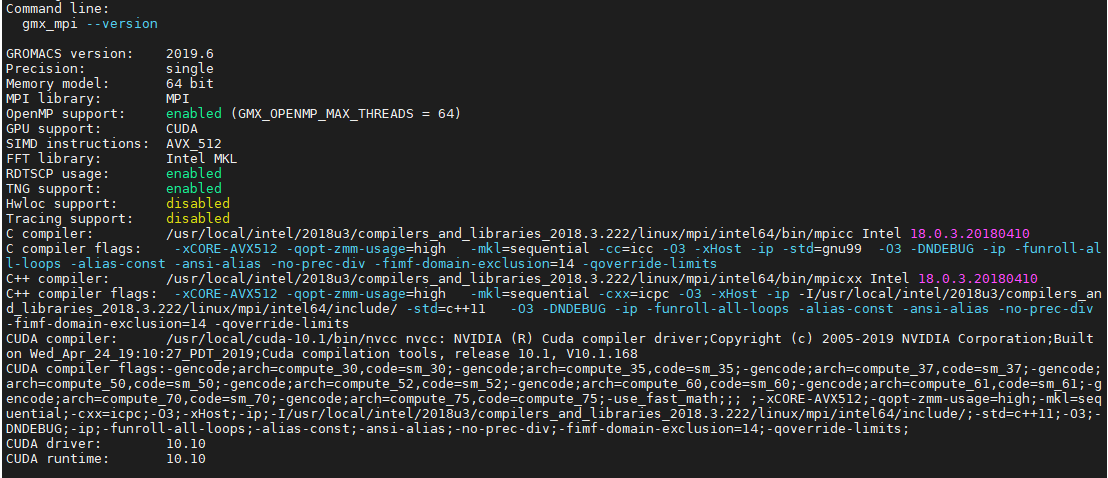
CC=mpicc CXX=mpicxx cmake .. -DCMAKE_C_COMPILER=mpicc -DCMAKE_CXX_COMPILER=mpicxx -DGMX_MPI=on -DGMX_FFT_LIBRARY=mkl \
-DCMAKE_INSTALL_PREFIX=/usr/local/gromacs-2019.3_intel18_mkl_cuda11.1 -DREGRESSIONTEST_DOWNLOAD=OFF -DREGRESSIONTEST_PATH=../regressiontests-2019.6 \
-DCMAKE_C_FLAGS:STRING="-cc=icc -O3 -xHost -ip" \
-DCMAKE_CXX_FLAGS:STRING="-cxx=icpc -O3 -xHost -ip -I/usr/local/intel/2018u3/compilers_and_libraries_2018.3.222/linux/mpi/intel64/include/" \
-DGMX_GPU=on \
-DCUDA_TOOLKIT_ROOT_DIR=/usr/local/cuda-10.1 \
-DCMAKE_BUILD_TYPE=Release \
-DCUDA_HOST_COMPILER:FILEPATH=/usr/local/intel/2018u3/compilers_and_libraries_2018.3.222/linux/bin/intel64/icpc


Updating fonts size GUI xfce4-settings-manager

If you feel that your font size is too small, you can change the font size by issuing the command

% ssh -X userid@remoteserver

If you are using xfce4, you can xfc4-settings-manager to change the font size settings by typing on the command line

% xfce4-settings-manager

You will see something like this. Click “Settings Others” under Others Category

Look for xsettings > “Sans 12”