Installing RoCE using Mellanox (Nvidia) OFED package

Prerequisites:

Do read Basic Understanding RoCE and Infiniband

Step 1: Install Mellanox Package

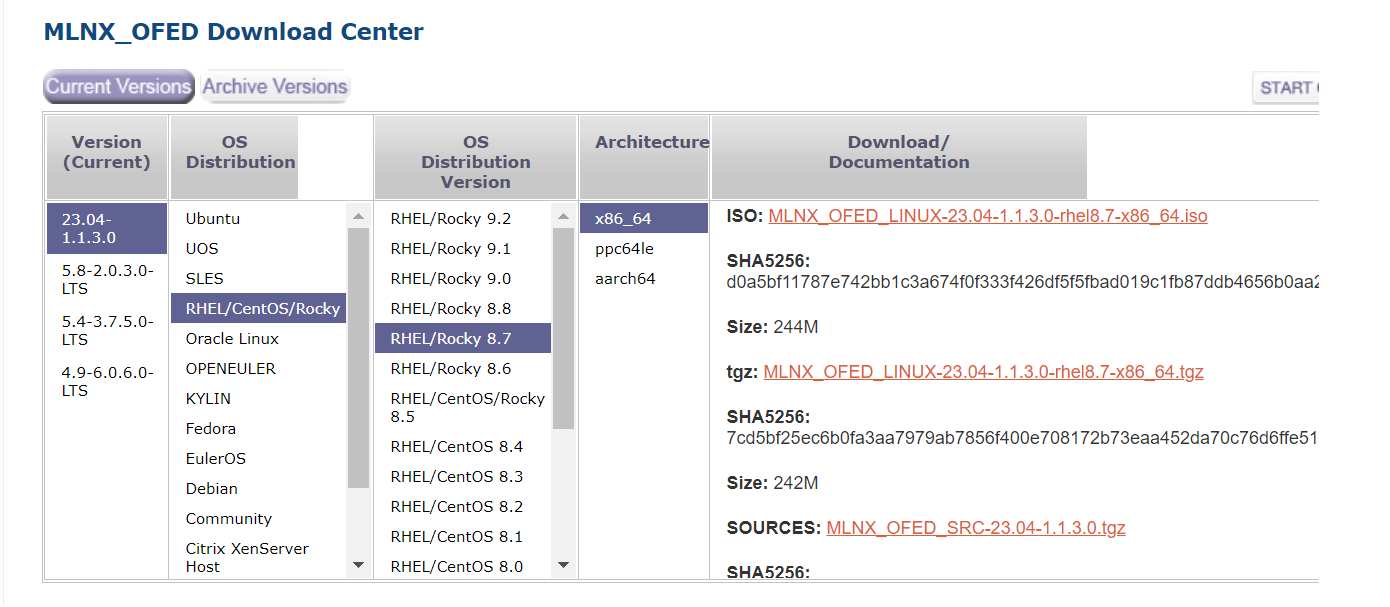
First and Foremost, you have to install Mellanox Package which you can download at https://developer.nvidia.com/networking/ethernet-software. You may want to consider installing using the traditional method or Ansible Method (Installing Mellanox OFED (mlnx_ofed) packages using Ansible)

Step 2: Load the Drivers

Activate two kernel modules that are needed for rdma and RoCE exchanges by using the command

# modprobe rdma_cm ib_umad

Step 3: Verify the drivers are loaded

# ibv_devinfo

Step 4: Set the RoCE to version 2

Set the version of the RoCE protocol to v2 by issuing the command below.

  • -d is the device, 
  • -p is the port 
  • -m the version of RoCE:
[root@node1]# cma_roce_mode -d mlx5_0 -p 1 -m 2
RoCE v2

Step 5: Check which RoCE devices are enabled on the Ethernet

[root@node-1]# ibdev2netdev
mlx5_0 port 1 ==> ens1f0 (Up)
mlx5_1 port 1 ==> ens1f1 (Down)

Refererences:

  1. Setting up a RoCE cluster

Basic Understanding RoCE and Infiniband

Prerequisites:

  1. RoCE required Compliant Ethernet. Currently, I am using Mellanox ConnectX-6 Cards
  2. RoCE required a Compliant Switch. I used Mellanox 100G Switch.

The Difference between Traditional Ethernet Communication and RoCE can be explained very clearly in the diagram taken by Huawei’s Basic Knowledge and Differences of RoCE, IB, and TCP Networks

Some Key Pointers on the difference between TCP/IP and RDMA

  1. The Traditional TCP/IP network communication uses the Kernel to send messages which have high data movement and data replication overhead.
  2. RDMA can bypass the kernel and access the memory directly which allows low-latency network communication.

There are 3 types of RDMA network technologies is so neatly presented in Basic Knowledge and Differences of RoCE, IB, and TCP Networks

References:

  1. Basic Knowledge and Differences of RoCE, IB, and TCP Networks

Compiling glibc-2.29 at CentOS-7

Step 1: Download the glibc

To Download the glibc-2.29, do download at https://ftp.gnu.org/gnu/glibc/

Step 2: Compile and Build the glibc libraries

# tar zxvf glibc-2.29.tar.gz
# cd glibc-2.29
# mkdir build
# cd build

Step 3: Compile and install

# ../configure --prefix=/usr/local/glibc-2.29
# make -j8
# make install

Step 4: Errors encountered

.....
checking version of ld... 2.27, ok
checking for gnumake... no
checking for gmake... gmake
checking version of gmake... 3.82, bad
checking for gnumsgfmt... no
checking for gmsgfmt... no
checking for msgfmt... msgfmt
checking version of msgfmt... 0.19.8.1, ok
.....

Step 5: You might need the new version of GNU make to resolve the issue

To Download the make-4.2.1, do download at https://ftp.gnu.org/gnu/make/

To compile the make, it is very simple

# tar -zxvf make-4.2.1.tar.gz
# cd make-4.2.1
# ./configure --prefix=/usr/local/make-4.2.1
# make && make install

Step 6: Update the $PATH & $LD_LIBRARY_PATH

# export PATH=$PATH:/usr/local/make-4.2.1/bin
# export LD_LIBRARY_PATH=$LD_LIBRARY_PATH:/usr/local/make-4.2.1/lib

Step 7: Repeat Step 3

Red Hat has decided to stop making the source code of RHEL available to the public.

Important News: for All RedHat Derivative Users

Red Hat has decided to stop making the source code of RHEL available to the public. From now on it will only be available to customers — who can’t legally share it.

A superficially modest blog post from a senior Hatter announces that going forward, the company will only publish the source code of its CentOS Stream product to the world. In other words, only paying customers will be able to obtain the source code to Red Hat Enterprise Linux… And under the terms of their contracts with the Hat, that means that they can’t publish it.

The Register Red Hat strikes a crushing blow against RHEL downstreams

Installing Mellanox OFED (mlnx_ofed) packages using Ansible

If you are planning to use ansible to install mlnx_ofed Packages to the compute nodes which have IB or RoCE Ethernet Card. The comprehensive documentation can be found at Installing Mellanox OFED

Step 1: Download Mellanox OFED Drivers

Download the .tar.gz file from Nvidia Networking Ethernet Download site

Step 2: Untar the mlnx_ofed packages on the Shared drive.

Supposedly, the Cluster is sharing the /usr/local/ within the cluster.

# mkdir /usr/local/mlnx_ofed
# cp MLNX_OFED_LINUX-23.04-1.1.3.0-rhel8.7-x86_64.tgz /usr/local/mlnx_ofed
# cd /usr/local/mlnx_ofed
# tar -zxvf MLNX_OFED_LINUX-23.04-1.1.3.0-rhel8.7-x86_64.tgz
# cd MLNX_OFED_LINUX-23.04-1.1.3.0-rhel8.7-x86_64

Step 3: Create a Template mlnx_ofed.repo.j2 and update the content

[mlnx_ofed]
name=MLNX_OFED Repository
baseurl=file:///usr/local/mlnx_ofed/MLNX_OFED_LINUX-23.04-1.1.3.0-rhel8.7-x86_64/RPMS
enabled=1
gpgkey=file:///usr/local/mlnx_ofed/MLNX_OFED_LINUX-23.04-1.1.3.0-rhel8.7-x86_64/RPM-GPG-KEY-Mellanox
gpgcheck=1

Step 4: Create a Playbook for updating the drivers

- name: Generate /etc/yum.repos.d/mlnx_ofed.repo
  template:
      src: ../templates/mlnx_ofed.repo.j2
      dest: /etc/yum.repos.d/mlnx_ofed.repo
      owner: root
      group: root
      mode: 0644
  become: true
  when: 
    - ansible_os_family == "RedHat"
    - ansible_distribution_major_version == "8"
    - ansible_distribution_version == "8.7"


- name: Install mlnx-ofed-all
  dnf:
      name:
        - mlnx-ofed-all
      state: latest
  when: 
    - ansible_os_family == "RedHat"
    - ansible_distribution_major_version == "8"
    - ansible_distribution_version == "8.7"
  register: install_mlnx

Step 5: Reboot if there are changes to MLNX-OFED

- name: Reboot if there are changes to MLNX-OFED
  ansible.builtin.reboot:
  when:
    - install_mlnx.changed
    - ansible_os_family == "RedHat"
    - ansible_distribution_major_version == "8"
    - ansible_distribution_version == "8.7"

- name: Modprobe rdma_cm ib_umad
  ansible.builtin.shell: "modprobe rdma_cm ib_umad"
  when: install_mlnx.changed

References:

  1. Installing Mellanox OFED

Intel Enters the Quantum Computing Horse Race With 12-Qubit Chip

Taken from Intel Enters the Quantum Computing Horse Race With 12-Qubit Chip

Intel has built a quantum processor called Tunnel Falls that it will offer to research labs hoping to make the revolutionary computing technology practical.

The Tunnel Falls processor, announced Thursday, houses 12 of the fundamental data processing elements called qubits. It’s a major step in the chipmaker’s attempt to develop quantum computing hardware it hopes will eventually surpass rivals.

Intel Enters the Quantum Computing Horse Race With 12-Qubit Chip

Gromacs Error – log: Protocol “https” not supported or disabled in libcurl

Downloading: https://ftp.gromacs.org/regressiontests/regressiontests-2020.6.tar.gz
CMake Error at tests/CMakeLists.txt:58 (message):
  error: downloading
  'https://ftp.gromacs.org/regressiontests/regressiontests-2020.6.tar.gz'
  failed

  status_code: 1

  status_string: "Unsupported protocol"

  log: Protocol "https" not supported or disabled in libcurl

  Closing connection -1

If you compiling Gromacs-2020.6 with Plumed2-2.7.2, do follow the Regression Test Errors during Gromacs Compilation. The Key issues are

DREGRESSIONTEST_DOWNLOAD=OFF -DREGRESSIONTEST_PATH=../regressiontests-2020.2

If you can download the regressiontests-2020.6.tar.gz and get the regressiontest PATH correct, it should work without issues.

Displaying the Number of Cores and Current Load average for All Nodes

If you wish to use Ansible to display the number of cores and current Load average for all your nodes, you may want to consider the code below.

- name: Display number of cores
  debug:
    var: ansible_processor_cores

- name: Get Load Average
  ansible.builtin.shell: "cat /proc/loadavg"
  register: load_avg_output
  changed_when: false

- name: Print Load Average for all Nodes
  debug:
    msg: "Load Average: {{ load_avg_output.stdout }}"