Compling ANTLR 2.7.7 on CentOS 6

What is ANTLR?

ANTLR, ANother Tool for Language Recognition, (formerly PCCTS) is a language tool that provides a framework for constructing recognizers, compilers, and translators from grammatical descriptions containing Java, C#, C++, or Python actions. ANTLR provides excellent support for tree construction, tree walking, and translation. There are

Step 1: Download ANTLR 2.7.7

Step 2: Untar ANTLR-2.7.7

# tar -zxvf antlr-2.7.7
# antlr-2.7.7

Step 3: For RHEL and CentOS, edit the source file /root/antlr-2.7.7/lib/cpp/antlr/CharScanner.hpp

# vim /root/antlr-2.7.7/lib/cpp/antlr/CharScanner.hpp

Add the following into the CharScanner.hpp file
antlr

Step 4: Compile the antlr-2.7.7

# ./configure --prefix=/usr/local/antlr2.7.7 --disable-examples
# make -j 8
# make install

References:

  1. http://sourceforge.net/p/nco/discussion/9830/thread/08ae0201

Install GCC 4.8.1 and other Scientitic Packages via Yum on CentOS

Do take a look at Linux @ CERN for the documentation on how to use yum to install devtoolset which contain the following packages. The latest version for CentOS 6 is devtoolset-2.1. Here is a summary of the Linux @ CERN

CentOS 6 / SL 6

Developer Toolset 2.1 provides following tools:

  • gcc/g++/gfortran – GNU Compiler Collection – version 4.8.2
  • gdb – GNU Debugger – version 7.6.34
  • binutils – A GNU collection of binary utilities – version 2.23.52
  • elfutils – A collection of utilities and DSOs to handle compiled objects – version 0.155
  • dwz – DWARF optimization and duplicate removal tool – version 0.11
  • systemtap – Programmable system-wide instrumentation system – version 2.1
  • valgrind – Tool for finding memory management bugs in programs – version 3.8.1
  • oprofile – System wide profiler – version 0.9.8
  • eclipse – An Integrated Development Environment – version 4.3.1 (Kepler)

CentOS 5 / SL 5

Developer Toolset 1.1 provides following tools:

  • gcc/g++/gfortran – GNU Compiler Collection – version 4.7.2
  • gdb – GNU Debugger – version 7.5
  • binutils – A GNU collection of binary utilities – version 2.23.51
  • elfutils – A collection of utilities and DSOs to handle compiled objects – version 0.154
  • dwz – DWARF optimization and duplicate removal tool – version 0.7
  • systemtap – Programmable system-wide instrumentation system – version 1.8
  • valgrind – Tool for finding memory management bugs in programs – version 3.8.1
  • oprofile – System wide profiler – version 0.9.7

Installation and Enablement

CentOS 6 / SL 6

Save repository information as /etc/yum.repos.d/slc6-devtoolset.repo on your system:

# cd /etc/yum.repos.d/ 
# wget -O /etc/yum.repos.d/slc6-devtoolset.repo http://linuxsoft.cern.ch/cern/devtoolset/slc6-devtoolset.repo
# yum install devtoolset-2 --nogpgcheck
# scl enable devtoolset-2 bash

CentOS 5 / SL 5

Save repository information as /etc/yum.repos.d/slc5-devtoolset.repo on your system:

# cd /etc/yum.repos.d/
# wget -O /etc/yum.repos.d/slc5-devtoolset.repo http://linuxsoft.cern.ch/cern/devtoolset/slc5-devtoolset.repo
# yum install devtoolset-1.1
# scl enable devtoolset-1.1 bash

Platform LSF – Controlling Hosts

1. Closing a Host

# badmin hclose hostid
Close hostid ...... done

2. Opening a Host

# badmin hopen hostid
Open hostid ...... done

3. Log a comment when closing or opening a host

# badmin hopen -C "Re-Provisioned" hostA
# badmin hclose -C "Weekly backup" hostB

The comment text Weekly backup is recorded in lsb.events. If you close or open a host group, each host group member displays with the same comment string.

Platform LSF – Working with Hosts (lshosts, lsmon)

The lshosts command shows the load thresholds. Using lshosts -l

$ lshosts -l
HOST_NAME:  comp001
type             model  cpuf ncpus ndisks maxmem maxswp maxtmp rexpri server nprocs ncores nthreads
X86_64     Intel_EM64T  60.0    16      1    63G    16G 352423M      0    Yes      2      8        1

RESOURCES: Not defined
RUN_WINDOWS:  (always open)

LOAD_THRESHOLDS:
r15s   r1m  r15m   ut    pg    io   ls   it   tmp   swp   mem   root maxroot processes clockskew netcard iptotal  cpuhz cachesize diskvolume processesroot   ipmi powerconsumption ambienttemp cputemp
-   3.5     -    -     -     -    -    -     -     -     -      -       -         -         -       -       -      -         -          -             -      -                -           -       -

Platform LSF – Working with Hosts (bhost, lsload, lsmon)

Host status

Host status describes the ability of a host to accept and run batch jobs in terms of daemon states, load levels, and administrative controls. The bhosts and lsload commands display host status.


1. bhosts
Displays the current status of the host

STATUS DESCRIPTION
ok  Host is available to accept and run new batch jobs
unavail  Host is down, or LIM and sbatchd are unreachable.
unreach  LIM is running but sbatchd is unreachable.
closed  Host will not accept new jobs. Use bhosts -l to display the reasons.
unlicensed Host does not have a valid license.


2. bhosts -l
Displays the closed reasons. A closed host does not accept new batch jobs:

$ bhosts -l
HOST  node001
STATUS           CPUF  JL/U    MAX  NJOBS    RUN  SSUSP  USUSP    RSV DISPATCH_WINDOW
closed_Adm      60.00     -     16      0      0      0      0      0      -

CURRENT LOAD USED FOR SCHEDULING:
r15s   r1m  r15m    ut    pg    io   ls    it   tmp   swp   mem   root maxroot
Total           0.0   0.0   0.0    0%   0.0     0    0 28656  324G   16G   60G  3e+05   4e+05
Reserved        0.0   0.0   0.0    0%   0.0     0    0     0    0M    0M    0M    0.0     0.0

processes clockskew netcard iptotal  cpuhz cachesize diskvolume
Total             404.0       0.0     2.0     2.0 1200.0     2e+04      5e+05
Reserved            0.0       0.0     0.0     0.0    0.0       0.0        0.0

processesroot   ipmi powerconsumption ambienttemp cputemp
Total                 396.0   -1.0             -1.0        -1.0    -1.0
Reserved                0.0    0.0              0.0         0.0     0.0


aa_r aa_r_dy aa_dy_p aa_r_ad aa_r_hpc fluentall fluent fluent_nox
Total         17.0    25.0   128.0    10.0    272.0      48.0   48.0       50.0
Reserved       0.0     0.0     0.0     0.0      0.0       0.0    0.0        0.0

gambit geom_trans tgrid fluent_par
Total           50.0       50.0  50.0      193.0
Reserved         0.0        0.0   0.0        0.0


3. bhosts -X

Condensed host groups in an condensed format

$ bhosts -X
HOST_NAME          STATUS       JL/U    MAX  NJOBS    RUN  SSUSP  USUSP    RSV
comp027            ok              -     16      0      0      0      0      0
comp028            ok              -     16      0      0      0      0      0
comp029            ok              -     16      0      0      0      0      0
comp030            ok              -     16      0      0      0      0      0
comp031            ok              -     16      0      0      0      0      0
comp032            ok              -     16      0      0      0      0      0
comp033            ok              -     16      0      0      0      0      0


4. bhosts -l hostID

Display all information about specific server host such as the CPU factor and the load thresholds to start, suspend, and resume jobs

# bhosts -l comp067
HOST  comp067
STATUS           CPUF  JL/U    MAX  NJOBS    RUN  SSUSP  USUSP    RSV DISPATCH_WINDOW
ok              60.00     -     16      0      0      0      0      0      -

CURRENT LOAD USED FOR SCHEDULING:
r15s   r1m  r15m    ut    pg    io   ls    it   tmp   swp   mem   root maxroot
Total           0.0   0.0   0.0    0%   0.0     0    0 13032  324G   16G   60G  3e+05   4e+05
Reserved        0.0   0.0   0.0    0%   0.0     0    0     0    0M    0M    0M    0.0     0.0

processes clockskew netcard iptotal  cpuhz cachesize diskvolume
Total             406.0       0.0     2.0     2.0 1200.0     2e+04      5e+05
Reserved            0.0       0.0     0.0     0.0    0.0       0.0        0.0

processesroot   ipmi powerconsumption ambienttemp cputemp
Total                 399.0   -1.0             -1.0        -1.0    -1.0
Reserved                0.0    0.0              0.0         0.0     0.0

aa_r aa_r_dy aa_dy_p aa_r_ad aa_r_hpc fluentall fluent fluent_nox
Total         18.0    25.0   128.0    10.0    272.0      47.0   47.0       50.0
Reserved       0.0     0.0     0.0     0.0      0.0       0.0    0.0        0.0

gambit geom_trans tgrid fluent_par
Total           50.0       50.0  50.0      193.0
Reserved         0.0        0.0   0.0        0.0

LOAD THRESHOLD USED FOR SCHEDULING:
r15s   r1m  r15m   ut      pg    io   ls    it    tmp    swp    mem
loadSched   -     -     -     -       -     -    -     -     -      -      -
loadStop    -     -     -     -       -     -    -     -     -      -      -

root maxroot processes clockskew netcard iptotal   cpuhz cachesize
loadSched     -       -         -         -       -       -       -         -
loadStop      -       -         -         -       -       -       -         -

diskvolume processesroot    ipmi powerconsumption ambienttemp cputemp
loadSched        -             -       -                -           -       -
loadStop         -             -       -                -           -       -


5. lsload

[user1@login1 ~]$ lsload
HOST_NAME       status  r15s   r1m  r15m   ut    pg  ls    it   tmp   swp   mem
login1          ok   0.0   0.0   0.0   1%   0.0  17     0  240G   16G   28G
login2          ok   0.0   0.0   0.0   0%   0.0   0  7040  242G   16G   28G
node1           ok   0.0   0.4   0.3   0%   0.0   0 31760  324G   16G   60G

Displays the current state of the host:

STATUS DESCRIPTION
ok Host is available to accept and run batch jobs and remote tasks.
-ok LIM is running but RES is unreachable.
busy Does not affect batch jobs, only used for remote task placement (i.e., lsrun). The value of a load index exceeded a threshold (configured in lsf.cluster.cluster_name, displayed by lshosts -l). Indices that exceed thresholds are identified with an asterisk (*).
lockW Does not affect batch jobs, only used for remote task placement (i.e., lsrun). Host is locked by a run window (configured in lsf.cluster.cluster_name, displayed by lshosts -l).
lockU Will not accept new batch jobs or remote tasks. An LSF administrator or root explicitly locked the host using lsadmin limlock, or an exclusive batch job (bsub -x) is running on the host. Running jobs are not affected. Use lsadmin limunlock to unlock LIM on the local host.
unavail Host is down, or LIM is unavailable.


6. lshosts -l
The lshosts command shows the load thresholds.

$ lshosts -l
HOST_NAME:  comp001
type             model  cpuf ncpus ndisks maxmem maxswp maxtmp rexpri server nprocs ncores nthreads
X86_64     Intel_EM64T  60.0    16      1    63G    16G 352423M      0    Yes      2      8        1

RESOURCES: Not defined
RUN_WINDOWS:  (always open)

LOAD_THRESHOLDS:
r15s   r1m  r15m   ut    pg    io   ls   it   tmp   swp   mem   root maxroot processes clockskew netcard iptotal  cpuhz cachesize diskvolume processesroot   ipmi powerconsumption ambienttemp cputemp
-   3.5     -    -     -     -    -    -     -     -     -      -       -         -         -       -       -      -         -          -             -      -                -           -       -


7. References:

  1. Platform – Working with hosts

RHEV 3.4 – Explanation of Settings in the New Data Center and Edit Data Center Windows

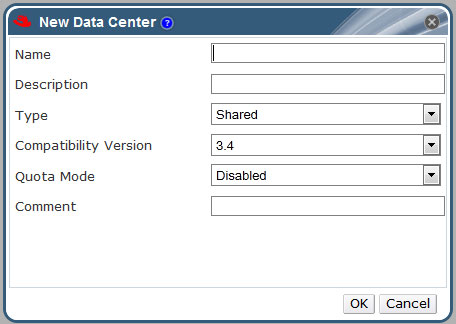
The table below describes the settings of a data center as displayed in the New Data Center and Edit Data Center windows. Invalid entries are outlined in orange when you click OK, prohibiting the changes being accepted. In addition, field prompts indicate the expected values or range of values.

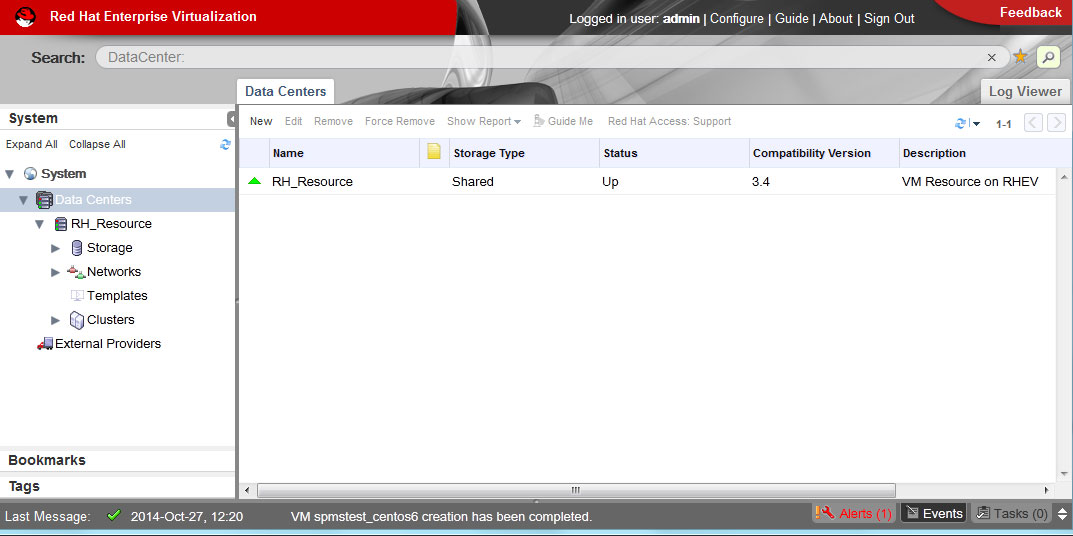
Figure 1: RHEVM Portal –

RHEV_Data-Centres

Figure 2: RHEVM – Adding New Data Centre

RHEV_Data-Centres-AddNew

Details on each items

Field
Description/Action
Name
The name of the data center. This text field has a 40-character limit and must be a unique name with any combination of uppercase and lowercase letters, numbers, hyphens, and underscores.
Description
The description of the data center. This field is recommended but not mandatory.
Type
The storage type. Choose one of the following:
  • Shared
  • Local
The type of data domain dictates the type of the data center and cannot be changed after creation without significant disruption. Multiple types of storage domains (iSCSI, NFS, FC, POSIX, and Gluster) can be added to the same data center, though local and shared domains cannot be mixed.
Compatibility Version
The version of Red Hat Enterprise Virtualization. Choose one of the following:
  • 3.0
  • 3.1
  • 3.2
  • 3.3
  • 3.4

After upgrading the Red Hat Enterprise Virtualization Manager, the hosts, clusters and data centers may still be in the earlier version. Ensure that you have upgraded all the hosts, then the clusters, before you upgrade the Compatibility Level of the data center.

Quota Mode
Quota is a resource limitation tool provided with Red Hat Enterprise Virtualization. Choose one of:

  • Disabled: Select if you do not want to implement Quota
  • Audit: Select if you want to edit the Quota settings
  • Enforced: Select to implement Quota