If you need to do a quick test on the batch mode, you can use this command
qsub -l select=1:ncpus=4 -l walltime=04:00:00 -q my_queue -P my_project_group -- /bin/sleep 100
Where
-q refers to the queue
-P refers to the Project Group

If you need to do a quick test on the batch mode, you can use this command
qsub -l select=1:ncpus=4 -l walltime=04:00:00 -q my_queue -P my_project_group -- /bin/sleep 100
Where
-q refers to the queue
-P refers to the Project Group

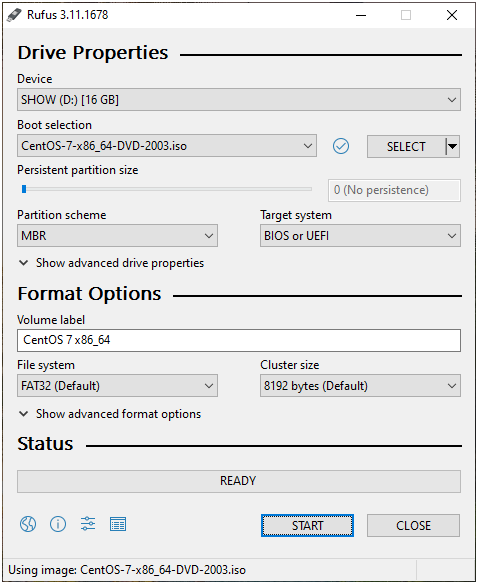
Rufus is a utility that helps format and create bootable USB flash drives, such as USB keys/pendrives, memory sticks, etc.

GCC-6.5 Compilers and associates libraries
m4-1.4.18
mpfr-3.1.4
cmake-3.15.1
gmp-6.1.0
mpc-1.0.3
% source /usr/local/intel/2018u3/bin/compilervars.sh intel64
% source /usr/local/intel/2018u3/impi/2018.3.222/bin64/mpivars.sh intel64
% source /usr/local/intel/2018u3/mkl/bin/mklvars.sh intel64
% source /usr/local/intel/2018u3/parallel_studio_xe_2018/bin/psxevars.sh intel64
% MKLROOT=/usr/local/intel/2018u3/mkl
Create a setup file and make a build directory
% mkdir build
% touch gromacs_cpu.sh
Put the following into the gromacs_cpu.sh
CC=mpicc CXX=mpicxx cmake .. \
-DCMAKE_C_COMPILER=mpicc \
-DCMAKE_CXX_COMPILER=mpicxx \
-DGMX_MPI=on -DGMX_FFT_LIBRARY=mkl \
-DCMAKE_INSTALL_PREFIX=/usr/local/gromacs-2019.3_intel18_mkl \
-DREGRESSIONTEST_DOWNLOAD=ON \
-DCMAKE_C_FLAGS:STRING="-cc=icc -O3 -xHost -ip" \
-DCMAKE_CXX_FLAGS:STRING="-cxx=icpc -O3 -xHost -ip" -DGMX_GPU=off \
-DCMAKE_BUILD_TYPE=Release -DGMX_SIMD=AVX_512
SIMD Support can be found at http://manual.gromacs.org/current/install-guide/index.html#simd-support
% ./gromacs_cpu.sh% make% make install$ source /your/installation/prefix/here/bin/GMXRC
./gmxtest.pl all -np 2
In this webinar you will learn:
Date: Aug 4, 2020
Time: 2:00pm SGT | 11:30am IST | 4:00pm AEST
To register: https://www.mellanox.com/webinar/best-practices-secure-edge-cloud-environment
The write-up is taken from RedHat Using nfsstat and nfsiostat to troubleshoot NFS performance issues on Linux
NFS relies on the existing network infrastructure, any glitches on the network may affect the performance of the connection. One of the tools that can be used is nfsstat
% yum install nfs-utils
The nfsstat command displays statistical information about the NFS and Remote Procedure Call (RPC) interfaces to the kernel.
% nfsstat -s
Server rpc stats:
calls badcalls badclnt badauth xdrcall
107310012 0 0 0 0
The most important field to check is the badcalls, which represents the total number of calls rejected by the RPC layer. When the badcalls is greater than 0, than the underlying network needs to be checked, as there might be latency.
% nfsstat -c
Client rpc stats:
calls retrans authrefrsh
23158 0 23172

Client nfs v3:
null getattr setattr lookup access readlink
0 0% 7237 31% 7 0% 1443 6% 7874 34% 11 0%
read write create mkdir symlink mknod
578 2% 4548 19% 585 2% 1 0% 0 0% 0 0%
remove rmdir rename link readdir readdirplus
0 0% 0 0% 0 0% 0 0% 0 0% 51 0%
fsstat fsinfo pathconf commit
25 0% 10 0% 5 0% 781 3%
The client is doing well as it has relatively few retransmission requests. If you are encountering excessive retransmissions, you may want to adjust data transfer buffer sizes, which are specified by the mount command options rsize and size.
Check dropped packet by running the following command on both the server and the client:
% nfsstat -o net
Client packet stats:
packets udp tcp tcpconn
0 0 0 0
 The Linux Cluster