Using Intel Cluster Checker (Part 1)

What is Intel Cluster Checker?

Intel® Cluster Checker provides tools to collect data from the cluster, analysis of the collected data, and provides a clear report of the analysis. Using Intel® Cluster Checker helps to quickly identify issues and improve utilization of resources.

Intel® Cluster Checker verifies the configuration and performance of Linux®-based clusters through analysis of cluster uniformity, performance characteristics, functionality and compliance with Intel® High Performance Computing (HPC) specifications. Data collection tools and analysis provide actionable remedies to identified issues. Intel® Cluster Checker tools and analysis are ideal for use by developers, administrators, architects, and users to easily identify issues within a cluster.

Installing Intel Cluster Checker Using Yum Repository

If you are using Yum Installation, do take a look at Intel Cluster Checker 2019 Installation

If not, you can untar the package if you have the tar.gz

Environment Setup

# source /usr/local/intel/2018u3/bin/compilervars.sh intel64
# source /usr/local/intel/2018u3/mkl/bin/mklvars.sh intel64
# source /usr/local/intel/2018u3/impi/2018.3.222/bin64/mpivars.sh intel64
# source /usr/local/intel/2018u3/parallel_studio_xe_2018/bin/psxevars.sh intel64
# export MPI_ROOT=/usr/local/intel/2018u3/impi/2018.3.222/intel64
# source /usr/local/intel/cc2019/clck/2019.10/bin/clckvars.sh

Create a nodefile and put the hosts in

% vim nodefile
node1
node2
node3

Running Intel Cluster Checker

*Make sure you have SSH  login to the nodes without password. See SSH Login without Password

% clck -f nodefile

Examples of run…..

Running Collect

................................................................................................................................................................................................................
Running Analyze

SUMMARY
Command-line: clck -f nodefile
Tests Run: health_base
**WARNING**: 3 tests failed to run. Information may be incomplete. See clck_execution_warnings.log for more information.
Overall Result: 8 issues found - HARDWARE UNIFORMITY (2), PERFORMANCE (2), SOFTWARE UNIFORMITY (4)
-----------------------------------------------------------------------------------------------------------------------------------------
8 nodes tested: node010, node[003-009]
0 nodes with no issues:
8 nodes with issues: node010, node[003-009]
-----------------------------------------------------------------------------------------------------------------------------------------
FUNCTIONALITY
No issues detected.

HARDWARE UNIFORMITY
The following hardware uniformity issues were detected:
1. The InfiniBand PCI physical slot for device 'MT27800 Family [ConnectX-5]' 

PERFORMANCE
The following performance issues were detected:
1.Zombie processes detected.
1 node: node010
2. Processes using high CPU.
7 nodes: node010, node[003,005-009]

SOFTWARE UNIFORMITY
The following software uniformity issues were detected:
1. The OFED version, 'MLNX_OFED_LINUX-4.5-1.0.1.0 (OFED-4.5-1.0.1)', is not uniform.....
5 nodes: node[003-004,006-007,009]
2. The OFED version, 'MLNX_OFED_LINUX-4.3-1.0.1.0 (OFED-4.3-1.0.1)', is not uniform.....
3 nodes: node010, node[005,008]
3. Environment variables are not uniform across the nodes.
.....
4. Inconsistent Ethernet driver version.
.....

See the following files for more information: clck_results.log, clck_execution_warnings.log

Intel MPI Library Troubleshooting

If you are an admin and if you make sure their cluster is set up to work with the Intel® MPI Library, do the following

% clck -f nodefile -F mpi_prereq_admin

If you are non-privileged user and if you make sure their cluster is set up to work with the Intel® MPI Library, do the following

% clck -f nodefile -F mpi_prereq_user

More Information:

  1. Using Intel Cluster Checker (Part 1)
  2. Using Intel Cluster Checker (Part 2)
  3. Using Intel Cluster Checker (Part 3)

User Guide:

MPI related Errors for ANSYS-20.1

One of my users was facing the issues when running ANSYS-20.1 Fluent

Error: eval: unbound variable
Error Object: c-flush
...
...
...
libibverbs: Warning: no userspace device-specific driver found for /sys/class/infiniband_verbs/uverbs1
libibverbs: Warning: no userspace device-specific driver found for /sys/class/infiniband_verbs/uverbs2
libibverbs: Warning: no userspace device-specific driver found for /sys/class/infiniband_verbs/uverbs1
libibverbs: Warning: no userspace device-specific driver found for /sys/class/infiniband_verbs/uverbs2
libibverbs: Warning: no userspace device-specific driver found for /sys/class/infiniband_verbs/uverbs1
fluent_mpi.20.1.0: Rank 0:110: MPI_Init: ibv_create_qp(left ring) failed
fluent_mpi.20.1.0: Rank 0:110: MPI_Init: probably you need to increase pinnable memory in /etc/security/limits.conf
fluent_mpi.20.1.0: Rank 0:110: MPI_Init: ibv_ring_createqp() failed
fluent_mpi.20.1.0: Rank 0:110: MPI_Init: Can't initialize RDMA device
fluent_mpi.20.1.0: Rank 0:110: MPI_Init: Internal Error: Cannot initialize RDMA protocol
...
...
...

There were a few steps that we took to resolve the issues. Do look at the generated logs which will give lots of information. If you are using the PBS-Professional. your fluent script may look like this.

fluent 3ddp -g -t$nprocs -mpi=ibmmpi -cflush -ssh -lsf -cnf=$PBS_NODEFILE -pinfiniband -nmon -i $inputfile >& $PBS_JOBID.log 2>&1
  • Do note that “-cflush” and that it should be placed after the -mpi flag. From our observation, if the -cflush is placed before -mpi, it seems to initiate the flush, but another error would be generated.
  • Make sure you choose the right mpi parameter.


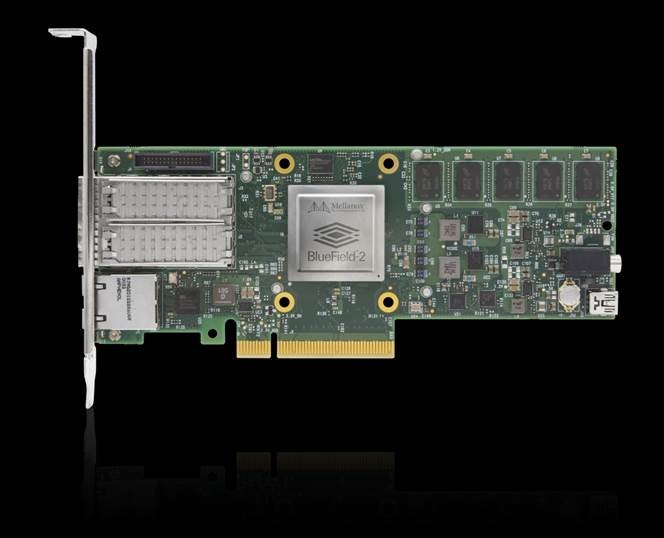
What is the difference between a DPU, a CPU, and a GPU?

An interesting blog to explain what is the difference a DPU, CPU, and GPU?


So What Makes a DPU Different?

A DPU is a new class of programmable processor that combines three key elements. A DPU is a system on a chip, or SOC, that combines:
An industry standard, high-performance, software programmable, multi-core CPU, typically based on the widely-used Arm architecture, tightly coupled to the other SOC components

A high-performance network interface capable of parsing, processing, and efficiently transferring data at line rate, or the speed of the rest of the network, to GPUs and CPUs

A rich set of flexible and programmable acceleration engines that offload and improve applications performance for AI and Machine Learning, security, telecommunications, and storage, among others.

For more information, do take a look at What’s a DPU? …And what’s the difference between a DPU, a CPU, and a GPU?

Installing R-Studio on CentOS-7

Prerequisites

  • R-Studio (rstudio-server-rhel-1.3.1093-x86_64.rpm)
  • R-3.6.3
  • GNU-6.5
  • m4-1.4.18
  • gmp-6.1.0
  • mpfr-3.1.4
  • mpc-1.0.3
  • isl-0.18
  • gsl-2.1

Step 1: Download R-Studio v1.3.1093

On your terminal, Download the free version RStudio Server v1.3.1093 from RStudio.com

Step 2: Install R-Studio v1.3.1093

Follow the Install Process as written in https://rstudio.com/products/rstudio/download-server/redhat-centos/

% wget https://download2.rstudio.org/server/centos6/x86_64/rstudio-server-rhel-1.3.1093-x86_64.rpm
% yum install rstudio-server-rhel-1.3.1093-x86_64.rpm

Step 3: Verify Installation

% /usr/sbin/rstudio-server verify-installation

Step 4: Make sure the R is compiled and placed correctly

  • Make sure the R –enable-R-shlib flags
  • RStudio will search for your installation of R in the traditional locations, such as RStudio will search for your installation of R in the traditional locations, such as
    /usr/bin/R
    /usr/local/bin/R

    If R is not installed in these locations, RStudio may not be able to find it.

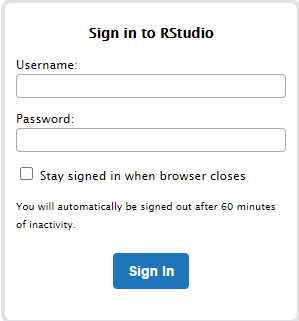
Step 5: Fixing Login Issues

If you managed to launch the R-Studio,


But not able to or having error. Do take a look at PAM authentication in RStudio Connect

Simply copy /etc/pam.d/login and replace the /etc/pam.d/rstudio

% cp /etc/pam.d/login /etc/pam.d/rstudio


Useful References:

  1. RStudio Server Will Not Start
  2. PAM authentication in RStudio Connect

Performance Comparative Analysis of Memverge memory machine with Redis Workload


MemVerge Memory Machine software and Intel Persistent Memory on HPE servers delivers enterprise-class data protection for in-memory workloads. With MemVerge software, a Redis 300M key database can be restored in half a second to bring enterprise-class business continuity to memory.


For more information on the technical paper https://psnow.ext.hpe.com/doc/a50002872enw

Cumulus in the Cloud Demo

Cumulus in the Cloud offers a free, personal, virtual data center network that provides a low-effort way to see Cumulus Networks technology in action and to learn about the latest open innovations that can help you improve network designs and operations.

Your virtual data center consists of two racks with two dual-homed servers connected with a leaf-spine network. The infrastructure can be personalized with production-ready automation or left unconfigured as a “blank slate”.

For more information, see https://cumulusnetworks.com/products/cumulus-in-the-cloud/


Edge Networking and Data: How to Build Edge Clouds with Low Latency Storage

Join Lightbits Labs and Intel in this joint webinar on deploying compute, storage and networking in edge data centers. You’ll learn why compute and storage is being pushed to the edge (vs. central cloud), what benefits this produces and the challenges that must be overcome for successful deployment and operation.

Do register and you can view the recording.


Achieving Non-Stop IT, More Important Than Ever

About this webinar
Recent events have taught us that infrastructure stability is more important than ever as business applications and continuity is only as reliable as the underlying infrastructure. It keeps businesses running, people connected, and customers engaged. In uncertain times, you simply cannot afford to have your systems go down or lose access to your data. The costs of system downtime are not only measured financially, but also in terms of customer trust and brand loyalty.

SUSE offers a complete, proven open source solution for nonstop IT across core, edge, and cloud. From our high availability extension for SUSE Linux Enterprise Server to Live Patching and Premium Support Services, we have a total solution to keep your business running. So whether you need always-on access to SAP business applications or real-time access to data, SUSE solutions designed for high availability provide you with the stability you need.

Join Brent Schroeder (CTO, SUSE) and Stacey Miller (Product Marketing Manager, SUSE) as they discuss the SUSE total solution for nonstop IT and share stories of customers using these high availability solutions for uninterrupted services. Learn why SUSE is the right choice to help you achieve nonstop IT.

To Register: https://www.brighttalk.com/webcast/11477/405478