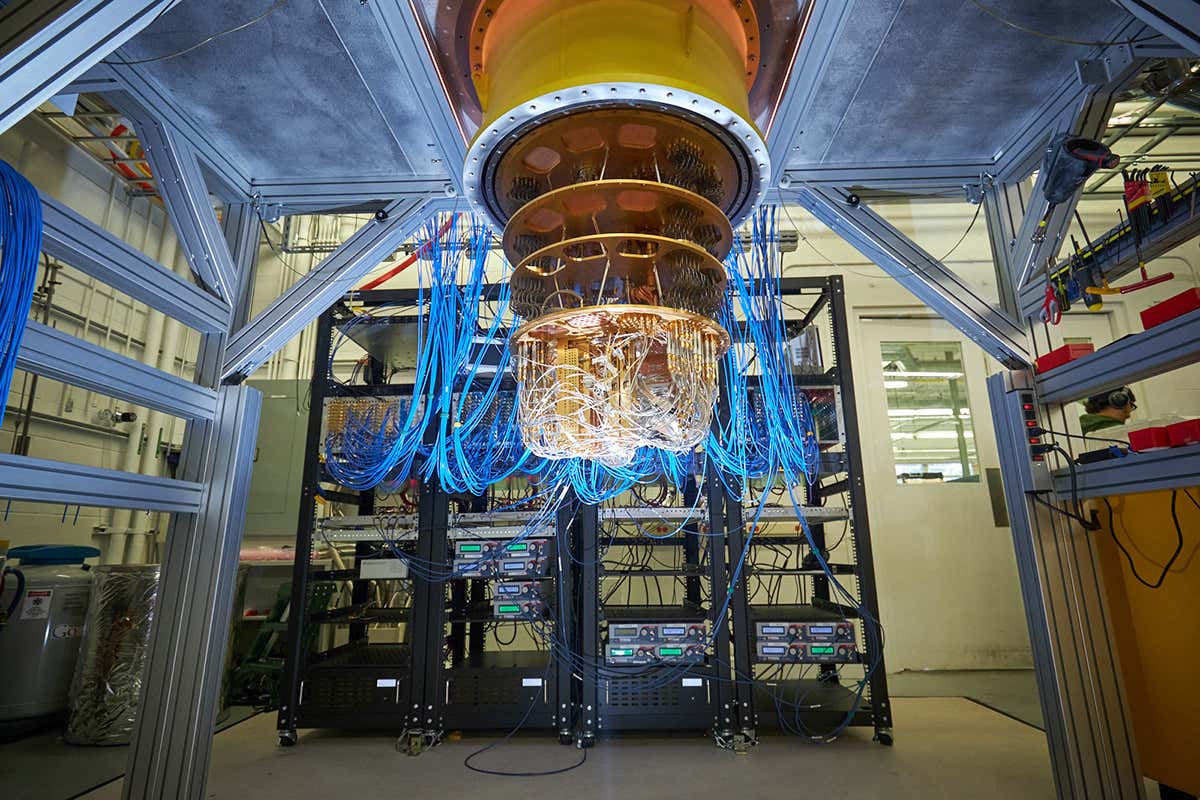
Researchers at the University of Innsbruck have built the smallest quantum computer yet, prompting questions if European outfits can take on the leading pack.
A notable feature of the compact quantum computer is its low power consumption, which stands at 1.5 kilowatts – the same amount of energy needed to power a kettle. “Indeed, such is its low power consumption, that the researchers in the University of Innsbruck are exploring how to power the device using solar panels.”
Another decisive factor for the industrial use of quantum computers is the number of available qubits. The Innsbruck physicists were able to run the quantum computer with 24 fully functional qubits – individually controlling and entangling 24 trapped ions with their device – meeting a recent target set by the German government with surprising speed.
When running Fluent from inside ANSYS Workbench on Linux. Hardware graphics rendering can fail and the Fluent application failed to start. This error can sometimes be prevented by switching to the software rendering mode. There are 2 approaches
Before Running Workbench, you may want to put this in your BASH Shell
% export HOOPS_PICTURE=x11/lin
In C Shell
% setenv HOOPS_PICTURE x11/lin
If you are using Fluent Launcher
Steps:
Open a Fluent set of cells Right Click the Fluent setup cell and choose, edit In the resulting Fluent launcher, choose +, Show More Options Select the Environment tab Add the following entry HOOPS_PICTURE=x11/lin
Submer is not only obsessed with Immersion Cooling, but also looks at the entire ecosystem surrounding datacenters for possible points of optimization. In this educational and informative webinar, we were joined by John Laban, from the Open Compute Project Foundation (OCP).
John helped us identify all points of electricity waste in the delivery of power to datacenters and HPC installations.
This is taken from Open Compute Project Site and a comparison is made between Power Utilization Effectiveness (PUE) versus Hardware Utilization Effectiveness (HUE)
NVIDIA and VMware have formed a strategic partnership to transform the data center to bring AI and modern workloads to every enterprise.
NVIDIA AI Enterprise is an end-to-end, cloud-native suite of AI and data analytics software, optimized, certified, and supported by NVIDIA to run on VMware vSphere with NVIDIA-Certified Systems. It includes key enabling technologies from NVIDIA for rapid deployment, management, and scaling of AI workloads in the modern hybrid cloud.
After you enter the command “paraview” and If you are encountering errors like “Your OpenGL drivers don’t support required OpenGL, features for basic rendering. Applications cannot continue. Please exit and use an older version. CONTINUE AT YOUR OWN RISK! OpenGL Vendor: Information Unavailable, OpenGL Version: Information Unavailable OpenGL Renderer: Information Unavailable.
The output messages shows
“Unable to find a valid OpenGL 3.2 or later…
failed to create offscreen window
GLEW could not be initialized
To resolve the issue, do run the command, to bypass hardware acceleration
I was trying to delete the files in the folder that has more than 90,000. When I delete the files, I had errors
% /bin/rm : Argument list too long
The issue is that there are too many files and rm is not able to clear. To workaround the issues, you can do the following. Make sure you are in the directory where you want to clear the file.
You should have binary called lmp_g++_openmpi. Do a softlink
% ln -s lmp_g++_openmpi lammps
Make and Run USER-GFMD Units Tests
% cd src/USER-GFMD/
% make unittests
% ./unittests
[==========] Running 23 tests from 5 test cases.
[----------] Global test environment set-up.
[----------] 5 tests from CrystalSurfaceTest
[ RUN      ] CrystalSurfaceTest.fcc100
[       OK ] CrystalSurfaceTest.fcc100 (0 ms)
[ RUN      ] CrystalSurfaceTest.fcc100_supercell
[       OK ] CrystalSurfaceTest.fcc100_supercell (11 ms)
[ RUN      ] CrystalSurfaceTest.reverse_indices
[       OK ] CrystalSurfaceTest.reverse_indices (0 ms)
[ RUN      ] CrystalSurfaceTest.fcc100_3nn
[       OK ] CrystalSurfaceTest.fcc100_3nn (0 ms)
[ RUN      ] CrystalSurfaceTest.fcc100_neighbor_shells
[       OK ] CrystalSurfaceTest.fcc100_neighbor_shells (0 ms)
[----------] 5 tests from CrystalSurfaceTest (12 ms total)
.....
.....
.....
Run Tests
% cd src/USER-GFMD/tests
% sh run_tests.sh ../../lmp_g++_openmpi
I had some errors, but it did not look critical. Tests were run without failures
.....
.....
TEST_Hertz_sc100_128x128_a0_1.3
eval.py:83: RuntimeWarning: invalid value encountered in sqrt
  pa_xy = np.where(r_xy<a, p0*np.sqrt(1-(r_xy/a)**2), np.zeros_like(r_xy))
.ok.
TEST_restart
.ok.
Ran 20 tests; 0 failures, 20 successes.




 The Linux Cluster