If you are using a MacOS and you are planning to do a X-forwarding, you may notice an error like this. In the Pix, below, after SSH, I wanted to X-forward Firefox Browser from Rocky Linux 8
ssh -X user1@192.168.0.1
There are a few settings we need to do. Let’s fix the “Locale not supported by C library. Using the fallback ‘C’ locale”
Issue 1 – Locale not support by C library. Using the fallback ‘C’ locale
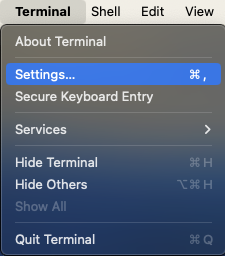
To fix it, go to Top-Left-Hand Corner of your Mac-Desktop to look for the Terminal App,
Click “Settings” (Pix 1)
Click the Profiles Icons (Pix 2)
Uncheck the “Set locale environment variable on startup” (Pix 2)
Close and Quit Terminal App and come in again. You should fix the first problem.
Issue 2 – Install XQuartz
X11 used to be included with macOS. Apple no longer includes X11 with macOS. That is why you see an error like this “Error: no DISPLAY environment variable specified.”
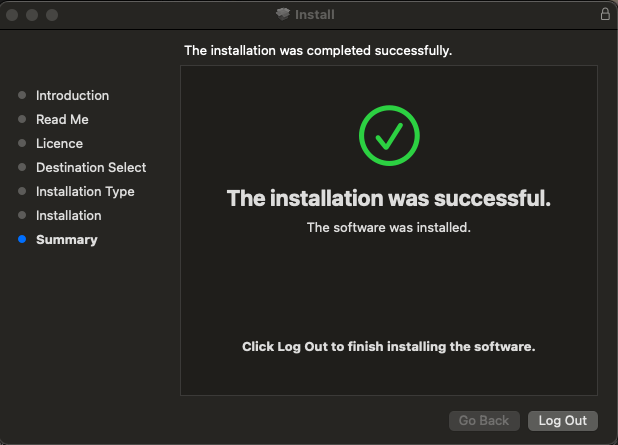
You have to download the XQuartz App which is an open-source effort to develop a version of the X.Org X Window System that runs on macOS. Downloading and Installing is very straight-forward and easy. I’ve captured selected screen-shots….
After installing, you may want to let is run in the background
Log-Off from Your Mac Completely to allow the settings to reinitate
You can use Ansible to extract Flexlm information from a remote license server, which is stored in a central place where you can display the information.
I use crontab to extract the information every 15 min and place it in a central place so that users can check the license availability.
- name: Extract Information from ANSYS Lic Server and extract to file
  block:
    - name: Get FlexLM License Info
      ansible.builtin.shell: "/usr/local/ansys_inc/shared_files/licensing/linx64/lmutil lmstat -c ../license_files/ansyslmd.lic -a"
      register: lmstat_output

    - name: Save FlexLM License Output to File on ANSYS Lic Server
      copy:
        content: "{{ lmstat_output.stdout }}"
        dest: "/var/log/ansible_logs/ansys_lmstat.log"

    - name: Get FlexLM Output from Remote Server
      fetch:
        src: "/var/log/ansible_logs/ansys_lmstat.log"
        dest: "/usr/local/lic_lmstat_log/ansys_lmstat.log"
        flat: yes
The fetch command is useful for fetching files from remote machines and storing them locally in a file tree. For more information, do take a look at Fetch files from remote nodes
.....
.....
Users of tfluid_int_ccmp:  (Total of 128 licenses issued;  Total of 0 licenses in use)

Users of tfluid_int_fluent:  (Total of 128 licenses issued;  Total of 0 licenses in use)
[user1@node1 ~]$










 The Linux Cluster