Tiger Lake SoC Architecture Explainer
SuperFin Technology: Advancing Process Performance

Tiger Lake SoC Architecture Explainer
SuperFin Technology: Advancing Process Performance

Step 1: Download Quantum ESPRESSO 6.5.0 from Quantum ESPRESSO Download Site or git-clone QE
% git clone https://gitlab.com/QEF/q-e.gitStep 2: Remember to source the Intel Compilers and indicate MKLROOT in your .bashrc
source /usr/local/intel/2018u3/mkl/bin/mklvars.sh intel64
source /usr/local/intel/2018u3/parallel_studio_xe_2018/bin/psxevars.sh intel64
source /usr/local/intel/2018u3/compilers_and_libraries/linux/bin/compilervars.sh intel64
source /usr/local/intel/2018u3/impi/2018.3.222/bin64/mpivars.sh intel64
Step 3: Make a file call setup.sh and copy the contents inside.
export F90=mpiifort
export F77=mpiifort
export MPIF90=mpiifort
export CC=mpiicc
export CPP="icc -E"
export CFLAGS=$FCFLAGS
export AR=xiar
export BLAS_LIBS=""
export LAPACK_LIBS="-lmkl_blacs_intelmpi_lp64"
export SCALAPACK_LIBS="-lmkl_scalapack_lp64 -lmkl_blacs_intelmpi_lp64"
export FFT_LIBS="-L$MKLROOT/intel64"
./configure --enable-parallel --enable-openmp --enable-shared --with-scalapack=intel --prefix=/usr/local/espresso-6.5.0
% ./setup.sh% make all -j 16
% make install% ./configure --prefix=/usr/local/espresso-6.5.0 --enable-parallel --enable-openmp --enable-shared --with-scalapack=intel | tee Configure.outChecking Configure.Out, there are some missing libraries which you have to fix.
.....
.....

ESPRESSO can take advantage of several optimized numerical libraries
(essl, fftw, mkl...). This configure script attempts to find them,
but may fail if they have been installed in non-standard locations.
If a required library is not found, the local copy will be compiled.

The following libraries have been found:
BLAS_LIBS= -lblas
LAPACK_LIBS=-L/usr/local/lib -llapack -lblas
FFT_LIBS=
.....
.....
The Intel® AI Developer Webinar Series features free one-hour sessions designed for serious developers who want to expand their technical knowledge. Learn about the latest frameworks, optimization tools, and new products. Now include AI Webinar on Demand
For more information, do register at AI Developer Webinar Series

The Intel® Math Kernel Library (Intel® MKL) is designed to run on multiple processors and operating systems. It is also compatible with several compilers and third party libraries, and provides different interfaces to the functionality. To support these different environments, tools, and interfaces Intel MKL provides mutliple libraries from which to choose.
For more information to generate the libraries Intel® Math Kernel Library Link Line Advisor
Online AI Training
TensorFlow*
MXNet
Intel® Distribution of OpenVINO™ Toolkit
Minimum Requirements version
I’m using Intel-16.0.4 and Intel-MPI-5.1.3.258
Step 1a: Download and Unpacking Sources
# wget -O - http://dl.openfoam.org/source/5-0 | tar xvz
# wget -O - http://dl.openfoam.org/third-party/5-0 | tar xvz
Step 1b: Rename the Directory
# mv OpenFOAM-5.x-version-5.0 OpenFOAM-5.0
# mv ThirdParty-5.x-version-5.0 ThirdParty-5.0
Step 2: Initiate Intel and Intel-MPI Environment and source OpenFOAM-5.0 bashrc
source /usr/local/intel/bin/compilervars.sh intel64
source /usr/local/intel/parallel_studio_xe_2016.4.072/bin/psxevars.sh intel64
source /usr/local/intel/impi/5.1.3.258/bin64/mpivars.sh intel64
source /usr/local/intel/mkl/bin/mklvars.sh intel64
source /usr/local/OpenFOAM/OpenFOAM-5.0/etc/bashrc
export MPI_ROOT=/usr/local/intel/impi/5.1.3.258/intel64
Step 3: Make sure your CentOS-7 Environment have the following base packages
# yum install gcc-c++ gcc-gfortran gmp flex flex-devel boost zlib zlib-devel qt4 qt4-devel
Step 4: Edit the OpenFOAM internal bashrc
# vim /usr/local/OpenFOAM/OpenFOAM-5.0/etc/bashrc
Line 35,36
export WM_PROJECT=OpenFOAM
export WM_PROJECT_VERSION=5.0
Line 45
FOAM_INST_DIR=/usr/local/$WM_PROJECT
Line 60
export WM_COMPILER_TYPE=system
Line 65
export WM_COMPILER=Icc
Line 88
export WM_MPLIB=INTELMPI
Step 5: Compile OpenFOAM
# ./Allwmake -update -j
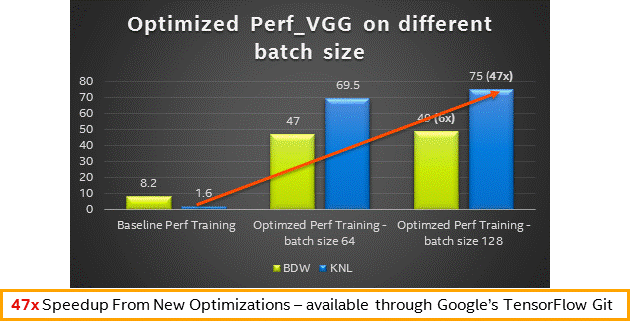
If you wish to down the Intel Optmised Tensor Flow, you can get


BLAS95 and LAPACK95 wrappers to Intel MKL are delivered both in Intel MKL and as source code which can be compiled to build to build standalone wrapper library with exactly the same functionality.
The source code for the wrappers, makefiles are found …..\interfaces\blas95 subdirectory in the Intel MKL Directory
For blas95
# cd $MKLROOT
# cd interfaces/blas95
# make libintel64  INSTALL_DIR=$MKLROOT/lib/intel64
Once Compiled, the libraries are kept $MKLROOT/lib/intel64
For Lapack95
# cd $MKLROOT
# cd interfaces/lapack95
# make libintel64  INSTALL_DIR=$MKLROOT/lib/intel64
Once Compiled, the libraries are kept $MKLROOT/lib/intel64
Selection of best available communication fabrics
Suggestion 1:
| I_MPI_DEVICE | I_MPI_FABRICS | Description |
|---|---|---|
| sock | tcp | TCP/IP-enable network fabrics, such as Ethernet and Infiniband* (through IPoIB*) |
| shm | shm | Shared-memory only |
| ssm | shm:tcp | Shared-memory + TCP/IP |
| rdma | dapl | DAPL-capable network fabrics, such as Infiniband*, iWarp*, Dolphon*, and XPMEM* (through DAPK*) |
| rdssm | shm:dapl | Shared-Memory + DAPL + sockers |
| ofa | OFA-capable network fabrics including Infiniband* (through OFED* verbs) | |
| tmi | TMI-capable network fabrics including Qlogic*, Myrinet* (through Tag Matching Interface) |
Suggestion 2:
| I_MPI_DAPL_UD | Values | Description |
|---|---|---|
| enable |
|
Suggestion 3:
| I_MPI_PERHOST | Values | Remarks |
|---|---|---|
| 1 | Make round-robin distirbution (Default value) | |
| all | Maps processes to all logical CPUs on a node | |
| allcores | Maps processes to all physical CPUs on a node |
Suggestion 4:
| I_MPI_SHM_BYPASS | Values | Remarks |
|---|---|---|
| disable | Set I_MPI_SHM_BYPASS* to ‘enable’ to turn on RDMA data exchange within single node that may outperform regular shared memory exchange. This is normally happens for large (350kb+) messages. |
Suggestion 5:
| I_MPI_ADJUST_ALLREDUCE | Values | Remarks |
|---|---|---|
| recursive doubling algorithm | 1 | |
| Rabenseifner’s algorithm | 2 | |
| Reduce + Bcast | 3 | |
| Topology aware Reduce + Bcast algorithm | 4 | |
| Binomial gather + scatter algorithm | 5 | |
| Topology Aware Binomial Gather + scatter algorithm | 6 | |
| Ring Algorithm | 7 |
Suggesion 6:
| I_MPI_WAIT_MODE | Values | Remarks |
|---|---|---|
| 1 | Set I_MPI_WAIT_MODE ‘to enable’ to try wait mode of the progress engine. The processes that waits for receiving that waits for receiving messages without polling of the fabrics(d) can save CPU time.
Apply wait mode to oversubscribe jobs |
References:
 The Linux Cluster