Learn how to use OpenGL to create 2D and 3D vector graphics in this course by Victor Gordan
Plan-Build-Run Organizational Model
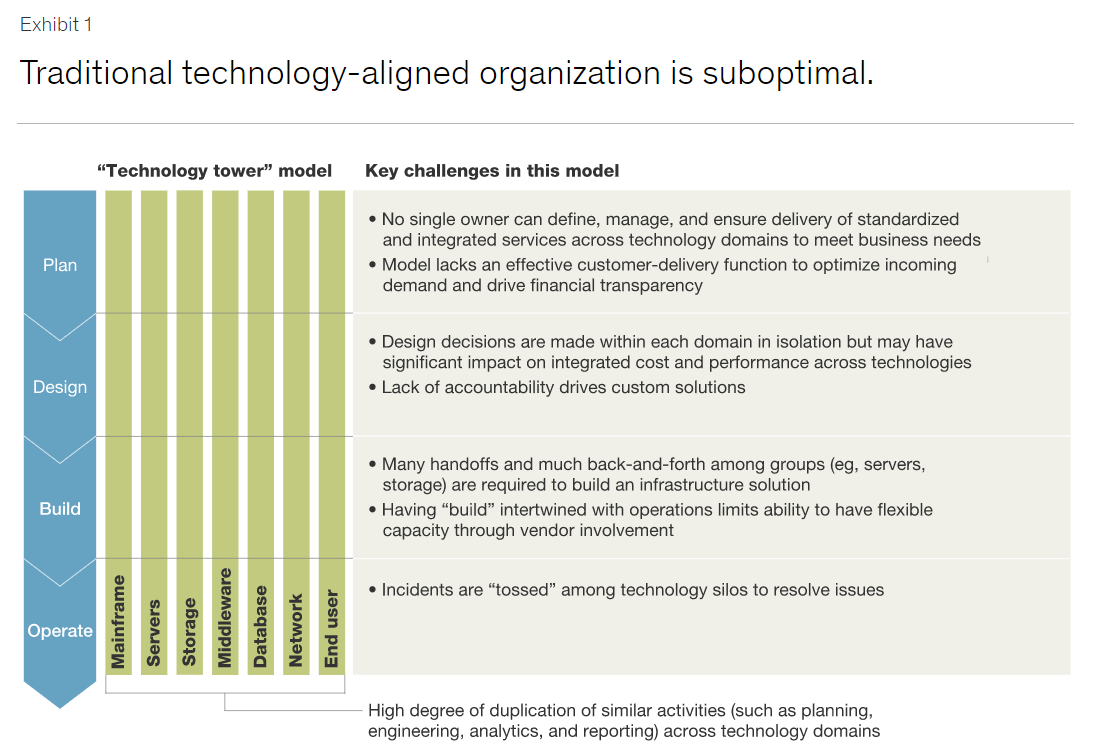
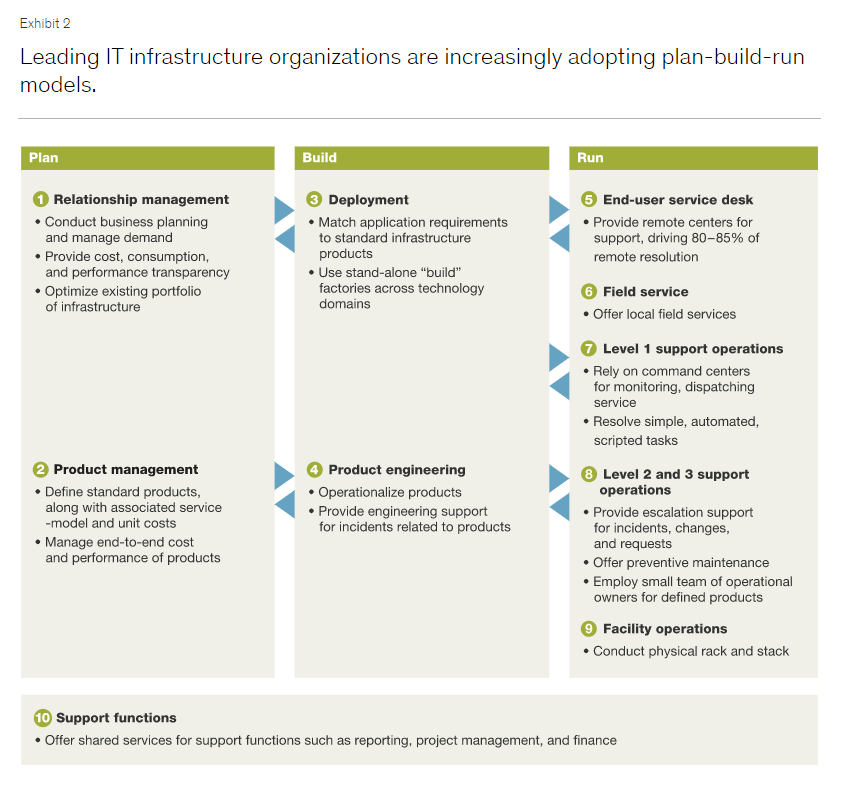
This is an interesting article published by McKinsey Digital how IT Infrastructure can reduce cost and improve performances. For more information, do look at the article Using a plan-build-run organizational model to drive IT infrastructure objectives


Extremely Low Thermal Conductivity material to insulate Space Craft
This video was demonstrated in 2011 and yet even now in 2021, I am still fascinated with science. Picking up a block at 2200 degree F with bare hand…. Wow… Enjoy
For more information, do take a look at
For more information about the Space Shuttle thermal tiles, how they work, what they are made of used on the Space Shuttle see Thermal Protection Systems. Enjoy
Intel 5G Vision: Unleash Network Modernization
5G is so much more than just delivering better broadband. It’s also about enabling service providers to deliver all sorts of vertical market, specific applications to unlock and unleash the potential across a wide variety of industries. And with that, we expect the network to truly be transformed, be very flexible, be very server-like, and utilize all sorts of cloud technologies to unleash the potential of all these wide variety of use cases.
Intel

Introducing Xeon Scalable Platforms with Lightbits Labs and FI-TS.
Compiling GAMESS-v2020.2 with Intel MPI
GAMESS Download Site can be found at https://www.msg.chem.iastate.edu/GAMESS/download/dist.source.shtml
Compiling GAMESS
% tar -zxvf gamess-current.tar.gz
% cd gamess
% ./config
You have to answer the following question on
- Machine Type? – I chose “linux64“
- GAMESS directory? -I chose “/usr/local/gamess“
- GAMESS Build Directory – I chose “/usr/local/gamess“
- Version? [00] – I chose default [00]
- Choice of Fortran Compilers – I chose “ifort”
- Version Number of ifort – I chose “18” (You can check by issuing the command ifort -V)
- Standard Math Library – I chose “mkl”
- Path of MKL – I chose “/usr/local/intel/2018u3/compilers_and_libraries_2018.3.222/linux/mkl“
- Type “Proceed” next
- Communication Library – I chose “mpi” (I’m using Infiniband)
- Enter MPI Library – I chose “impi“
- Enter Location of impi – I chose “/usr/local/intel/2018u3/impi/2018.3.222“
- Build experimental support of LibXC – I chose “no“
- Build Beta Version of Active Space CCT3 and CCSD3A – I chose “no“
- Build LIBCCHEM – I chose “no“
- Build GAMESS with OpenMP thread support – I chose “yes”
Once done, you should see
Your configuration for GAMESS compilation is now in
/usr/local/gamess/install.info
Now, please follow the directions in
/usr/local/gamess/machines/readme.unix
Compiling ddi
Edit DDI Node Sizes by editing /usr/local/gamess/ddi/compddi
Look at Line 90 and 91. You may want to edit MAXCPUS and MAXNODES. Once done, you can compile ddi
% ./compddi >& compddi.log &
Compiling GAMESS
The compilation will take a while. So relax…..
% ./compall >& compall.log &
Linking Executable Form of GAMESS with the command
./lked gamess 01 >& lked.log &
Edit the Scratch Directory setting at rungms
% vim rungms
set SCR=/scratch/$USER
Finding Top Processes using Highest Memory and CPU Usage in Linux
Read this Article from Find Top Running Processes by Highest Memory and CPU Usage in Linux. This is a quick way to view processes that consumed the largest RAM and CPU
ps -eo pid,ppid,cmd,%mem,%cpu --sort=-%mem | head
PID PPID CMD %MEM %CPU
414699 414695 /usr/local/ansys_inc/v201/f 20.4 98.8
30371 1 /usr/local/pbsworks/pbs_acc 0.2 1.0
32241 1 /usr/local/pbsworks/pbs_acc 0.2 4.0
30222 1 /usr/local/pbsworks/pbs_acc 0.2 0.6
7191 1 /usr/local/pbsworks/dm_exec 0.1 0.8
30595 1 /usr/local/pbsworks/pbs_acc 0.1 3.1
30013 1 /usr/local/pbsworks/pbs_acc 0.1 0.3
29602 29599 nginx: worker process 0.1 0.2
29601 29599 nginx: worker process 0.1 0.3
The -o is to specify the output format. The -e is to select all processes. In order to sort in descending format, it hsould be –sort=–%mem
Interesting.
Storage Performance Basics for Deep Learning

This is an interesting write-up from James Mauro from Nvidia on Storage Performance Basics for Deep Learning.
“The complexity of the workloads plus the volume of data required to feed deep-learning training creates a challenging performance environment. Deep learning workloads cut across a broad array of data sources (images, binary data, etc), imposing different disk IO load attributes, depending on the model and a myriad of parameters and variables.”
For Further Reads… Do take a look at https://developer.nvidia.com/blog/storage-performance-basics-for-deep-learning/
Accelerate Your End-to-End AI, Data Analytics and HPC Workflows with the NVIDIA NGC Catalog
The NGC catalog is a hub of GPU-optimized AI, high-performance computing (HPC), and data analytics software that simplifies and accelerates end-to-end workflows
GTC 2021 Keynote with NVIDIA CEO Jensen Huang
NVIDIA CEO Jensen announced NVIDIA’s first data center CPU, Grace, named after Grace Hopper, a U.S. Navy rear admiral and computer programming pioneer. Grace is a highly specialized processor targeting largest data intensive HPC and AI applications as the training of next-generation natural-language processing models that have more than one trillion parameters.
Further accelerating the infrastructure upon which hyperscale data centers, workstations, and supercomputers are built, Huang announced the NVIDIA BlueField-3 DPU.
The next-generation data processing unit will deliver the most powerful software-defined networking, storage and cybersecurity acceleration capabilities.
Where BlueField-2 offloaded the equivalent of 30 CPU cores, it would take 300 CPU cores to secure, offload, and accelerate network traffic at 400 Gbps as BlueField-3— a 10x leap in performance, Huang explained.