Myths and Legends in High-Performance Computing

Abstract Taken form Myths and Legends in High-Performance Computing

In this humorous and thought provoking article, we discuss certain myths and legends that are folklore among members of the high-performance computing community. We collected those myths from conversations at conferences and meetings, product advertisements, papers, and other communications such as tweets, blogs, and news articles within (and beyond) our community. We believe they represent the zeitgeist of the current era of massive change, driven by the end of many scaling laws such as ennard scaling and Moore’s law. While some laws end, new directions open up, such as algorithmic scaling or novel architecture research. However, these myths are rarely based on scientific facts but often on some evidence or argumentation. In fact, we believe that this is the very reason for the existence of many myths and why they cannot be answered clearly. While it feels like there should be clear answers for each, some may remain endless philosophical debates such as the question whether Beethoven was better than Mozart. We would like to see our collection of myths as a discussion of possible new directions for research and industry investment

Myths and Legends in High-Performance Computing

The article addresses the follow myths

  • Myth 1: Quantum Computing Will Take Over HPC!
  • Myth 2: Everything Will Be Deep Learning!
  • Myth 3: Extreme Specialization as Seen in Smartphones Will Push Supercomputers Beyond Moore’s Law!
  • Myth 4: Everything Will Run on Some Accelerator!
  • Myth 5: Reconfigurable Hardware Will Give You 100X Speedup!
  • Myth 6: We Will Soon Run at Zettascale!
  • Myth 7: Next-Generation Systems Need More Memory per Core!
  • Myth 8: Everything Will Be Disaggregated!
  • Myth 9: Applications Continue to Improve, Even on Stagnating Hardware!
  • Myth 10: Fortran Is Dead, Long Live the DSL!
  • Myth 11: HPC Will Pivot to Low or Mixed Precision!
  • Myth 12: All HPC Will Be Subsumed by the Clouds!

Basic Ansible Introductory Learning Notes

I have been learning from this book Fabio Alessandro Locati, published under Packt>

I thought I just capture a few learning notes as I read.

Introduction to Playbooks

Playgroups are one of the core features of Ansible and tell what Ansible what to execute. They are like a do-list for Ansible that contains a list of tasks; each task internally links to a piece of code called a module

- hosts: all 
  remote_user: vagrant
  tasks: 
    - name: Ensure the HTTPd package is installed 
      yum: 
        name: httpd 
        state: present 
      become: True 
    - name: Ensure the HTTPd service is enabled and running 
      service: 
        name: httpd 
        state: started 
        enabled: True 
      become: True 

What it means?

  • hosts: List the Host or Host groups. The Host field is required. The –list-hosts-host will let us know which hosts the playbook is using.
  • remote_user: The user Ansible will be using while logging onto the system.
  • There are 2 tasks.
    • The first one is to ensure that the httpd package is present
    • The 2nd one is to enable the httpd service is enabled and running
  • The tasks are quite self-explanatory.
  • become: True. The commands should be executed with sudo access. If the sudo user’s file does not allow the user to run the particular command, the command will fail

Running a Playbook

$ ansible-playbook -i host setup_apache.yml

Ansible Verbosity

You can increase the verbosity by using the parameter -v, -vv or -vvv

Variables in Ansible

---
- hosts: all
  remote_user: vagrant
  tasks: 
    - name: Print OS and version
      debug:
        msg: '{{ ansible_distribution }} {{ ansible_distribution_version }}'

Creating the Ansible User

--- 
- hosts: all 
  user: vagrant 
  tasks: 
    - name: Ensure ansible user exists 
      user: 
        name: ansible 
        state: present 
        comment: Ansible 
      become: True
    - name: Ensure ansible user accepts the SSH key 
      authorized_key: 
        user: ansible 
        key: https://github.com/fale.keys 
        state: present 
      become: True
    - name: Ensure the ansible user is sudoer with no password required 
      lineinfile: 
        dest: /etc/sudoers 
        state: present 
        regexp: '^ansible ALL\=' 
        line: 'ansible ALL=(ALL) NOPASSWD:ALL' 
        validate: 'visudo -cf %s'
      become: True

The lineinfile is an interesting module. It works in a similar way to sed (a stream editor) where you specify the regular expression that will be used to match the line, and then specify the new line that will be used to substitute the matched line.

World’s first hydrogen-powered off-grid data centre announced

‘Data Centre-as-a-Service’ pioneer, ECL, has announced the launch of what it claims is the world’s first modular, sustainable, off-grid data centre that uses green hydrogen as its primary power source. The company further claims to be able to deliver data centres in one megawatt (MW) blocks that can achieve 99.9999 per cent uptime.
…..
…..
While other data center providers have deployed hydrogen fuel cells as backup power supplies, and with some conducting trials of systems forecast for production delivery in three-to-five years, ECL asserts that it is the first provider to deliver a fully-green hydrogen-powered data centre. This leapfrog innovation is enabled by bringing together several disruptive technologies including green hydrogen-based power generation, battery energy storage and highly reliable power architecture without dependence on the utility grid.
…..
…..
ECL also said that its cooling innovations enable much higher density-per-rack than traditional data centre providers, a strong benefit given the increasing per-server power consumption driven by accelerating chip and system density. Water created as a by-product of hydrogen-based power generation is used to cool ECL’s server racks, eliminating the need for external water sources. Combining this with proprietary rear door heat exchange technology results in lower Power Usage Effectiveness (PUE) ratios than any other colocation data centre provider.

World’s first hydrogen-powered off-grid data centre announced

Open Source – Policy Plus for All Windows Edition

This is not an entry for Linux, but for Open Source

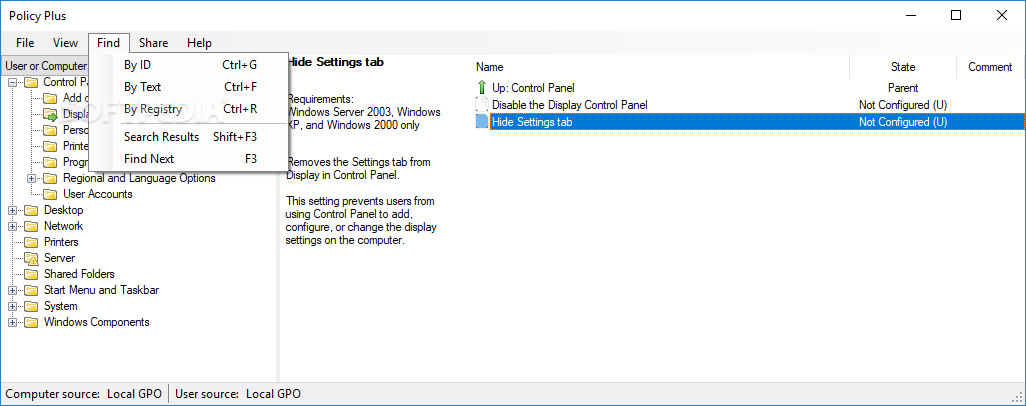
If you require an Open-Source Local Group Policy for All Windows Editions including Home, you may want to consider Policy Plus

According to the Project Websie

Policy Plus is intended to make the power of Group Policy settings available to everyone.

  • Run and work on all Windows editions, not just Pro and Enterprise
  • Comply fully with licensing (i.e. transplant no components across Windows installations)
  • View and edit Registry-based policies in local GPOs, per-user GPOs, individual POL files, offline Registry user hives, and the live Registry
  • Navigate to policies by ID, text, or affected Registry entries
  • Show additional technical information about objects (policies, categories, products)
  • Provide convenient ways to share and import policy settings