Installing GPFS 3.4 Packages

In this work-in-progress tutorial, I will write how to install the packages and compile portability layer (gpfs.gplbin) for each kernel or  architecture

First thing first, you may have to do a  yum install for ksh and rsh

# yum install ksh rsh compat-libstdc++-33 gcc-c++ imake kernel-devel kernel-headers libstdc++ redhat-lsb

Unpacked the GPFS rpms on the nodes. Remember to unpack the gpfs.base first before installing the gpfs.base update rpm

# rpm -ivh gpfs.base-3.4.0-0.x86_64.rpm
# rpm -ivh gpfs.base-3.4.0-12.x86_64.update.rpm
# rpm -ivh gpfs.docs-3.4.0-12.noarch.rpm
# rpm -ivh gpfs.gpl-3.4.0-12.noarch.rpm
# rpm -ivh gpfs.msg.en_US-3.4.0-12.noarch.rpm

Build the portability layer based on your architecture. I’m using CentOS

# cd /usr/lpp/mmfs/src
# make LINUX_DISTRIBUTION=REDHAT_AS_LINUX Autoconfig
# make World
# make InstallImages
# make rpm

The resulting customised package will be placed in  /usr/src/redhat/RPMS/x86_64/gpfs.gplbin-2.6.18-164.el5-3.4.0-12.x86_64.rpm

# cd /usr/src/redhat/RPMS/x86_64/gpfs.gplbin-2.6.18-164.el5-3.4.0-12.x86_64.rpm
# rpm -ivh gpfs.gplbin-2.6.18-164.el5-3.4.0-12.x86_64.rpm

Related information:

  1. Adding nodes to a GPFS cluster

Adding nodes to a GPFS cluster

Assumption:

  1. You have to exchange SSH keys between GPFS nodes and Servers. For more information on key exchange, you can take a look at Auto SSH Login without Password
  2. You have installed the gpfs packages. See Installing GPFS 3.4 Packages

You must follow these rules when adding nodes to a GPFS cluster:

  • You may issue the command only from a node that already belongs to the GPFS cluster.
  • A node may belong to only one GPFS cluster at a time.
  • The nodes must be available for the command to be successful. If any of the nodes listed are not available when the command is issued, a message listing those nodes is displayed. You must correct the problem on each node and reissue the command to add those nodes.
  • After the nodes are added to the cluster, you must use the mmchlicense command to designate appropriate GPFS licenses to the new nodes.

To add node2 to the GPFS cluster, enter:

# mmaddnode -N node2
The system displays information similar to:
Mon Aug 9 21:53:30 EDT 2004: 6027-1664 mmaddnode: Processing node2
mmaddnode: Command successfully completed
mmaddnode: 6027-1371 Propagating the changes to all affected nodes.
This is an asynchronous process.

To confirm the addition of the nodes, enter:

# mmlscluster

The system displays information similar to:

GPFS cluster information
========================
  GPFS cluster name:         gpfs_cluster
  GPFS cluster id:           680681562214606028
  GPFS UID domain:           gpfs_cluster.com
  Remote shell command:      /usr/bin/rsh
  Remote file copy command:  /usr/bin/rcp

GPFS cluster configuration servers:
-----------------------------------
  Primary server:    nsd1
  Secondary server:  nsd2

 Node  Daemon node name        IP address       Admin node name         Designation
--------------------------------------------------------------------------------------
   1   nsd1                    198.117.68.68      nsd1                  quorum
   2   nsd2                    198.117.68.69      nsd2                  quorum
   3   node2                   198.117.68.70      node2

At the GPFS Clients, remember to add the path in your .bashrc

export PATH=$PATH:/usr/lpp/mmfs/bin

Update the License file of GPFS. Do make sure you have purchased your licenses from IBM. My license file is located at /gpfs_install

# vim /gpfs_install/license_client.lst
node1
node2

Issue the mmchlicense command to set the license nodes in the cluster. Make sure you have purchased the licenses from IBM.

# mmchlicense client --accept -N license_client.lst
node1
node2
mmchlicense: Command successfully completed
mmchlicense: Propagating the cluster configuration data to all affected nodes.  This is an asynchronous process.

Use the mmstartup command to start the GPFS daemons on one or more nodes. If you wish to specify only a node to startup

# mmstartup -N node2

You should see the /dev/gpfs_data mounted on the client node.

Taxonomy of File System (Part 2)

This writeup is a replica subset copy of the presentation of “How to Build a Petabyte Sized Storage System” by Dr. Ray Paden as given in LISA’09. This information is critical for Administrators to make decision on File Systems. For full information do look at “How to Build a Petabyte Sized Storage System”

Taxonomy of File System (Part 1) dealt with 3 file system – Convention I/O, Networked File System, Networked Attached Storage.

4. Basic Clustered File Systems

  1. File access is parallel
    • supports POSIX API, but provides safe parallel file access semantics
  2. File system overhead operations
    • File System overhead operations is distributed and done in parallel
    • No single server bottlenecks ie no metadata servers
  3. Common component architecture
    • commonly configred using seperate file clients and file servers (costs too much to have a seperate storage controller for every node)
    • some file system allow a single component architecture where file clients and file serves are combined (ie no distinction between client and server -> yield very good scalling for async applications)
  4. File System access file data through file servers via the LAN
  5. Example: GPFS, GFS, IBRIX Fusion

5. SAN File Systems

  1. File access in parallel
    • supports POSIX API, but provides parallel file access semantics
  2. File System overhead operations
    • Not done in parallel
    • single metadata with a backup metadata server
    • metadata server is accessed via LAN
    • metadata server is a potential bottleneck, but this is not considered a limitation since these file system are generally used for smaller cluster.
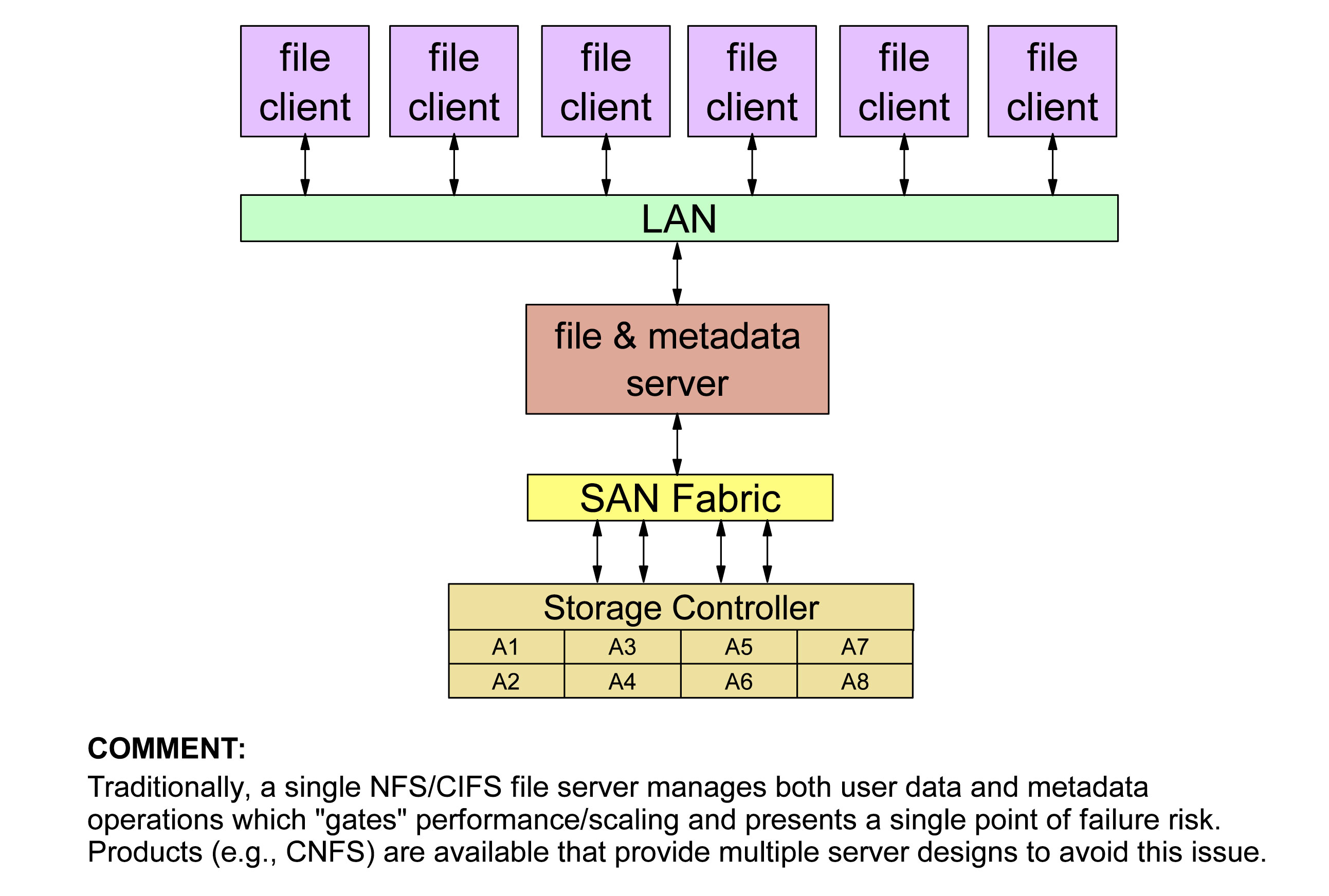
  3. Dual Component Architecture
    • file client/server and metadata server
  4. All disks connected to all file client/server nodes via the SAN, not the LAN
    • file data accessed via the SAN, not the LAN
    • inhibits scaling due to cost of FC SAN
  5. Examples: Stornext, CXFS, QFS

6. Multi-Components File System

  1. File access in parallel
    • Supports POSIX API
  2. File System overhead operations
    • Lustre: metadata server per file system (with backup) accessed via LAB
    • Lustre: potential bottleneck (deploy multiple file systems to avoid backup)
    • Panasas: Director Blade manages protocol
    • Panasas: contains a director blade and 10 disks accessible via Rthernet
    • Pasanas: This provides multiple metadata servers reducing contention
  3. Multi-Component Architecture
    • Lustre: file clients, file servers, metadata servers
    • Panasas: file clients, director blade
    • Panasas: Director Blade encapsulates file service, metadata service,storage controller operations
  4. File clients access file data through file servers or director blades via the LAN
  5. Examples: Lustre, Panasas

Taxonomy of File System (Part 1)

This writeup is a replica subset copy of the presentation of “How to Build a Petabyte Sized Storage System” by Dr. Ray Paden as given in LISA’09. This information is critical for Administrators to make decision on File Systems. For full information do look at “How to Build a Petabyte Sized Storage System”

1. Conventional I/O

  1. Used generally for “Local File Systems”
  2. Support POSIX I/O  model
  3. Limited form of parallelism
    • Disk level parallelism possible via striping
    • Intra-Node process parallelism (within the node)
  4. Journal extent based semantics
    • Journalling (AKA logging). Log information about operations performed on the file system meta-data as atomic transactions. In the event of a system failure, a file system is restored to a consistent state by replaying the log for the appropriate transactions.
  5. Caching is done via Virtual Memory which is slow….
  6. Example: ext3, NTFS, ReiserFS

2. Networked File Systems

  1. Disk access from remote nodes via network access
    • Generally based TCP/IP over ethernet
    • Useful for in-line interactive access (e.g. home directories)
  2. NFS is ubiquitos in UNIX/Linux Environments
    • Does not provide genuinely parallel model of I/O
      • Not cache coherent
      • Parallel write requires o_sync and -noac options to be safe
    • Poorer performance for HPC jobs especially parallel I/O
      • write: only 90MB/s on system capable of 400MB/s (4 tasks)
      • read: only 381 MB/s on a system capable of 40MB/s (16 tasks)
    • Used POSIX I/O API, but not its esmantics
    • Traditional NFS is limited by “single server” bottleneck
    • Parallel is not designed for parallel file access, by placing restriction on an file access and/or doing non-parallel file server, it may be good enough performance.

3. Network Attached Storage (AKA: Appliances)

  1. Appliance Concept
    • Focused on CIFS and/or NFS protocols
    • Integrated HW/SW storage product
      • Integrate servers, storage controllers, disks, networks, file system, protocol all into single product
      • Not intended for high performance storage
      • “black box” design
    • Provides an NFS server and/or CIFS/Samba solution
      • Server-based product; they do not improve client access or operation
      • Generally based on Ethernet LANS
    • Examples:
      • NetApp, Scale-out File System (SoFS)

Which File System Blocksize is suitable for my system?

Taken from IBM Developer Network “File System Blocksize”

Although the article has referenced to General Parallel File System (GPFS), but there are many good pointers System Administrators can take note of.

Here are some excerpts from the article……..

This is one question that many system administrator asked before we start preparing the system. How do choose a blocksize for your file system? IBM Developer Network (File System Blocksize) recommends the following block size for various type of application.

IO Type Application Examples Blocksize
Large Sequential IO Scientific Computing, Digital Media 1MB to 4MB
Relational Database DB2, Oracle 512kb
Small I/O Sequential General File Service, File based Analytics,Email, Web Applications 256kb
Special* Special 16KB-64KB

What if I do not know my application IO profile?

Often you do not have good information on the nature of the IO
profile or the applications are so diverse it is difficult to optimize
for one or the other. There are generally two approaches to designing
for this type of situation separation or compromise.

Separation

In this model you create two file systems, one with a large file system blocksize for sequential applications and one with a smaller block size for small file applications. You can gain benefits from having file systems of two different block sizes even on a single type of storage. Or you can use different types of storage for each file system to further optimize to the workload. In either case the idea is that you provide two file systems to your end users, for scratch space on a compute cluster for example. Then the end users can run tests themselves by pointing the application to one file system or another to and determining by direct testing which is best for their workload. In this situation you may have one file system optimized for sequential IO with a 1MB blocksize and one for more random workloads at 256KB block size.

Compromise

In this situation you either do not have sufficient information on workloads (i.e. end users won’t think about IO performance) or enough storage for multiple file systems. In this case it is generally recommended to go with a blocksize of 256KB or 512KB depending on the general workloads and storage model used. With a 256KB block size you will still get good sequential performance (though not necessarily peak marketing numbers) and you will get good performance and space utilization with small files (256KB has minimum allocation of 8KB to a file). This is a good configuration for multi-purpose research workloads where the application developers are focusing on their algorithms more than IO optimization.