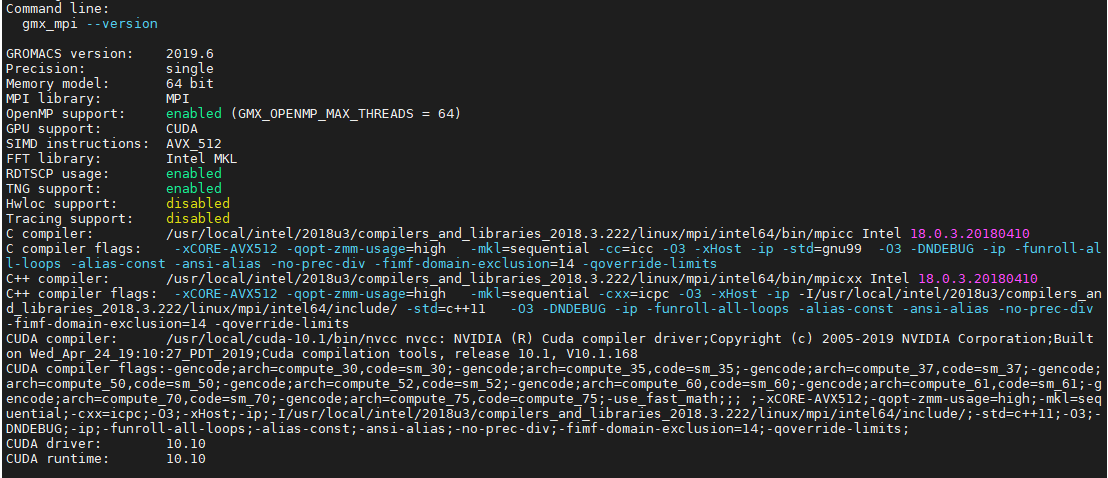
To test whether you have compiled your GROMACS correctly with the CUDA drivers and runtime. You can use the command
% gmx_mpi --version
You should see
GPU support: CUDA ..... ..... CUDA driver: 10.10 CUDA runtime: 10.10
How to install CUDA Python followed by a tutorial on how to run a Python example on a GPU
GCC-6.5 Compilers and associates libraries
m4-1.4.18
mpfr-3.1.4
cmake-3.15.1
gmp-6.1.0
mpc-1.0.3
% source /usr/local/intel/2018u3/bin/compilervars.sh intel64
% source /usr/local/intel/2018u3/impi/2018.3.222/bin64/mpivars.sh intel64
% source /usr/local/intel/2018u3/mkl/bin/mklvars.sh intel64
% source /usr/local/intel/2018u3/parallel_studio_xe_2018/bin/psxevars.sh intel64
% MKLROOT=/usr/local/intel/2018u3/mkl
Create a setup file
% touch gromacs_gpgpu.sh
Put the following into the gromacs_cpu.sh
CC=mpicc CXX=mpicxx cmake .. -DCMAKE_C_COMPILER=mpicc -DCMAKE_CXX_COMPILER=mpicxx -DGMX_MPI=on -DGMX_FFT_LIBRARY=mkl
-DCMAKE_INSTALL_PREFIX=/usr/local/gromacs-2019.3_intel18_mkl_cuda10.1 -DREGRESSIONTEST_DOWNLOAD=ON
-DCMAKE_C_FLAGS:STRING="-cc=icc -O3 -xHost -ip"
-DCMAKE_CXX_FLAGS:STRING="-cxx=icpc -O3 -xHost -ip -I/usr/local/intel/2018u3/compilers_and_libraries_2018.3.222/linux/mpi/intel64/include/"
-DGMX_GPU=on
-DCUDA_TOOLKIT_ROOT_DIR=/usr/local/cuda-10.1
-DCMAKE_BUILD_TYPE=Release
-DCUDA_HOST_COMPILER:FILEPATH=/usr/local/intel/2018u3/compilers_and_libraries_2018.3.222/linux/bin/intel64/icpc
% ./gromacs_gpgpu.sh
% make
% make install
$ source /your/installation/prefix/here/bin/GMXRC
./gmxtest.pl all -np 2
This is a white Paper from Nvidia which is an interesting information for easy deployment of DGX Servers for Deep Learning
Taken from Developing a Linux Kernel Module using GPUDirect RDMA
1.0 Overview
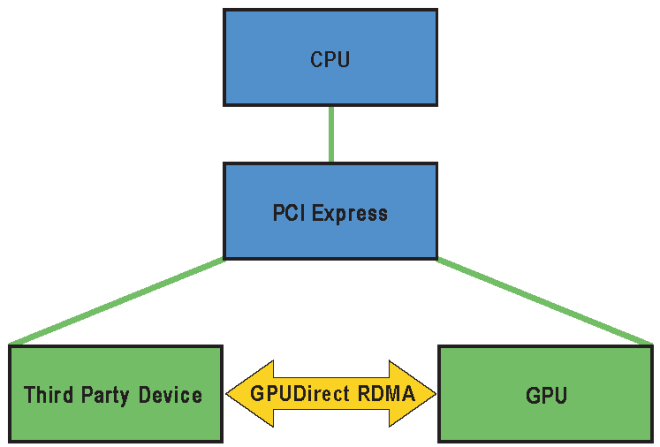
GPUDirect RDMA is a technology introduced in Kepler-class GPUs and CUDA 5.0 that enables a direct path for data exchange between the GPU and a third-party peer device using standard features of PCI Express. Examples of third-party devices are: network interfaces, video acquisition devices, storage adapters.
GPUDirect RDMA is available on both Tesla and Quadro GPUs.
A number of limitations can apply, the most important being that the two devices must share the same upstream PCI Express root complex. Some of the limitations depend on the platform used and could be lifted in current/future products.
A few straightforward changes must be made to device drivers to enable this functionality with a wide range of hardware devices. This document introduces the technology and describes the steps necessary to enable an GPUDirect RDMA connection to NVIDIA GPUs on Linux.
1.1. How GPUDirect RDMA Works
When setting up GPUDirect RDMA communication between two peers, all physical addresses are the same from the PCI Express devices’ point of view. Within this physical address space are linear windows called PCI BARs. Each device has six BAR registers at most, so it can have up to six active 32bit BAR regions. 64bit BARs consume two BAR registers. The PCI Express device issues reads and writes to a peer device’s BAR addresses in the same way that they are issued to system memory.
Traditionally, resources like BAR windows are mapped to user or kernel address space using the CPU’s MMU as memory mapped I/O (MMIO) addresses. However, because current operating systems don’t have sufficient mechanisms for exchanging MMIO regions between drivers, the NVIDIA kernel driver exports functions to perform the necessary address translations and mappings.
To add GPUDirect RDMA support to a device driver, a small amount of address mapping code within the kernel driver must be modified. This code typically resides near existing calls to get_user_pages().
The APIs and control flow involved with GPUDirect RDMA are very similar to those used with standard DMA transfers.
References:
Read more at: http://docs.nvidia.com/cuda/gpudirect-rdma/index.html
Configuration parameters for Compiling OpenMPI-1.8.8 with Intel Compiler and CUDA can be found here.
# ./configure --prefix=/usr/local/openmpi-1.8.8-gpu_intel-15.0.7 CC=icc CXX=icpc F77=ifort FC=ifort --with-devel-headers --enable-binaries --with-cuda=/usr/local/cuda/ # make -j 16 # make all
References:
This note is derived from How to install Nvidia CUDA environment in RHEL 6? It works for me.
Step 1: Install kernel
# yum install kernel-devel kernel-headers -y
Step 2: Download and Install Cuda Toolkit
Step 3: Configure CUDA Toolkit
# echo -e "/usr/local/cuda-7.5/lib64\n/usr/local/cuda-7.5/lib" > /etc/ld.so.conf./cuda.conf # echo "export PATH=/usr/local/cuda-7.5/bin:$PATH" > /etc/profile.d/cuda.sh # /sbin/ldconfig
Step 4: Disable Noveau Driver
# echo -e "\nblacklist nouveau" >> /etc/modprobe.d/blacklist.conf
# dracut -f /boot/initramfs-`rpm -qa kernel --queryformat "%{PROVIDEVERSION}.%{ARCH}\n" | tail -1`.img `rpm -qa kernel --queryformat "%{PROVIDEVERSION}.%{ARCH}\n" | tail -1`
Step 5: Reboot the Server
Step 6: Check Supported Nvidia Card
[root@comp1 ~]# lspci -d "10de:*" -v 84:00.0 3D controller: NVIDIA Corporation GK110BGL [Tesla K40m] (rev a1) Subsystem: NVIDIA Corporation Device 097e Flags: bus master, fast devsel, latency 0, IRQ 64 Memory at c9000000 (32-bit, non-prefetchable) [size=16M] Memory at 3c400000000 (64-bit, prefetchable) [size=16G] Memory at 3c3fe000000 (64-bit, prefetchable) [size=32M] Capabilities: [60] Power Management version 3 Capabilities: [68] MSI: Enable- Count=1/1 Maskable- 64bit+ Capabilities: [78] Express Endpoint, MSI 00 Capabilities: [100] Virtual Channel Capabilities: [128] Power Budgeting <?> Capabilities: [420] Advanced Error Reporting Capabilities: [600] Vendor Specific Information: ID=0001 Rev=1 Len=024 <?> Capabilities: [900] #19 Kernel driver in use: nvidia Kernel modules: nvidia, nouveau, nvidiafb
NVIDIA’s System Management Interface (nvidia-smi) is a useful tool to manipulate and control the GPU Cards. There are a few use case listed here
1. Listing of NVIDIA GPU Cards
# nvidia-smi -L GPU 0: Tesla M2070 (S/N: 03212xxxxxxxx) GPU 1: Tesla M2070 (S/N: 03212yyyyyyyy)
2. Display GPU information
# nvidia-smi -i 0 -q ==============NVSMI LOG============== Timestamp : Sun Jul 28 23:49:20 2013 Driver Version : 295.41 Attached GPUs : 2 GPU 0000:19:00.0 Product Name : Tesla M2070 Display Mode : Disabled Persistence Mode : Disabled Driver Model Current : N/A Pending : N/A Serial Number : 03212xxxxxxxx GPU UUID : GPU-xxxxxxxx-xxxx-xxxx-xxxx-xxxxxxxx VBIOS Version : 70.00.3E.00.03 Inforom Version OEM Object : 1.0 ECC Object : 1.0 Power Management Object : 1.0 PCI Bus : 0x19 Device : 0x00 Domain : 0x0000 Device Id : 0xxxxxxxxx Bus Id : 0000:19:00.0 Sub System Id : 0x083010DE GPU Link Info PCIe Generation Max : 2 Current : 2 Link Width Max : 16x Current : 16x Fan Speed : N/A Performance State : P0 Memory Usage Total : 6143 MB Used : 10 MB Free : 6132 MB Compute Mode : Exclusive_Thread Utilization Gpu : 0 % Memory : 0 % Ecc Mode Current : Disabled Pending : Disabled ECC Errors Volatile Single Bit Device Memory : N/A Register File : N/A L1 Cache : N/A L2 Cache : N/A Total : N/A Double Bit Device Memory : N/A Register File : N/A L1 Cache : N/A L2 Cache : N/A Total : N/A Aggregate Single Bit Device Memory : N/A Register File : N/A L1 Cache : N/A L2 Cache : N/A Total : N/A Double Bit Device Memory : N/A Register File : N/A L1 Cache : N/A L2 Cache : N/A Total : N/A Temperature Gpu : N/A Power Readings Power Management : N/A Power Draw : N/A Power Limit : N/A Clocks Graphics : 573 MHz SM : 1147 MHz Memory : 1566 MHz Max Clocks Graphics : 573 MHz SM : 1147 MHz Memory : 1566 MHz Compute Processes : None
3. Display selected GPU Information (MEMORY, UTILIZATION, ECC, TEMPERATURE, POWER, CLOCK, COMPUTE, PIDS, PERFORMANCE)
# nvidia-smi -i 0 -q -d MEMORY,ECC ==============NVSMI LOG============== Timestamp : Mon Jul 29 00:04:36 2013 Driver Version : 295.41 Attached GPUs : 2 GPU 0000:19:00.0 Memory Usage Total : 6143 MB Used : 10 MB Free : 6132 MB Ecc Mode Current : Disabled Pending : Disabled ECC Errors Volatile Single Bit Device Memory : N/A Register File : N/A L1 Cache : N/A L2 Cache : N/A Total : N/A Double Bit Device Memory : N/A Register File : N/A L1 Cache : N/A L2 Cache : N/A Total : N/A Aggregate Single Bit Device Memory : N/A Register File : N/A L1 Cache : N/A L2 Cache : N/A Total : N/A Double Bit Device Memory : N/A Register File : N/A L1 Cache : N/A L2 Cache : N/A Total : N/A