GPFS NSD Nodes stuck in Arbitrating Mode

One of our GPFS NSD Nodes are forever stuck in arbitrating nodes. One of the symptoms that was noticeable was that the users was able to log-in but unable to do a “ls” of their own directories. You can get a quick deduction by looking at one of the NSD Nodes. For this kind of issues, do a mmdiag –waiters first. There are limited articles on this

# mmdiag --waiters 

.....
.....
0x7FB0C0013D10 waiting 27176.264845756 seconds, SharedHashTabFetchHandlerThread: 
on ThCond 0x1C0000F9B78 (0x1C0000F9B78) (TokenCondvar), reason 'wait for SubToken to become stable'

References:

  1. IZ17622: GPFS DEADLOCK WAITING FOR SUBTOKEN TO BECOME STABLE CAUSES HANG
  2. GPFS File System Deadlock

Here is how PMR Solution to collect information to help resolve the issue.

The steps below will gather all the docs you could provide in terms of first time data capture given an unknown problem.   Do these steps for all your performance/hang/unknown GPFS issues WHEN the problem is occurring.  Commands are executed from one node.  Collection of the docs will vary based on the working collective created below.
.
1) Gather waiters and create working collective. It can be good to get  multiple looks at what the waiters are and how they have changed,  so doing the first mmlsnode command (with the -L) numerous times  as you proceed through the steps below  might be helpful (specially
if issue is pure performance, no hangs).
.

# mmlsnode -N waiters -L  > /tmp/allwaiters.$(date +"%m%d%H%M%S")
# mmlsnode -N waiters > /tmp/waiters.wcoll

.
View allwaiters and waiters.wcoll files to verify that these files are not empty.
.
If either (or both) file(s) are empty, this indicates that the issues seen are not GPFS waiting on any of it’s threads.  Docs to be gathered in this case will vary.  Do not continue with steps.  Tell Service person and they will determine the best course of action and what docs will be needed.
.
2) Gather internaldump from all nodes in the working collective
.

# mmdsh -N /tmp/waiters.wcoll "/usr/lpp/mmfs/bin/mmfsadm dump all > /tmp/\$(hostname -s).dumpall.\$(date +"%m%d%H%M%S")"

.
3) Gather kthreads from all nodes in the working collective
.
Depending on various factors, this command can take a long time
to complete.   If not specifically looking for kernel threads, this
step can be skipped. If command is running it can stopped by
ctrl-C.
.

# mmdsh -N /tmp/waiters.wcoll "/usr/lpp/mmfs/bin/mmfsadm dump kthreads > /tmp/\$(hostname -s).kthreads.\$(date +"%m%d%H%M%S")"

.
4) If this is a performance problem, get 60 seconds mmfs trace from the
nodes in the working collective.
.
If AIX …
.

# mmtracectl --start --aix-trace-buffer-size=64M --trace-file-size=128M -N /tmp/waiters.wcoll ; sleep 60; mmtracectl --stop -N /tmp/waiters.wcoll

.
If Linux ..
.

# mmtracectl --start i--trace-file-size=128M -N /tmp/waiters.wcoll ; sleep 60; mmtracectl --stop -N /tmp/waiters.wcoll

.
5) Gather gpfs.snap from same nodes.
.

# gpfs.snap -N /tmp/waiters.wcoll

.
Gather the docs taken. Steps 1) and 5) will be on the local node, in /tmp and /tmp/gpfs.snapOut respectively and steps 2) and 3) will be in /tmp on the nodes represented in the waiters.wcoll file. The gpfs.snap will pick up the trcrpt in /tmp/mmfs

Many times steps 3) and 4) are not needed unless asked for.  If supplied they may or may not be used.  If there are any issues collecting doc, Steps 1), 2) and 5) are the most critical.


Solution:

1) The all waiters show:

nsd1:  0x2AAAACC659F0 waiting 31358.847013000 seconds, GroupProtocolDriverThread: 
on ThCond 0x5572138 (0x5572138) (MsgRecordCondvar), reason 'RPC wait' for ccMsgGroupLeave
nsd1:  0x2AAAACC659F0 waiting 31358.847013000 seconds, GroupProtocolDriverThread: 
on ThCond 0x5572138 (0x5572138) (MsgRecordCondvar), reason 'RPC wait' for ccMsgGroupLeave

2) Looking at the tscomm section to see which node is “pending”:

Output for mmfsadm dump tscomm on nsd1
######################################################################

Pending messages:
msg_id 345326326, service 1.1, msg_type 26 'ccMsgGroupLeave', n_dest 470, n_pending 1
this 0x5571F90, n_xhold 1, cl 0, cbFn 0x0, age 33501 sec
sent by 'GroupProtocolDriverThread' (0x2AAAACC659F0)

.
.
.
dest <c0n3>          status pending   , err 0, reply len 0
c0n3> 10.x.x.x/0, x.y.y.u (nsd2)

3) Waiters for nsd2 show the following:

nsd2:  0x2AAAAC9F5A50 waiting 193857.401337000 seconds, NSDThread: 
on ThCond 0x2AAAC01CA600 (0x2AAAC01CA600) (VERBSEventWaitCondvar), reason 'waiting for RDMA write DTO completion'
nsd2:  0x2AAAAC9F33D0 waiting 193856.387375000 seconds, NSDThread: 
on ThCond 0x2AAAD806B190 (0x2AAAD806B190) (VERBSEventWaitCondvar), reason 'waiting for RDMA write DTO completion'
nsd2:  0x2AAAAC9F2090 waiting 193857.691998000 seconds, NSDThread: 
on ThCond 0x2AAAD40A0F90 (0x2AAAD40A0F90) (VERBSEventWaitCondvar), reason 'waiting for RDMA write DTO completion'
nsd2:  0x2AAAAC9DC610 waiting 193857.589074000 seconds, NSDThread: 
on ThCond 0x2AAAC81B2DE0 (0x2AAAC81B2DE0) (VERBSEventWaitCondvar), reason 'waiting for RDMA read DTO completion'
nsd2:  0x2AAAAC9D8C50 waiting 193857.406763000 seconds, NSDThread: 
on ThCond 0x2AAAC01FE5E0 (0x2AAAC01FE5E0) (VERBSEventWaitCondvar), reason 'waiting for RDMA write DTO completion'
nsd2:  0x2AAAAC9CDF10 waiting 193857.692074000 seconds, NSDThread: 
on ThCond 0x2AAAD806F120 (0x2AAAD806F120) (VERBSEventWaitCondvar), reason 'waiting for RDMA write DTO completion'
nsd2:  0x2AAAAC9CB890 waiting 193857.686966000 seconds, NSDThread: 
on ThCond 0x2AAABC140880 (0x2AAABC140880) (VERBSEventWaitCondvar), reason 'waiting for RDMA write DTO completion'
nsd2:  0x2AAAAC9C31D0 waiting 193857.412257000 seconds, NSDThread: 
on ThCond 0x2AAAACD83400 (0x2AAAACD83400) (VERBSEventWaitCondvar), reason 'waiting for RDMA write DTO completion'

Do a “mmfsadm dump verbs” from all of the NSD nodes.

# mmfsadmn dump verbs

To fix this issue, stop and restart the GPFS daemon on nsd2.

# mmshutdown -N nsd2
# mmstartup -N nsd2
Deleting Nodes from a GPFS Cluster

Notes to take care of:

  1. A node being deleted cannot be the primary or secondary GPFS cluster configuration server unless you intend to delete the entire cluster. Verify this by issuing the mmlscluster command. If a node to be deleted is one of the servers and you intend to keep the cluster, issue the mmchcluster command to assign another node as a configuration server before deleting the node.
  2. A node that is being deleted cannot be designated as an NSD server for any disk in the GPFS cluster, unless you intend to delete the entire cluster. Verify this by issuing the mmlsnsd command. If a node that is to be deleted is an NSD server for one or more disks, move the disks to nodes that will remain in the cluster. Issue the mmchnsd command to assign new NSD servers for those disks.

Step 1: Shutdown the Nodes before deleting

On the NSD Node

# mmshutdown -N node01
mmshutdown -N node01 
Wed May  1 01:09:51 SGT 2013: mmshutdown: Starting force unmount of GPFS file systems
Wed May  1 01:09:56 SGT 2013: mmshutdown: Shutting down GPFS daemons
node01:  Shutting down!
node01:  'shutdown' command about to kill process 10682
node01:  Unloading modules from /lib/modules/2.6.32-220.el6.x86_64/extra
node01:  Unloading module mmfs26
node01:  Unloading module mmfslinux
node01:  Unloading module tracedev
Wed May  1 01:10:04 SGT 2013: mmshutdown: Finished

Step 2: Deleting a Node

# mmdelnode -N node01
Verifying GPFS is stopped on all affected nodes ...
mmdelnode: Command successfully completed
mmdelnode: Propagating the cluster configuration data to all
affected nodes.  This is an asynchronous process.

Step 3: Confirm that the nodes has been deleted

# mmlscluster

Step 4: If you are deleting the client permanently, check and update the license file.

# mmlslicense
Summary information
---------------------
Number of nodes defined in the cluster:                         20
Number of nodes with server license designation:                 3
Number of nodes with client license designation:                17
Number of nodes still requiring server license designation:      0
Number of nodes still requiring client license designation:      0

Step 5: Update the license file.

# vim /gpfs_install/license_client.lst

Step 6: Update the license file

mmchlicense client --accept -N license_client.lst

Related Information:

  1. Resolving mmremote: Unknown GPFS execution environment when issuing mmdelnode commands

Enable and Disable Quota Management for GPFS

Taken from GPFS Administration and Programming Reference – Enabling and disabling GPFS quota management

To enable GPFS quota management on an existing GPFS file system

  1. Unmount the file system everywhere.
  2. Run the mmchfs -Q yes command. This command automatically activates quota enforcement whenever the file system is mounted.
  3. Remount the file system, activating the new quota files. All subsequent mounts follow the new quota setting.
  4. Compile inode and disk block statistics using the mmcheckquota command. The values obtained can be used to establish realistic quota values when issuing the mmedquota command.
  5. Issue the mmedquota command to explicitly set quota values for users, groups, or filesets.

Once GPFS quota management has been enabled, you may establish quota values by:

  1. Setting default quotas for all new users, groups of users, or filesets.
  2. Explicitly establishing or changing quotas for users, groups of users, or filesets.
  3. Using the gpfs_quotactl() subroutine.

To disable quota management:

  1. Unmount the file system everywhere.
  2. Run the mmchfs -Q no command.
  3. Remount the file system, deactivating the quota files. All subsequent mounts obey the new quota setting.

To enable GPFS quota management on a new GPFS file system:

  1. Run  mmcrfs -Q yes command. This option automatically activates quota enforcement whenever the file system is mounted.
  2. Mount the file system.
  3. Issue the mmedquota command to explicitly set quota values for users, groups, or filesets. See Explicitly establishing and changing quotas.

GPFS Tuning Parameters

This section is taken from IBM GPFS Tuning Parameters

Option 1: To view GPFS Configuration Parameters

# mmlsconfig
Configuration data for cluster nsd-nas:
----------------------------------------
myNodeConfigNumber 1
clusterName nsd1-nas
clusterId 111111111111
autoload yes
minReleaseLevel 3.4.0.7
dmapiFileHandleSize 32
maxMBpS 2000
maxblocksize 4m
pagepool 1000m
adminMode allToAll

File systems in cluster nsd1-nas:
---------------------------------
/dev/gpfs1

Option 2: Detailed Dump of configuration

# mmfsadm dump config
afmAsyncDelay 15
afmAtimeXattr 0
afmDirLookupRefreshInterval 60
afmDirOpenRefreshInterval 60
afmDisconnectTimeout 60
afmExpirationTimeout disable
afmFileLookupRefreshInterval 30
afmFileOpenRefreshInterval 30
afmLastPSnapId 0
afmMode 1
afmNumReadGWs 0
afmNumReadThreads 1
afmParallelReadChunkSize 134217728
afmParallelReadThreshold disable
afmReadBufferSize 33554432
afmReadPrefetchThreshold 2
.....
.....

Option 3: Change Configuration Parameters

# mmchconfig pagepool=256M

Use -i to make the change permanent and affect the running GPFS daemon immediately.
Use -I to affect the GPFS daemon only (reverts to saved settings on restart)

Parameters
(For more information, see GPFS Tuning Parameters)

leaseRecoveryWait
logfile size
GPFSCmdPortRange
maxBufferDescs
maxFilesToCache
maxMBpS
maxMissedPingTimeout
maxReceiverThreads
maxStatCache
minMissedPingTimeout
nfsPrefetchStrategy
nsdMaxWorkerThreads
numaMemoryInterleave
pagepool
opensslLibName
prefetchPct
prefetchThreads
readReplicaPolicy
seqDiscardThreshold
sharedMemLimit
socketMaxListenConnections
socketRcvBufferSize
socketSndBufferSize
verbsLibName
verbsrdmasperconnection
verbsrdmaspernode
worker1Threads
worker3Threads
writebehindThreshold

Total Reconfiguration of GPFS from scratch again

If you have messed things up in the configuration and wish to redo the entire setup again, you have to do the following. From our training at GPFS, there are 2 advisable ways. The first one is the recommended way. The latter one is the “nuclear” option

Step 1: Unmount the GPFS file system

# mmumount /gpfs1 -a

Step 2: Delete GPFS file system. Deleting the file system and descriptors are important so that will not create issues during the subsequent file creation attempt

# mmdelfs /gpfs1

Step 3: Delete GPFS NSDs. Deleting the NSDs are important so that they will not create issues during the subsequent NSD creation.

# mmdelnsd nsd1-nas
# mmdelnsd nsd2-nas

Step 4: Shutdown GPFS daemons

# mmshutdown -a

Step 5: Delete the GPFS cluster

# mmdelnode -a

The “nuclear” option

Step 1: Unmount the GPFS file system
(Caution: GPFS cluster will be  erased and data will be lost)

# mmunmount /gpfs1 -a
# mmfsadm cleanup

Step 2: Delete selected configuration files on all nodes

# rm -f /var/mmfs/etc/mmfs.cfg
# rm -f /var/mmfs/gen/*
# rm -f /var/mmfs/tmp/*

Basic Installing and Configuring of GPFS Cluster (Part 4)

Step 10: Create a NSD Specification File at

At /gpfs_install, create a disk.lst

# vim disk.lst

Example of the file using primary and secondary NSD are as followed

/dev/sdb:nsd1-nas,nsd2-nas::::ds4200_b
/dev/sdc:nsd2-nas,nsd1-nas::::ds4200_c

The format is
s1:s2:s3:s4:s5:s6:s7

where
s1 = scsi device
s2 = NSD server list seperate by comma. Arrange in primary and secondary order
s3 = NULL (retained for legacy reasons)
s4 = usage
s5 = failure groups
s6 = NSD name
s7 = storage pool name

Step 11: Backup the disk.lst

Back up this specifications since its an input/output file for the mmcrnsd.

# cp disk.lst disk.lst.org

Step 12: Create the new NSD specification file

# mmcrnsd -F disk.lst -v no

-F = name of the NSD Specification File
-v = Check the disk is part of an eixsting GPFS file system or ever had a GPFS file system on it (if yes, mmcrnsd will not create it as a new NSD

mmcrnsd: Processing disk /dev/sdb
mmcrnsd: Processing disk /dev/sdc
mmcrnsd: Propagating the cluster configuration data to all
affected nodes. This is an asynchronous process.

Step 13: Verify that the NSD is properly created.

# mmlsnsd
File system   Disk name    NSD servers
---------------------------------------------------------------------------
gpfs1         ds4200_b     nsd1-nas,nsd2-nas
gpfs1         ds4200_c     nsd2-nas,nsd1-nas

Step 14: Creating different partitions

If you are just creating a single partitions, the above will suffice. If you are creating more than 1 partition, you should allocate the appropriate number of LUNs and repeat Step 11 – 13. But for each partition you can use different “disk.lst” name such as disk2.lst, disk3.lst etc.

Step 15: Create the GPFS  file system

# mmcrfs /gpfs1 gpfs1 -F disk.lst -A yes -B 1m -v no -n 50 -j scatter

/gpfs1 = a mount point
gpfs1 = device entry in /dev for the file system
-F = output file from the mmcrnsd command
-A = mount the file system automatically every time mmfsd is started
-B = actual block size for this file system; it can not be larger than the maxblocksize set by the mmchconfig command
-v = check if this disk is part of an existing GPFS file system or ever had a GPFS file system on it. If yes, mmcrfs will not include this disk in the file system
-n = estimated number of nodes that will mount this file system.

If you have more than 1 partitions, you have to create the file system

# mmcrfs /gpfs2 gpfs2 -F disk2.lst -A yes -B 1m -b no -n 50 -j scatter
The following disks of gpfs1 will be formatted on nsd1-nas
.....
.....
Formatting file system
Disk up to 2.7 TB  can be added to
storage pool 'dcs_4200'
Creating Inode File
Creating Allocation Maps
Clearing Inode Allocation Map
Clearing Block Allocation Map
Formatting Allocation Map for storage pool 'system'
.....
.....
mmcrfs: Propagating the cluster configuration data
to all affected nodes. This is an asynchronous process.

Step 16: Verify GPFS Disk Status

# mmlsdisk gpfs1
disk         driver   sector failure holds    holds                            storage
name         type       size   group metadata data  status        availability pool
------------ -------- ------ ------- -------- ----- ------------- ------------ ------------
ds4200_b     nsd         512    4001 yes      yes   ready         up           system
ds4200_c     nsd         512    4002 yes      yes   ready         up           system

Step 17: Mount the file systems and checking permissions

# mmmount /gpfs1 -a
Fri Sep 11 12:50:17 EST 2012: mmmount:  Mounting file systems ...

Change Permission for /gpfs1

# chmod 777 /gpfs1

Step 18: Checking and testing of file system

Adding time for dd to test and analyse read and write performance

Step 19: Update the /etc/fstab

LABEL=/                 /                       ext3    defaults        1 1
tmpfs                   /dev/shm                tmpfs   defaults        0 0
devpts                  /dev/pts                devpts  gid=5,mode=620  0 0
sysfs                   /sys                    sysfs   defaults        0 0
proc                    /proc                   proc    defaults        0 0
LABEL=SWAP-sda2         swap                    swap    defaults        0 0
......
/dev/gpfs1           /gpfs_data           gpfs       rw,mtime,atime,dev=gpfs1,noauto 0 0

More Information:

  1. Basic Installing and Configuring of GPFS Cluster (Part 1)
  2. Basic Installing and Configuring of GPFS Cluster (Part 2)
  3. Basic Installing and Configuring of GPFS Cluster (Part 3)
  4. Basic Installing and Configuring of GPFS Cluster (Part 4)

Basic Installing and Configuring of GPFS Cluster (Part 3)

Step 8: Starting up GPFS Daemon on all the nodes

# mmstartup -a
Fri Aug 31 21:58:56 EST 2010: mmstartup: Starting GPFS ...

Step 9: Ensure all the GPFS daemon (mmfsd) is active on all the node before proceeding

# mmgetstate -a

Node number  Node name   GPFS state
-----------------------------------
1            nsd1        active
2            nsd2        active
3            node1       active
4            node2       active
5            node3       active
6            node4       active
7            node5       active
8            node6       active

More Information:

  1. Basic Installing and Configuring of GPFS Cluster (Part 1)
  2. Basic Installing and Configuring of GPFS Cluster (Part 2)
  3. Basic Installing and Configuring of GPFS Cluster (Part 3)
  4. Basic Installing and Configuring of GPFS Cluster (Part 4)

Basic Installing and Configuring of GPFS Cluster (Part 2)

This is a continuation of Installing and configuring of GPFS Cluster (Part 1).

Step 4b: Verify License Settings (mmlslicense)

# mmlslicense
Summary information
---------------------
Number of nodes defined in the cluster:                         33
Number of nodes with server license designation:                 3
Number of nodes with client license designation:                30
Number of nodes still requiring server license designation:      0
Number of nodes still requiring client license designation:      0

Step 5a: Configure Cluster Settings

# mmchconfig maxMBps=2000,maxblocksize=4m,pagepool=2000m,autoload=yes,adminMode=allToAll
  • maxMBps specifies the limit of LAN bandwidth per node. To get peak rate, set it to approximately 2x the desired bandwidth. For InfiniBand QDR, maxMBps=6000 is recommended
  • maxblocksize specifies the maximum file-system blocksize. As the typical file-size and transaction-size are unknown, maxblocksize=4m is recommended
  • pagepool specifies the size of the GPFS cache. If you are using applications that display temporal locality, pagepool > 1G is recommended, otherwise, pagepool=1G is sufficient
  • autoload specifies whether the cluster should automatically load mmfsd when a node is rebooted
  • adminMode specifies whether all nodes allow passwordless root access (allToAll) or whether only a subset of the nodes allow passwordless root access (client).

Step 5b: Verify Cluster Settings

# mmlsconfig
Configuration data for cluster nsd1:
----------------------------------------
myNodeConfigNumber 1
clusterName nsd1-nas
clusterId 130000000000
autoload yes
minReleaseLevel 3.4.0.7
dmapiFileHandleSize 32
maxMBpS 2000
maxblocksize 4m
pagepool 1000m
adminMode allToAll

File systems in cluster nsd1:
---------------------------------
/dev/gpfs1

Step 6: Check the InfiniBand communication method and details using the ibstatus command

Infiniband device 'mlx4_0' port 1 status:

       default gid:     fe80:0000:0000:0000:0002:c903:0006:d403
        base lid:        0x2
        sm lid:          0x2
        state:           4: ACTIVE
        phys state:      5: LinkUp
        rate:            40 Gb/sec (4X QDR)        
        link_layer:      InfiniBand

Step 7 (if you are using RDMA): Change the GPFS configuration to ensure RDMA is used instead of IP over IB (double the performance)

# mmchconfig verbsRdma=enable,verbsPorts=mlx4_0/1
mmchconfig: Command successfully completed
mmchconfig: Propagating the cluster configuration data to all
affected nodes. This is an asynchronous process.

More Information

  1. Basic Installing and Configuring of GPFS Cluster (Part 1)
  2. Basic Installing and Configuring of GPFS Cluster (Part 2)
  3. Basic Installing and Configuring of GPFS Cluster (Part 3)
  4. Basic Installing and Configuring of GPFS Cluster (Part 4)

Basic Installing and Configuring of GPFS Cluster (Part 1)

This tutorial is a brief writeup of setting up the General Parallel Fils System (GPFS) Networked Shared Disk (NSD). For more detailed and comprehensive, do look at GPFS: Concepts, Planning, and Installation Guide. for a detailed understanding of the underlying principles of quorum manager. This tutorial only deals with the technical setup

Step 1: Preparation

All Nodes to be installed with GPFS should be installed with supported Operating System; For Linux, it should be  SLES and RHEL.

  1. The nodes should be able to communicate with each other and password-less ssh should be configured for all nodes in the cluster.
  2. Create an installation directory where you can put all the base and update rpm. For example, /gpfs_install. Copy all the
  3. Build the portability layer for each node with a different architecture or kernel level. For more information see,  Installing GPFS 3.4 Packages. For ease of installation, put all the rpm at /gpfs_install

Step 2: Export the path of GPFS commands

Remember to Export the PATH

# vim ~/.bashrc
export PATH=$PATH:/usr/lpp/mmfs/bin

Step 3: Setup of quorum manager and cluster

Just a nutshell explanation taken from GPFS: Concepts, Planning and installation Guide

Node quorum is the default quorum algorithm for GPFS™. With node quorum:

  • Quorum is defined as one plus half of the explicitly defined quorum nodes in the GPFS cluster.
  • There are no default quorum nodes; you must specify which nodes have this role.
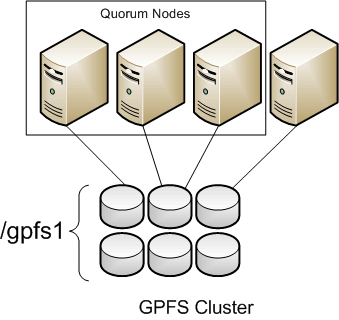
  • For example, in Figure 1, there are three quorum nodes. In this configuration, GPFS remains active as long as there are two quorum nodes available.

Create node_spec.lst at /gpfs_install containing a list of all the nodes in the cluster

# vim node_spec.lst
nsd1:quorum-manager
nsd2:quorum-manager
node1:quorum
node2
node3
node4
node5
node6

Create the gpfs cluster using the created file

# mmcrcluster -n node_spec.lst -p nsd1 -s nsd2 -R /usr/bin/scp -r /usr/bin/ssh
Fri Aug 10 14:40:53 SGT 2012: mmcrcluster: Processing node nsd1-nas
Fri Aug 10 14:40:54 SGT 2012: mmcrcluster: Processing node nsd2-nas
Fri Aug 10 14:40:54 SGT 2012: mmcrcluster: Processing node avocado-h00-nas
mmcrcluster: Command successfully completed
mmcrcluster: Warning: Not all nodes have proper GPFS license designations.
Use the mmchlicense command to designate licenses as needed.
mmcrcluster: Propagating the cluster configuration data to all
affected nodes.  This is an asynchronous process.

-n: list of nodes to be included in the cluster
-p: primary GPFS cluster configuration server node
-s: secondary GPFS cluster configuration server node
-R: remote copy command (e.g., rcp or scp)
-r: remote shell command (e.g., rsh or ssh)

To check whether all nodes were properly added, use the mmlscluster command

# mmcluster
GPFS cluster information
========================
GPFS cluster name:         nsd1
GPFS cluster id:           1300000000000000000
GPFS UID domain:           nsd1
Remote shell command:      /usr/bin/ssh
Remote file copy command:  /usr/bin/scp

GPFS cluster configuration servers:
-----------------------------------
Primary server:    nsd1
Secondary server:  nsd2

Node  Daemon node name     IP address       Admin node name     Designation
---------------------------------------------------------------------------
1     nsd1                 192.168.5.60     nsd1-nas            quorum-manager
2     nsd2                 192.168.5.61     nsd2-nas            quorum-manager
3     node1                192.168.5.24     node1               quorum-manager

Step 4a: Setup license files (mmchliense)

Configure GPFS Server Licensing. Create a license file at /gpfs_install

# vim license_server.lst
nsd1
nsd2
node1
# mmchlicense  server --accept -N license_server.lst

The output will be

The following nodes will be designated as possessing GPFS server licenses:
nsd1
nsd2
node1
mmchlicense: Command successfully completed
mmchlicense: Propagating the cluster configuration data to all
affected nodes.  This is an asynchronous process.

Configuring GPFS Client Licensing. Create a file at /gpfs_install

# vim license_client.lst
node2
node3
node4
node5
node6
# mmchlicense client --accept -N license_client.lst

The output will be

The following nodes will be designated as possessing GPFS client licenses:
node2
node3
node4
node5
node6

mmchlicense: Command successfully completed
mmchlicense: Propagating the cluster configuration data to all
affected nodes.  This is an asynchronous process.

More information

  1. Basic Installing and Configuring of GPFS Cluster (Part 1)
  2. Basic Installing and Configuring of GPFS Cluster (Part 2)
  3. Basic Installing and Configuring of GPFS Cluster (Part 3)
  4. Basic Installing and Configuring of GPFS Cluster (Part 4)

Installing GPFS 3.4 Packages

In this work-in-progress tutorial, I will write how to install the packages and compile portability layer (gpfs.gplbin) for each kernel or  architecture

First thing first, you may have to do a  yum install for ksh and rsh

# yum install ksh rsh compat-libstdc++-33 gcc-c++ imake kernel-devel kernel-headers libstdc++ redhat-lsb

Unpacked the GPFS rpms on the nodes. Remember to unpack the gpfs.base first before installing the gpfs.base update rpm

# rpm -ivh gpfs.base-3.4.0-0.x86_64.rpm
# rpm -ivh gpfs.base-3.4.0-12.x86_64.update.rpm
# rpm -ivh gpfs.docs-3.4.0-12.noarch.rpm
# rpm -ivh gpfs.gpl-3.4.0-12.noarch.rpm
# rpm -ivh gpfs.msg.en_US-3.4.0-12.noarch.rpm

Build the portability layer based on your architecture. I’m using CentOS

# cd /usr/lpp/mmfs/src
# make LINUX_DISTRIBUTION=REDHAT_AS_LINUX Autoconfig
# make World
# make InstallImages
# make rpm

The resulting customised package will be placed in  /usr/src/redhat/RPMS/x86_64/gpfs.gplbin-2.6.18-164.el5-3.4.0-12.x86_64.rpm

# cd /usr/src/redhat/RPMS/x86_64/gpfs.gplbin-2.6.18-164.el5-3.4.0-12.x86_64.rpm
# rpm -ivh gpfs.gplbin-2.6.18-164.el5-3.4.0-12.x86_64.rpm

Related information:

  1. Adding nodes to a GPFS cluster